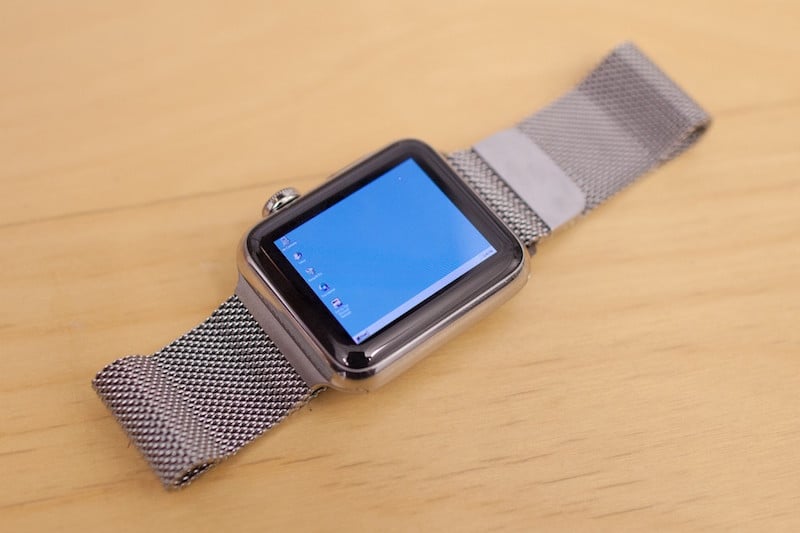
Developer Gets Apple Watch to Run Windows 95

After developer Nick Lee realized that the Apple Watch's 520 MHz processor, 512 MB of RAM and 8 GB of internal storage made it more powerful than many desktops running Windows 95 in the 1990s, he felt confident he could get it to run Microsoft's successful operating system.
applewatchwindows95

Photo via Nick Lee

To get Windows 95 to run on the Apple Watch, Lee knew he couldn't rely on Apple's WatchKit SDK because it doesn't allow developers to directly access user touch locations. Instead, the SDK forces developers to use Apple's stock controls. So Lee had to patch certain files within a WatchKit app to load his own app code rather than Apple's. Lee tells MacRumors the process, which puts an x86 emulator into a self-contained Watch app, essentially turned Windows 95 into an an app.

Once Windows 95 was loaded onto the Apple Watch, the booting process took an hour because it's being emulated rather than virtualized. Lee also had to attach a straw to a small motor that nudged the Digital Crown periodically to keep the Watch awake. Once the Watch is all booted up and ready, users can control the mouse with their finger. However, because the emulation is so slow, Lee told MacRumors that "it only registers a few pixels per movement on the screen." To combat the lack of speed users can queue up commands by rapidly swiping on the display.


The Watch can be seen booting up and running Windows 95 in the video above, and Lee goes into further detail about the process in his Medium post.


Related Roundup: Apple Watch 11
Buyer's Guide: Apple Watch (Buy Now)

Popular Stories

iOS 26

iOS 26.2 Coming Soon With These 8 New Features on Your iPhone

Thursday December 11, 2025 8:49 am PST by
Apple seeded the second iOS 26.2 Release Candidate to developers earlier this week, meaning the update will be released to the general public very soon. Apple confirmed iOS 26.2 would be released in December, but it did not provide a specific date. We expect the update to be released by early next week. iOS 26.2 includes a handful of new features and changes on the iPhone, such as a new...
Google maps feaure

Google Maps Quietly Added This Long-Overdue Feature for Drivers

Wednesday December 10, 2025 2:52 am PST by
Google Maps on iOS quietly gained a new feature recently that automatically recognizes where you've parked your vehicle and saves the location for you. Announced on LinkedIn by Rio Akasaka, Google Maps' senior product manager, the new feature auto-detects your parked location even if you don't use the parking pin function, saves it for up to 48 hours, and then automatically removes it once...
Foldable iPhone 2023 Feature 1

Apple to Make More Foldable iPhones Than Expected [Updated]

Tuesday December 9, 2025 9:59 am PST by
Apple has ordered 22 million OLED panels from Samsung Display for the first foldable iPhone, signaling a significantly larger production target than the display industry had previously anticipated, ET News reports. In the now-seemingly deleted report, ET News claimed that Samsung plans to mass-produce 11 million inward-folding OLED displays for Apple next year, as well as 11 million...
AirPods Pro Firmware Feature

Apple Releases New Firmware for AirPods Pro 2 and AirPods Pro 3

Thursday December 11, 2025 11:28 am PST by
Apple today released new firmware designed for the AirPods Pro 3 and the prior-generation AirPods Pro 2. The AirPods Pro 3 firmware is 8B30, up from 8B25, while the AirPods Pro 2 firmware is 8B28, up from 8B21. There's no word on what's include in the updated firmware, but the AirPods Pro 2 and AirPods Pro 3 are getting expanded support for Live Translation in the European Union in iOS...
iOS 26

15 New Things Your iPhone Can Do in iOS 26.2

Friday December 5, 2025 9:40 am PST by
Apple is about to release iOS 26.2, the second major point update for iPhones since iOS 26 was rolled out in September, and there are at least 15 notable changes and improvements worth checking out. We've rounded them up below. Apple is expected to roll out iOS 26.2 to compatible devices sometime between December 8 and December 16. When the update drops, you can check Apple's servers for the ...
AirTag 2 Mock Feature

Apple AirTag 2: Four New Features Found in iOS 26 Code

Thursday December 11, 2025 10:31 am PST by
The AirTag 2 will include a handful of new features that will improve tracking capabilities, according to a new report from Macworld. The site says that it was able to access an internal build of iOS 26, which includes references to multiple unreleased products. Here's what's supposedly coming: An improved pairing process, though no details were provided. AirTag pairing is already...
iOS 26

Apple Seeds Second iOS 26.2 Release Candidate to Developers and Public Beta Testers

Monday December 8, 2025 10:18 am PST by
Apple today seeded the second release candidate version of iOS 26.2 to developers and public beta testers, with the software coming one week after Apple seeded the first RC. The release candidate represents the final version iOS 26.2 that will be provided to the public if no further bugs are found. Registered developers and public beta testers can download the betas from the Settings app on...
iPhone 14 Pro Dynamic Island

iPhone 18 Pro Leak Adds New Evidence for Under-Display Face ID

Monday December 8, 2025 4:54 am PST by
Apple is actively testing under-screen Face ID for next year's iPhone 18 Pro models using a special "spliced micro-transparent glass" window built into the display, claims a Chinese leaker. According to "Smart Pikachu," a Weibo account that has previously shared accurate supply-chain details on Chinese Android hardware, Apple is testing the special glass as a way to let the TrueDepth...
maxresdefault

iOS 26 Code Leak Reveals Apple Smart Home Hub Details

Thursday December 11, 2025 4:02 pm PST by
Apple is working on a smart home hub that will rely heavily on the more capable version of Siri that's coming next year. We've heard quite a bit about the hub over the last two years, but a recent iOS 26 code leak provides additional insight into what we can expect and confirms rumored features. Subscribe to the MacRumors YouTube channel for more videos. Macworld claims to have access to an ...
studio display purple

Apple Studio Display 2 Code Hints at 120Hz ProMotion, HDR, A19 Chip

Thursday December 11, 2025 4:19 am PST by
Apple's next-generation Studio Display is expected to arrive early next year, and a new report allegedly provides a couple more details on the external monitor's capabilities. According to internal Apple code seen by Macworld, the new external display will feature a variable refresh rate capable of up to 120Hz – aka ProMotion – as well as support for HDR content. The current Studio...

Top Rated Comments

garirry Avatar
126 months ago
It's quite impressive how a once very big computer can all be ran on a tiny watch today.
Score: 22 Votes (Like | Disagree)
andrewgasson Avatar
126 months ago
('https://www.macrumors.com/2016/04/29/apple-watch-windows-95/')


After developer Nick Lee ('https://twitter.com/nickplee') realized that the Apple Watch's 520 MHz processor, 512 MB of RAM and 8 GB of internal storage made it more powerful than many desktops running Windows 95 in the 1990s, he felt confident he could get it to run ('https://medium.com/tendigi-insights/i-installed-windows-95-on-my-apple-watch-589fda5e36d#.3h04a5jwq') Microsoft's successful operating system.


Photo via Nick Lee
To get Windows 95 to run on the Apple Watch, Lee knew he couldn't rely on Apple's WatchKit SDK because it doesn't allow developers to directly access user touch locations. Instead, the SDK forces developers to use Apple's stock controls. So Lee had to patch certain files within a WatchKit app to load his own app code rather than Apple's. Lee tells MacRumors the process, which puts an x86 emulator into a self-contained Watch app, essentially turned Windows 95 into an an app.

Once Windows 95 was loaded onto the Apple Watch, the booting process took an hour because it's being emulated rather than virtualized. Lee also had to attach a straw to a small motor that nudged the Digital Crown periodically to keep the Watch awake. Once the Watch is all booted up and ready, users can control the mouse with their finger. However, because the emulation is so slow, Lee told MacRumors that "it only registers a few pixels per movement on the screen." To combat the lack of speed users can queue up commands by rapidly swiping on the display.


The Watch can be seen booting up and running Windows 95 in the video above, and Lee goes into further detail about the process in his Medium post ('https://medium.com/tendigi-insights/i-installed-windows-95-on-my-apple-watch-589fda5e36d#.3h04a5jwq').

Article Link: Developer Gets Apple Watch to Run Windows 95 ('https://www.macrumors.com/2016/04/29/apple-watch-windows-95/')
Laggy as hell. Just like watch OS.
Score: 18 Votes (Like | Disagree)
edenwaith Avatar
126 months ago
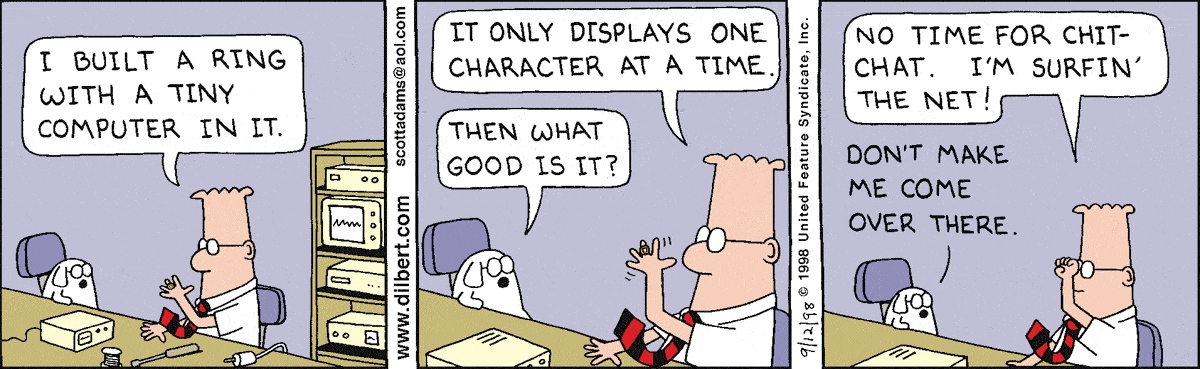
My initial reaction was an amused laugh. Quite clever what can be done.

Still, not as impressive as Dilbert's web browser in a ring:

('http://assets.amuniversal.com/57a9bd10a12a012f2fe600163e41dd5b')
Score: 17 Votes (Like | Disagree)
corbindavenport Avatar
126 months ago
I got this working on Android Wear a while back. Was really fun to try, and certainly didn't expect for it to go viral:


For that video I was using a pretty awful port of DOSBox to Android. I found out after that video you could add RAM/CPU cycles by changing the config file hidden in the app's files.
Score: 9 Votes (Like | Disagree)
MacsRgr8 Avatar
126 months ago

BUT WHY?
Because:
a) You can
b) It's amusing
c) Gives perspective to how the tech of modern a smartwatch compares to a desktop PC of some 15 - 20 years ago.
Score: 7 Votes (Like | Disagree)
MH01 Avatar
126 months ago
That's cool, beats constant news about new bands.
Score: 5 Votes (Like | Disagree)