Tapbots today launched its long-awaited Tweetbot 4 update, which brings a slew of important changes to the popular Twitter client. Most notably, today's update expands support to the iPad, making Tweetbot 4 a universal app for the first time and bringing an updated look to the tablet version of the app.
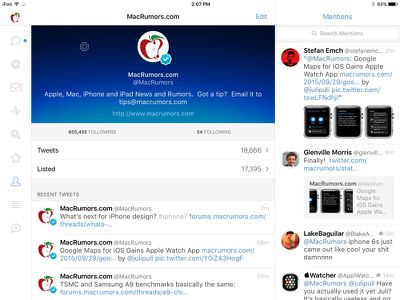
tweetbotforipad

Tweetbot 4 on iPad, landscape mode

Tweetbot for the iPad has not been updated since June of 2014 and it was never given a refreshed look in line with the design updates introduced in iOS 7, so today's new iPad app is a welcome change. On the iPad, Tweetbot 4 includes the same clean design that was introduced on the iPhone with Tweetbot 3. Tweetbot 4 includes support for Apple's newest operating system, iOS 9, and it works with the split-screen multitasking feature on Apple's newer iPads.
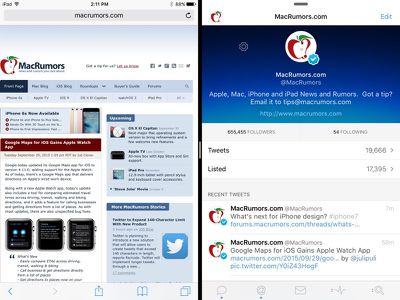
tweetbotsplitscreenmultitasking

Tweetbot 4 split-screen multitasking

For the first time, Tweetbot 4 introduces a landscape view that's available on the iPad and the iPhone. In landscape mode on the iPhone 6/6s Plus or iPad, the app is able to display two windows side-by-side, so users can watch their timelines and another section like mentions or lists at the same time.

tweetbotlandscapeiphone6splus
Tweetbot 4's new landscape mode on the iPhone 6s Plus

Feature wise, the new Tweetbot includes a Statistics and Activity View. The Activity View displays Twitter's feed of recent follows, comments, and retweets, while the Statistics View gives a daily overview of retweets, follows, and favorites, all displayed on a graph.
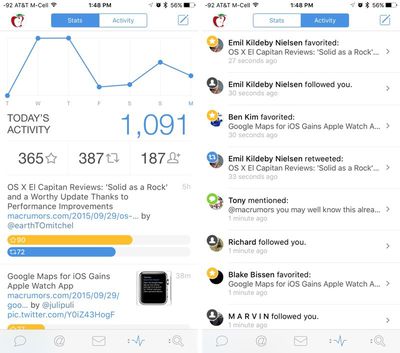
tweetbotstatsandactivity

New Activity and Statistics Views

Enjoy keeping track of how popular your tweets are or how many new followers you get each day? Fall in love with the new Statistics view. Watch your tweets get faved and retweeted in real time (on a WiFi network), and see your daily global activity graph grow over the last 7 days. See all of the recent activity happening on your account in real time on the Activity view. Watch people follow, mention, retweet, fave, and quote you live.

Mute filters have been improved in this version of the app, and there's support for Quick Reply from Notifications. It's now possible to mute keywords, hashtags, and clients directly from the dedicated mute section, and there are options for setting a specific length of time for the mute and toggling whether it affects mentions, searches, and lists.

Profiles have been redesigned to be more streamlined, and the user interface has a tweaked look that updates the colors and includes a redesigned Tweet window. Along with this, Tapbots has also included several under-the-hood optimizations that are designed to make Tweetbot 4 run better.
tweetbot4newdesign

Redesigned look for the user interface

Tweetbot 4 is a new app that's priced at $4.99 for all users, new and old. The $4.99 price is a limited time offer to celebrate launch, after which the price will go up to $9.99. Previous Twitter users who purchased Tweetbot 3 will continue to be able to get Tweetbot 4 for $4.99 even after the launch sale has ended via a bundle discount that Tapbots is offering. [Direct Link]


Top Rated Comments

ericg301 Avatar
133 months ago
I already bought this app and they wanna charge me another $4.99 for the update? No way.
That's like saying I bought a Pumpkin Spice Latte two years ago and want a free refill.
Score: 4 Votes (Like | Disagree)
nutmac Avatar
133 months ago
The guys at Tapbots lost me a long time ago when they just simply stopped updating their apps. Now I guess they are all in on Tweetbot... no thanks. Same old. They wait a long time to update an app just so they can call it a "major" version and charge you again. Pathetic. I'll never buy another app from these guys, and I've had almost all of their apps including Tweetbot (for Mac).
Yes, how dare they make anything but free upgrade for life! Don't they realize that I don't want to skip a cup of cappuccino to buy this app?! </s>
Score: 3 Votes (Like | Disagree)
furi0usbee Avatar
133 months ago
The guys at Tapbots lost me a long time ago when they just simply stopped updating their apps. Now I guess they are all in on Tweetbot... no thanks. Same old. They wait a long time to update an app just so they can call it a "major" version and charge you again. Pathetic. I'll never buy another app from these guys, and I've had almost all of their apps including Tweetbot (for Mac).

Ugh I have to pay AGAIN to upgrade?! (coming from 2-->3-->4?)

*pays the $5 anyways*
They have this down. Never give regular updates, then bring out the new *major* version, charge. Repeat and repeat.
Score: 3 Votes (Like | Disagree)
Paradoxally Avatar
133 months ago
I used to be a huge fan of tweetbot, but their contrast seems completely insane to me. Its great for seeing who tweeted, but terrible for reading actual tweets.
That's what the dark mode is for. Stark white is horrendous.
Score: 3 Votes (Like | Disagree)
S.B.G Avatar
133 months ago
Finally! The long awaited iPad (universal) update. Already bought and installed and it looks great.
Score: 3 Votes (Like | Disagree)
AppleInLVX Avatar
133 months ago
Instabuy. Still the only Twitter experience I like.
Score: 3 Votes (Like | Disagree)

Popular Stories

iOS 26

When Will Apple Release iOS 26.2?

Monday December 1, 2025 4:37 pm PST by
We're getting closer to the launch of the final major iOS update of the year, with Apple set to release iOS 26.2 in December. We've had three betas so far and are expecting a fourth beta or a release candidate this week, so a launch could follow as soon as next week. Past Launch Dates Apple's past iOS x.2 updates from the last few years have all happened right around the middle of the...
ios 18 to ios 26 upgrade

Apple Pushes iPhone Users Still on iOS 18 to Upgrade to iOS 26

Tuesday December 2, 2025 11:09 am PST by
Apple is encouraging iPhone users who are still running iOS 18 to upgrade to iOS 26 by making the iOS 26 software upgrade option more prominent. Since iOS 26 launched in September, it has been displayed as an optional upgrade at the bottom of the Software Update interface in the Settings app. iOS 18 has been the default operating system option, and users running iOS 18 have seen iOS 18...
maxresdefault

iPhone Fold: Launch, Pricing, and What to Expect From Apple's Foldable

Monday December 1, 2025 3:00 am PST by
Apple is expected to launch a new foldable iPhone next year, based on multiple rumors and credible sources. The long-awaited device has been rumored for years now, but signs increasingly suggest that 2026 could indeed be the year that Apple releases its first foldable device. Subscribe to the MacRumors YouTube channel for more videos. Below, we've collated an updated set of key details that ...
iphone 17 cyber

iPhone 17 Demand Is Breaking Apple's Sales Records

Tuesday December 2, 2025 9:44 am PST by
Apple's iPhone 17 lineup is selling well enough that Apple is on track to ship more than 247.4 million total iPhones in 2025, according to a new report from IDC. Total 2025 shipments are forecast to grow 6.1 percent year over year due to iPhone 17 demand and increased sales in China, a major market for Apple. Overall worldwide smartphone shipments across Android and iOS are forecast to...
iOS 26

Apple Seeds iOS 26.2 and iPadOS 26.2 Release Candidates to Developers and Public Beta Testers

Wednesday December 3, 2025 10:33 am PST by
Apple today seeded the release candidate versions of upcoming iOS 26.2 and iPadOS 26.2 updates to developers and public beta testers, with the software coming two weeks after Apple seeded the third betas. The release candidates represent the final versions of iOS 26.2 and iPadOS 26.2 that will be provided to the public if no further bugs are found during this final week of testing....
Touchscreen MacBook Feature

Here Are the Four MacBooks Apple Is Expected to Launch Next Year

Monday December 1, 2025 5:00 am PST by
2026 could be a bumper year for Apple's Mac lineup, with the company expected to announce as many as four separate MacBook launches. Rumors suggest Apple will court both ends of the consumer spectrum, with more affordable options for students and feature-rich premium lines for users that seek the highest specifications from a laptop. Below is a breakdown of what we're expecting over the next ...
Photos App Icon Liquid Glass

John Gruber Shares Scathing Commentary About Apple's Departing Software Design Chief

Thursday December 4, 2025 9:30 am PST by
In a statement shared with Bloomberg on Wednesday, Apple confirmed that its software design chief Alan Dye will be leaving. Apple said Dye will be succeeded by Stephen Lemay, who has been a software designer at the company since 1999. Meta CEO Mark Zuckerberg announced that Dye will lead a new creative studio within the company's AR/VR division Reality Labs. On his blog Daring Fireball,...
iphone air camera

iPhone Air's Resale Value Has Dropped Dramatically, Data Shows

Thursday December 4, 2025 5:27 am PST by
The iPhone Air has recorded the steepest early resale value drop of any iPhone model in years, with new data showing that several configurations have lost almost 50% of their value within ten weeks of launch. According to a ten-week analysis published by SellCell, Apple's latest lineup is showing a pronounced split in resale performance between the iPhone 17 models and the iPhone Air....
chatgpt logo

Sam Altman Declares 'Code Red' for ChatGPT, Delays OpenAI Advertising Plans

Tuesday December 2, 2025 3:30 pm PST by
OpenAI is deprioritizing work on advertising as it focuses on improving the quality of ChatGPT, reports The Information. OpenAI CEO Sam Altman declared a "code red" on Monday, and told employees that the company needs to improve ChatGPT so it doesn't fall behind competitors like Google and Anthropic. Altman said that OpenAI needs to work on personalization for each user, image generation,...
iPhone 17 Pro Cosmic Orange

iPhone 17 Pro Lost a Camera Feature Pro Models Have Had Since 2020

Thursday December 4, 2025 5:18 am PST by
iPhone 17 Pro models, it turns out, can't take photos in Night mode when Portrait mode is selected in the Camera app – a capability that's been available on Apple's Pro devices since the iPhone 12 Pro in 2020. If you're an iPhone 17 Pro or iPhone 17 Pro Max owner, try it for yourself: Open the Camera app with Photo selected in the carousel, then cover the rear lenses with your hand to...