

In iOS 9, some of the best features are the ones that aren't readily visible. iOS 9 has several under-the-hood updates that boost battery life, improve security, and cut down on the amount of storage space iOS updates and apps use on iPhones and iPads.
Even disregarding all of the consumer facing features, these quiet improvements make the upgrade to iOS 9 from iOS 8 or iOS 7 well worth it on all supported devices: the iPhone 4s and up, the iPad 2 and up, and all iPad mini models.
Battery Life
With operating system optimizations, Apple is able to eke out an additional hour of battery life on iPhones under normal usage conditions. One of these improvements, for example, pertains to the iPhone's ambient light and proximity sensor. When the iPhone is placed facedown, it now detects that the screen isn't visible, so an incoming notification does not light up the screen.
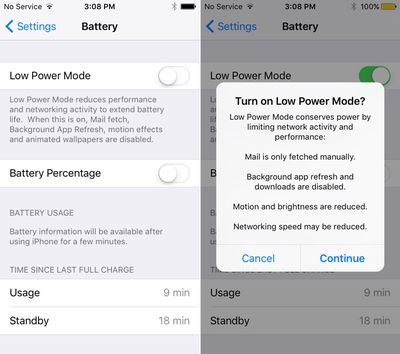
There's also a new Low Power Mode on the iPhone that can add another three hours of battery life by cutting down on battery-draining features. Low Power Mode turns off automatic Mail fetch, disables background app refresh, disables motion effects, and disables animated wallpapers.
Low Power mode also throttles the performance of the iPhone so it drains less power. Benchmark testing suggests Low Power mode reduces an iPhone's performance by about 40 percent to cut down on power usage.
Security
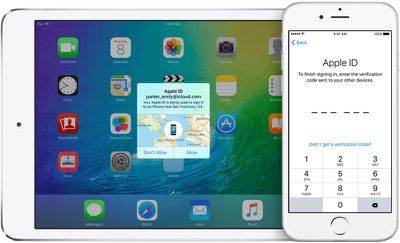
iOS 9 prompts users to create 6-digit passcodes instead of 4-digit passcodes for additional security. It's still possible to create a 4-digit passcode, but Apple recommends a 6-digit code because it adds one million possible combinations instead of 10,000, making a passcode harder to crack. Two-factor authentication support is also enhanced in iOS 9.
Installation Size
With iOS 9, Apple's cut way down on the installation size, so far less free space is required to download the new update. While iOS required 4.58 GB of space to install, iOS 9 requires only 1.3 GB of space to install, making it more accessible to users who have 16 GB iOS devices.
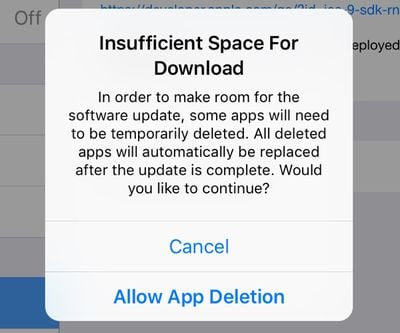
For devices that still don't have enough space to install the iOS 9 update, Apple has a new auto app delete/reinstall feature. When attempting to install iOS 9 on a device with insufficient space, there's a popup that offers to temporarily delete some apps in order to make room for the update. Apps that are deleted are then reinstalled and replaced after the operating system update is completed.
App Thinning
Apps from third-party developers also require less installation space thanks to a feature called App Thinning. With App Thinning, apps can be optimized for specific devices, allowing them to take up less space on iOS devices.
An app for the iPhone doesn't need all of the iPad assets, so those won't be downloaded. That means faster installs, faster launch times, and more storage space left for other apps and content.
App Thinning also includes on-demand resources like image and sound files, which can be downloaded only when needed. The imagery for later levels in a game, for example, might not be downloaded until it's necessary.
Metal
Apps in iOS 9 take advantage of Metal, making more efficient use of the CPU and GPU for faster scrolling, smoother animations, and better performance. Email, messages, web pages, and PDFs all render faster.


















Top Rated Comments
Not a huge feature, but it's definitely a nice touch.
Well done Apple, credit where credit is due.
Better yet, let me set it to automatically turn on when it hits a user designated threshold, i.e. when the phone hits 40% automagically turn on low power mode...
Gary