Apple Watch Face Design Studio Showcases Detailed Photography Process

Wired earlier this morning posted an interview with Apple Human Interface Chief Alan Dye, in which Dye discusses a few lesser-known details of the Apple Watch, specifically giving Wired an inside look at the obsessive level of detail that went in to making each of the Watch's customizable faces.
AppleWatch_Process_Book_HI-kwc01-16-1024x691

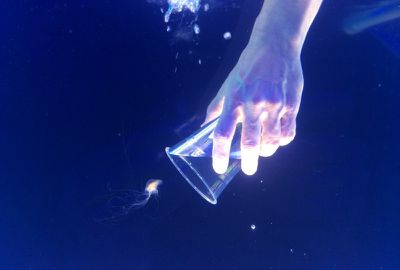
An Apple designer works to capture a jellyfish for a photograph in Apple's design studio

During the interview, Dye elaborates on his team's enormous talent, but says what makes them work so well is that they "really care" about what they create. Echoing back to Steve Jobs' creative concern over every bit of minutiae within any one of Apple's products, Dye begins discussing the process of capturing a simple flower bloom for one of the Apple Watch faces.

Yet what Dye seems most fascinated by is one of the Apple Watch’s faces, called Motion, which you can set to show a flower blooming. Each time you raise your wrist, you’ll see a different color, a different flower. This is not CGI. It’s photography.

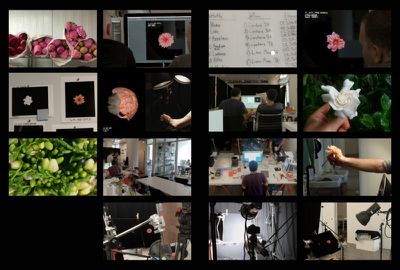
“We shot all this stuff,” Dye says, “the butterflies and the jellyfish and the flowers for the motion face, it’s all in-camera. And so the flowers were shot blooming over time. I think the longest one took us 285 hours, and over 24,000 shots.”

The same goes for the jellyfish face, which was captured by the team after building a tank within the design studio and shooting a variety of different species at 300 frames-per-second with high-end Phantom cameras. The resulting 4096 x 2304 images were shrunk down to fit the Watch screen, Dye noting “when you look at the Motion face of the jellyfish, no reasonable person can see that level of detail. And yet to us it’s really important to get those details right.”
AppleWatch_Process_Book_HI-kwc01-5-1024x691

A look at Apple's detailed process in photographing jellyfish, butterflies, and flowers for the Watch.

The Mickey Mouse face features a similar level of detail, with the popular mouse's feet tapping in exact rhythmic beat to a one second count. Dye claims that if one were to line up 100 Apple Watches with the Mickey face on, his foot would tap in perfect unison on each one. The astronomy faces are some of Dye's favorites, however, with the Apple chief noting how hard the team worked to perfect the Earth and Moon's daily orbits and cycles.

Dye points out the subtlety of this face. “When you tap on the Earth and fly over the moon: We worked really hard with our engineering team to make sure the path you take from your actual position on the Earth to where the moon is and seeing its phase, is true to the actual position of the Earth relative to the moon.”

Wired interviewed both Dye and Apple vice president of technology Kevin Lynch earlier in April, with the two providing some behind-the-scenes knowledge on everything from the origins of the Apple Watch to the reasoning behind the look of the fitness-related medals.

Check out the full Wired interview here.

Related Roundup: Apple Watch 11
Buyer's Guide: Apple Watch (Buy Now)

Popular Stories

iOS 26

iOS 26.2 Coming Soon With These 8 New Features on Your iPhone

Thursday December 11, 2025 8:49 am PST by
Apple seeded the second iOS 26.2 Release Candidate to developers earlier this week, meaning the update will be released to the general public very soon. Apple confirmed iOS 26.2 would be released in December, but it did not provide a specific date. We expect the update to be released by early next week. iOS 26.2 includes a handful of new features and changes on the iPhone, such as a new...
Google maps feaure

Google Maps Quietly Added This Long-Overdue Feature for Drivers

Wednesday December 10, 2025 2:52 am PST by
Google Maps on iOS quietly gained a new feature recently that automatically recognizes where you've parked your vehicle and saves the location for you. Announced on LinkedIn by Rio Akasaka, Google Maps' senior product manager, the new feature auto-detects your parked location even if you don't use the parking pin function, saves it for up to 48 hours, and then automatically removes it once...
AirPods Pro Firmware Feature

Apple Releases New Firmware for AirPods Pro 2 and AirPods Pro 3

Thursday December 11, 2025 11:28 am PST by
Apple today released new firmware designed for the AirPods Pro 3 and the prior-generation AirPods Pro 2. The AirPods Pro 3 firmware is 8B30, up from 8B25, while the AirPods Pro 2 firmware is 8B28, up from 8B21. There's no word on what's include in the updated firmware, but the AirPods Pro 2 and AirPods Pro 3 are getting expanded support for Live Translation in the European Union in iOS...
Foldable iPhone 2023 Feature 1

Apple to Make More Foldable iPhones Than Expected [Updated]

Tuesday December 9, 2025 9:59 am PST by
Apple has ordered 22 million OLED panels from Samsung Display for the first foldable iPhone, signaling a significantly larger production target than the display industry had previously anticipated, ET News reports. In the now-seemingly deleted report, ET News claimed that Samsung plans to mass-produce 11 million inward-folding OLED displays for Apple next year, as well as 11 million...
AirTag 2 Mock Feature

Apple AirTag 2: Four New Features Found in iOS 26 Code

Thursday December 11, 2025 10:31 am PST by
The AirTag 2 will include a handful of new features that will improve tracking capabilities, according to a new report from Macworld. The site says that it was able to access an internal build of iOS 26, which includes references to multiple unreleased products. Here's what's supposedly coming: An improved pairing process, though no details were provided. AirTag pairing is already...
iOS 26

iOS 26.4 and iOS 27 Features Revealed in New Leak

Friday December 12, 2025 10:56 am PST by
Macworld's Filipe Espósito today revealed a handful of features that Apple is allegedly planning for iOS 26.4, iOS 27, and even iOS 28. The report said the features are referenced within the code for a leaked internal build of iOS 26 that is not meant to be seen by the public. However, it appears that Espósito and/or his sources managed to gain access to it, providing us with a sneak peek...
iOS 26

15 New Things Your iPhone Can Do in iOS 26.2

Friday December 5, 2025 9:40 am PST by
Apple is about to release iOS 26.2, the second major point update for iPhones since iOS 26 was rolled out in September, and there are at least 15 notable changes and improvements worth checking out. We've rounded them up below. Apple is expected to roll out iOS 26.2 to compatible devices sometime between December 8 and December 16. When the update drops, you can check Apple's servers for the ...
iOS 26

Apple Releases iOS 26.2 With Alarms for Reminders, Lock Screen Changes, Enhanced Safety Alerts and More

Friday December 12, 2025 10:10 am PST by
Apple today released iOS 26.2, the second major update to the iOS 26 operating system that came out in September, iOS 26.2 comes a little over a month after iOS 26.1 launched. ‌iOS 26‌.2 is compatible with the ‌iPhone‌ 11 series and later, as well as the second-generation ‌iPhone‌ SE. The new software can be downloaded on eligible iPhones over-the-air by going to Settings >...
maxresdefault

iOS 26 Code Leak Reveals Apple Smart Home Hub Details

Thursday December 11, 2025 4:02 pm PST by
Apple is working on a smart home hub that will rely heavily on the more capable version of Siri that's coming next year. We've heard quite a bit about the hub over the last two years, but a recent iOS 26 code leak provides additional insight into what we can expect and confirms rumored features. Subscribe to the MacRumors YouTube channel for more videos. Macworld claims to have access to an ...
studio display purple

Apple Studio Display 2 Code Hints at 120Hz ProMotion, HDR, A19 Chip

Thursday December 11, 2025 4:19 am PST by
Apple's next-generation Studio Display is expected to arrive early next year, and a new report allegedly provides a couple more details on the external monitor's capabilities. According to internal Apple code seen by Macworld, the new external display will feature a variable refresh rate capable of up to 120Hz – aka ProMotion – as well as support for HDR content. The current Studio...

Top Rated Comments

pee jay bee Avatar
139 months ago
Some aspects of the UI I absolutely hate - the confusing fitness milestone icons, ugly glossy emojis, creepy white hand, exploding hearts etc. Way too skeuomorphic and just plain ugly. Just my opinion, of course.

I think people are misunderstanding skeuomorphism, which is about real world features represented on a screen. Stitches in leather, shadows under watch hands, torn paper calendars etc.

3D emoticons and hands are not skeuomorphic.

Mind you, I totally agree, those emoticons are horrible and the worst thing about the Watch. I like the fitness rings though.
Score: 11 Votes (Like | Disagree)
2457282 Avatar
139 months ago
So, skeuomorphism is back?

:D
Score: 8 Votes (Like | Disagree)
Michaelgtrusa Avatar
139 months ago
Some quality people at Apple.
Score: 8 Votes (Like | Disagree)
pee jay bee Avatar
139 months ago
So, skeuomorphism is back?

:D

A photo or movie on a screen isn't skeuomorphic. I think they're nice and just show the attention to detail within the RandD of this Watch
Score: 5 Votes (Like | Disagree)
kagharaht Avatar
139 months ago
I for one appreciate the level of detail that Apple does for their products. Some blows it off as a waste of time and effort. Thats fine, everybody is different. For me, I love it. The fit and finish of Apple hardware products is astonishing.
Score: 3 Votes (Like | Disagree)
AngerDanger Avatar
139 months ago
As impressed as I am by the level of detail strived for with the photography, this doesn't seem to be nearly as amazing:

The Mickey Mouse face features a similar level of detail, with the popular mouse's feet tapping in exact rhythmic beat to a one second count.
The exact second? Is that feat even possible in a watch?
Score: 3 Votes (Like | Disagree)