

New Apple Pay Setup Screens Unearthed in iOS 8.1 Beta 2

Hours after Apple seeded the second iOS 8.1 beta to developers, developer Hamza Sood has located the Apple Pay setup screen in the Passbook app, the Apple Pay setup screen in the initial iOS 8.1 setup and Apple Pay setup on the iPad. Previously, Sood had found the Apple Pay setup screen within the Settings app.
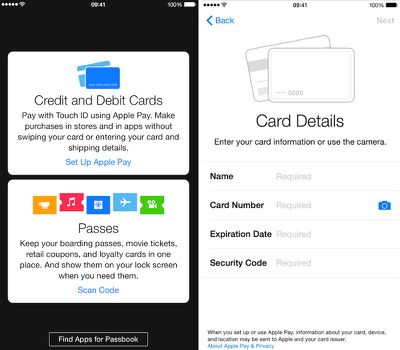
applepaysetup
The setup prompt within Passbook is similar to the setup prompt to add passes, educating potential users on what the service is before providing a link to where users can input and scan their credit cards for use. Potential users have the choice to either input their credit card numbers via the keyboard or to take a photo of their card and have it inputted automatically.

The iPad gets the same setup screen as the iPhone version, but does not mention the ability to use Apple Pay in a retail store as no current iPads contain the NFC technology required to use the feature and it is uncertain whether it could be included in future iPads. Additionally, Apple Pay requires Touch ID, which current iPad models do not have, although future iPads are expected to have the new Touch ID home button.

iOS 8.1 is likely to be the update to include Apple Pay, although Apple has not yet flipped the switch within the betas seeded to developers. Instead, the company seems to have been preparing the features behind-the-scenes. Alongside Apple Pay, iOS 8.1 is expected to include a host of bug fixes for issues in iOS 8, including a fix for Bluetooth connectivity problems.


Tag: iOS 8.1

Popular Stories

iOS 26

iOS 26.2 Coming Soon With These 8 New Features on Your iPhone

Thursday December 11, 2025 8:49 am PST by
Apple seeded the second iOS 26.2 Release Candidate to developers earlier this week, meaning the update will be released to the general public very soon. Apple confirmed iOS 26.2 would be released in December, but it did not provide a specific date. We expect the update to be released by early next week. iOS 26.2 includes a handful of new features and changes on the iPhone, such as a new...
iOS 26

iOS 26.4 and iOS 27 Features Revealed in New Leak

Friday December 12, 2025 10:56 am PST by
Macworld's Filipe Espósito today revealed a handful of features that Apple is allegedly planning for iOS 26.4, iOS 27, and even iOS 28. The report said the features are referenced within the code for a leaked internal build of iOS 26 that is not meant to be seen by the public. However, it appears that Espósito and/or his sources managed to gain access to it, providing us with a sneak peek...
AirPods Pro Firmware Feature

Apple Releases New Firmware for AirPods Pro 2 and AirPods Pro 3

Thursday December 11, 2025 11:28 am PST by
Apple today released new firmware designed for the AirPods Pro 3 and the prior-generation AirPods Pro 2. The AirPods Pro 3 firmware is 8B30, up from 8B25, while the AirPods Pro 2 firmware is 8B28, up from 8B21. There's no word on what's include in the updated firmware, but the AirPods Pro 2 and AirPods Pro 3 are getting expanded support for Live Translation in the European Union in iOS...
iOS 26

Apple Releases iOS 26.2 With Alarms for Reminders, Lock Screen Changes, Enhanced Safety Alerts and More

Friday December 12, 2025 10:10 am PST by
Apple today released iOS 26.2, the second major update to the iOS 26 operating system that came out in September, iOS 26.2 comes a little over a month after iOS 26.1 launched. ‌iOS 26‌.2 is compatible with the ‌iPhone‌ 11 series and later, as well as the second-generation ‌iPhone‌ SE. The new software can be downloaded on eligible iPhones over-the-air by going to Settings >...
Google maps feaure

Google Maps Quietly Added This Long-Overdue Feature for Drivers

Wednesday December 10, 2025 2:52 am PST by
Google Maps on iOS quietly gained a new feature recently that automatically recognizes where you've parked your vehicle and saves the location for you. Announced on LinkedIn by Rio Akasaka, Google Maps' senior product manager, the new feature auto-detects your parked location even if you don't use the parking pin function, saves it for up to 48 hours, and then automatically removes it once...
AirTag 2 Mock Feature

Apple AirTag 2: Four New Features Found in iOS 26 Code

Thursday December 11, 2025 10:31 am PST by
The AirTag 2 will include a handful of new features that will improve tracking capabilities, according to a new report from Macworld. The site says that it was able to access an internal build of iOS 26, which includes references to multiple unreleased products. Here's what's supposedly coming: An improved pairing process, though no details were provided. AirTag pairing is already...
macOS Tahoe 26 Thumb

Apple Releases macOS Tahoe 26.2 With Edge Light

Friday December 12, 2025 10:08 am PST by
Apple today released macOS Tahoe 26.2, the second major update to the macOS Tahoe operating system that came out in September. macOS Tahoe 26.2 comes five weeks after Apple released macOS Tahoe 26.1. Mac users can download the macOS Tahoe update by using the Software Update section of System Settings. macOS Tahoe 26.2 includes Edge Light, a feature that illuminates your face with soft...
iOS 26

15 New Things Your iPhone Can Do in iOS 26.2

Friday December 5, 2025 9:40 am PST by
Apple is about to release iOS 26.2, the second major point update for iPhones since iOS 26 was rolled out in September, and there are at least 15 notable changes and improvements worth checking out. We've rounded them up below. Apple is expected to roll out iOS 26.2 to compatible devices sometime between December 8 and December 16. When the update drops, you can check Apple's servers for the ...

Top Rated Comments

Recognition Avatar
146 months ago
Still no word of this coming to thw UK though. NFC adoption is pretty poor here.

In fact I am still not sure this is quicker or easier than a chip and pin card.

Hmm, I've found NFC to be in quite a lot of places.
Sainsburys, Tesco, Whsmith, McDonald's, Pret a Manger, café Nero, Greggs, Eat, Uppercrust and I'm sure there's more that I haven't been in.

Granted most of them are food related but that's probably because of the £20 (iirc) limit for contactless payments.
Score: 4 Votes (Like | Disagree)
macmikey2 Avatar
146 months ago
So I updated my iPhone 6 to 8.1 and launched Passbook to NOT find Apple Pay setup. Any ideas?

So, you DID NOT read the entire article?
Score: 3 Votes (Like | Disagree)
sziehr Avatar
146 months ago
awesome can't wait for this to happen.
Score: 3 Votes (Like | Disagree)
dontwalkhand Avatar
146 months ago
WRONG! The retailer also has to contract with their bank/processor to accept it also. One notable example is Walmart who will not accept Apple Pay...

----------


Again, wrong wrong wrong. The retail establishment may have the terminal but that doesn't mean they will accept Apple Pay! There is a lot more behind the scenes that has to occur before they can accept Apple Pay, and not every notable retailer has signed up for this yet.

----------


This stupidity has to stop folks. Just because there is a terminal does not mean Apple Pay is usable. The stores on Apple's web site are there only because they can accept Apple Pay. It's not universal by any means, and it's not going to be "everywhere you see a PayPass terminal"


Learn to research something before you post please: http://consumerist.com/2014/09/12/walmart-best-buy-wont-accept-apple-pay-at-their-stores/

What sucks about this is that the "other" pay applications will not have the same security that Apple Pay has, and will put at risk your money more than Apple at first. That may be fixed later, but I doubt it.
I must be wrong when I use my Wells Fargo debit card by tapping it at this store every day and it works. Of course the store had it enabled, it just didn't show it due to lazy programmers.

Apple Pay is NFC, it does NOT NEED ANYTHING at the register. Even take a look at Apple's website. Apple did not get 220,000 retailers to update their registers because the iPhone 6 is coming out.

Do you really think the retailers listed using IBM 4690 is going to have an entry for Apple Pay?

The reason why it doesn't work at the stores you've mentioned is because they only have regular Chip & PIN mag stripe terminals not ones with NFC

It looks like YOU need to do research. Come the day of Apple Pay being released I'll post videos of me using it at mom and pop that obviously didn't pay Apple. Especially if you're going to call people stupid.
Score: 2 Votes (Like | Disagree)
Diode Avatar
146 months ago
Quick question: Don't have a 6 or 6 plus, but does Apple Pay allow you to pay with not Apple Pay merchants? So if you wanted to buy from Wegmans instead of Whole Foods, would the transaction continue?

Anywhere Mastercard PayPass, Visa PayWave, or American Express ExpressPay is accepted will take Apple Pay.

Score: 2 Votes (Like | Disagree)
Ivan0310 Avatar
146 months ago
i guess you haven't been paying attention. the 6 has an NFC chip, which is the protocol used to do contactless payments. how on earth could older phones transmit that when they don't have the hardware to do so?
And I guess you can't read; try some basic reading comprehension before calling someone else out for perceived ignorance--my question was legitimate, deal with it.

I already acknowledged the fact that the 5s doesn't have an NFC chip and therefore cannot do contactless payments.
Can someone please explain to me why previous generation iPhones and iPads are being cut out of using Apple Pay for online purchases? Clearly I can't do contactless payments with my 5s because no NFC, but what's the deal otherwise? Is this just an artificial limitation to get people to buy new phones?
NFC-enabled contactless payments aren't the only method available for the Apple Pay system. It will also allow for online payments through supported apps. There is no physical point of service, just a method of online payment--meaning this doesn't appear to be a hardware issue on the face of it.

However, others have explained that there is a secure element for credit cards separate from the secure enclave for Touch ID. This means it is a hardware issue after all. So thank you to those that actually provided useful input.
Score: 2 Votes (Like | Disagree)









































