OS X Mountain Lion Apps Now Ask Permission to Access Contacts
Dustin Curtis points out that in the latest developer seed of OS X Mountain Lion, Apple now requires OS X Apps to get explicit permission to access your address book information.
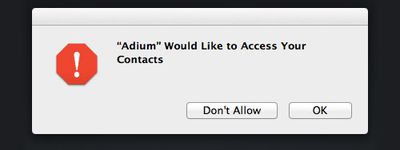
The move mirrors recent changes made to iOS which will also ask the user for permission for an App to access their contact data. The change in policy came after it was revealed that some iOS apps were quietly collecting and transmitting customer address book data without their permission.
At the time, Apple issued this statement:
“Apps that collect or transmit a user’s contact data without their prior permission are in violation of our guidelines,” Apple spokesman Tom Neumayr told AllThingsD. “We’re working to make this even better for our customers, and as we have done with location services, any app wishing to access contact data will require explicit user approval in a future software release.”
The policy now appears to extend to OS X Mountain Lion as well as iOS. Users can later manage these permissions in a new "Privacy" tab in System Preferences.
Popular Stories
iOS 26.4 was released today, and it includes a couple of new features for CarPlay: an Ambient Music widget and support for voice-based chatbot apps.
To update your iPhone 11 or newer to iOS 26.4, open the Settings app and tap on General → Software Update. CarPlay will automatically offer the new features so long as the iPhone connected to your vehicle is running iOS 26.4 or later....
Apple today released new firmware for the AirPods Pro 2, AirPods Pro 3, and the AirPods 4. The firmware has a version number of 8B39, up from 8B34 on the AirPods Pro 3, 8B28 on the AirPods Pro 2, and 8B21 on the AirPods 4.
There is no word on what's included in the firmware, but Apple has a support document with limited notes. Most updates are limited to bug fixes and performance...
Apple this week released tvOS 26.4, and the software update includes a handful of new features and changes for the Apple TV.
tvOS 26.4 is compatible with all Apple TV 4K and Apple TV HD models released since 2015. To update your Apple TV, open the Settings app on the device, navigate to System → Software Updates, and select Update Software.
Below, we have recapped what is new in tvOS...























