Apple Releases Public Beta of New Messages App for OS X

Alongside today's OS X Mountain Lion news, Apple released a public beta version of its new Messages app for OS X for existing users. Set to replace iChat in OS X Mountain Lion, the new Messages app integrates features of iChat and FaceTime and adds compatibility with the iMessages service introduced for iOS last year.

Download Messages Beta and get a taste of what’s coming in OS X Mountain Lion. When you install Messages, it replaces iChat. But iChat services will continue to work. And Messages brings iMessage to the Mac — just like on iPad, iPhone, and iPod touch running iOS 5. Here are the features you can expect with Messages:

- Send unlimited iMessages to any Mac, iPad, iPhone, or iPod touch.
- Start an iMessage conversation on your Mac and continue it on your iPad, iPhone, or iPod touch.
- Send photos, videos, attachments, contacts, locations, and more.
- Launch a FaceTime video call and bring the conversation face-to-face.
- Messages supports iMessage, AIM, Yahoo!, Google Talk, and Jabber accounts.
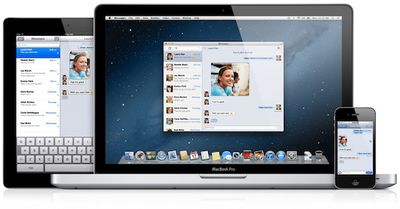
os x messages
Update: Apple's servers appear to be overwhelmed at the moment, with the download button for the Messages beta showing an error message. The app is, however, still available via direct download (63.8 MB).

Update 2: The Messages download button is now operating properly.

Popular Stories

maxresdefault

Apple Shows Off a Key Reason to Upgrade to the iPhone 17

Saturday February 7, 2026 9:26 am PST by
Apple today shared an ad that shows how the upgraded Center Stage front camera on the latest iPhones improves the process of taking a group selfie. "Watch how the new front facing camera on iPhone 17 Pro takes group selfies that automatically expand and rotate as more people come into frame," says Apple. While the ad is focused on the iPhone 17 Pro and iPhone 17 Pro Max, the regular iPhone...
apple wallet drivers license feature iPhone 15 pro

Apple Says These 7 U.S. States Plan to Offer iPhone Driver's Licenses

Monday February 9, 2026 6:24 am PST by
In select U.S. states, residents can add their driver's license or state ID to the Apple Wallet app on the iPhone and Apple Watch, and then use it to display proof of identity or age at select airports and businesses, and in select apps. The feature is currently available in 13 U.S. states and Puerto Rico, and it is expected to launch in at least seven more in the future. To set up the...
m5 macbook pro deal

Why You Shouldn't Buy the Next MacBook Pro

Tuesday February 10, 2026 4:27 pm PST by
Apple is planning to launch new MacBook Pro models as soon as early March, but if you can, this is one generation you should skip because there's something much better in the works. We're waiting on 14-inch and 16-inch MacBook Pro models with M5 Pro and M5 Max chips, with few changes other than the processor upgrade. There won't be any tweaks to the design or the display, but later this...
iOS 26

Apple Releases iOS 26.3 and iPadOS 26.3

Wednesday February 11, 2026 10:07 am PST by
Apple today released iOS 26.3 and iPadOS 26.3, the latest updates to the iOS 26 and iPadOS 26 operating systems that came out in September. The new software comes almost two months after Apple released iOS 26.2 and iPadOS 26.2. The new software can be downloaded on eligible iPhones and iPads over-the-air by going to Settings > General > Software Update. According to Apple's release notes, ...
Apple Logo Zoomed

Apple Expected to Launch These 10+ Products Over the Coming Months

Tuesday February 10, 2026 6:33 am PST by
It has been a slow start to 2026 for Apple product launches, with only a new AirTag and a special Apple Watch band released so far. We are still waiting for MacBook Pro models with M5 Pro and M5 Max chips, the iPhone 17e, a lower-cost MacBook with an iPhone chip, long-rumored updates to the Apple TV and HomePod mini, and much more. Apple is expected to release/update the following products...

Top Rated Comments

mrat93 Avatar
183 months ago
Does anybody else HATE this about iMessage?

When a friend iMessages me, the iMessage my phone number, NOT my Apple ID.

With Messages for Mac, you don't have a choice but to send from your Apple ID, creating two separate conversations or threads in Messages on iOS.

If you're iMessaging somebody on a Mac from your iPhone, and you lose your 3G or WiFi data connection (every so often you'll see that message that says "Sent as text message") you're screwed. Without a data connection, you can't reply to somebody using Messages for Mac, because it goes through the iMessage protocol.

Apple should find a way to integrate your phone number in iMessage for Mac (and iPad and iPod touch provided the user has an iPhone) so there are no double-conversations in the iOS version of Messages.
Score: 8 Votes (Like | Disagree)
Mess Avatar
183 months ago
WOW!!! AWESOME!!! :cool::cool::cool::cool::cool:

Direct link:

http://appldnld.apple.com/MessagesBeta/041-4274.20120216.z5km/MessagesBeta.dmg
Score: 8 Votes (Like | Disagree)
183 months ago
Cool! bye-bye microsoft messenger!
Score: 8 Votes (Like | Disagree)
sparky1499 Avatar
183 months ago
It doesnt work from mac to send to non iphone users... they must be iphone users with imessage...
I just tried to send to friend and doesnt have iphone and I got an error message

What did you expect?
Score: 7 Votes (Like | Disagree)
LukeHarrison Avatar
183 months ago
And it doesn't work on 10.6 - GRR!
Score: 7 Votes (Like | Disagree)
sterumbelow Avatar
183 months ago
One thing that remains very frustrating is how every device you have iMessage enabled on lights up and bleeps/vibrates when you receive a message.

The Mac version needs to have a status you can select that enabled only the Computer to bleep and notify, while the others receive in the background.

Would be great to save lots of battery life on my iPhone through the day while I'm at home, but that won't happen if it's lighting up and bleeping every time.
Score: 6 Votes (Like | Disagree)