

cardsApple's new Cards app makes it very easy to send real, physical greeting cards through the mail. For just $2.99 (within the U.S.), Apple will print and mail a custom card. But the implementation has some faults.

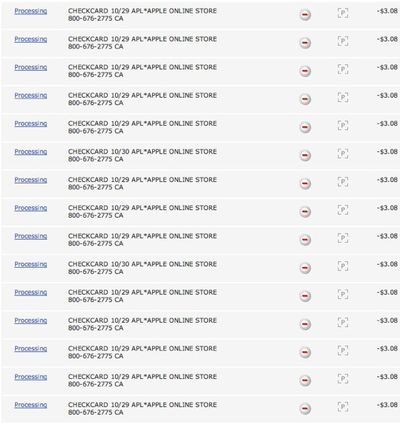
For one, when sending cards to multiple addressees (holiday cards or event invitations, for example), Apple treats each card as an individual purchase from the Apple Online Store, rather than bundling purchases like on the iTunes Store. This means that for each card sent, Apple sends two emails (one for the order and another when it ships), sends a push notification (upon delivery), and charges a credit card.
cardscharges
When purchasing multiple apps or songs from the iTunes or App Stores, Apple aggregates multiple orders into one credit card charge. This lowers the company's credit card fees and, as seen above, avoids clogging bank statements with dozens of charges. It also avoids having a credit card locked due to the bank assuming that 8 charges for $3.08 in 10 minutes is fraudulent activity.

The most annoying of the app's quirks is the tendency of the app to fail during checkout, occasionally requiring multiple attempts to purchase a card for no discernible reason. When the purchase fails Apple still authorizes the credit card, resulting in even more charges appearing. This weekend, when ordering 37 cards, my credit card was charged for 52 transactions, though the additional charges eventually disappeared.

The Cards app is a convenient way to send personalized cards through the mail, but it needs a few tweaks, including a native iPad version and the ability for users to easily send cards to multiple addresses without dozens of individual credit card charges.

Top Rated Comments

wordoflife Avatar
184 months ago
I wish I could pay using iTunes credit. Apparently, you need to type in a CC. You can't just simply use your iTunes account.

Come on, Apple!
Score: 5 Votes (Like | Disagree)
photographypro Avatar
184 months ago
2 cards sent- quality good, delivery slow- tips for high quality!

I sent two cards (I'm in Italy) to two people with birthdays in the US. I was excited because by mail it would take about 8 days to get cards from Italy ( and postage alone would have been over $2, not to mention the card price). I ordered them on Saturday the 15th of October.

Preparing and sending the cards was no problem, but I would recommend making sure photos are at least 2MB in size, otherwise the photo quality is going to be poor.

Well, 2 days later I got a message saying one card was out for delivery. 5 days later the 2nd card hadn't been sent, so I checked online. It said it was still processing. I tried to cancel the card, which WAS an option, but the system said it couldn't do it. I called Apple, and they said it was actually going out, and could not be cancelled. The woman was very nice, and tried to give me a refund on the card, but said unless the card took more than 10 days to deliver, they couldn't give a refund.

I never did receive the message from the post office for either card, but both people told me that they received their cards on the 24th of October, 9 days after I sent them. One person, my sister in law, who is in the graphics trade, said the card quality was very high, that is was embossed, and printed on high quality rag paper. She was very impressed. The 2nd person said the card was very nice, and of high quality.

In the process of all this, I happened to go into iPhoto on my Mac, and never realized that you can send cards from iPhoto. The prices and process are the same, but their are many more options for cards. There is also a video showing the card quality, and how they are produced. Since photos from iPhoto would normally be much higher resolution than iPhone photos, and the options and control are much better, I probably will use iPhoto in the future to do this.

However, the :apple: Card app on the iPhone would be very handy for a quick card sent on the road, and if the photo is from the iPhone (taken with), the quality would be very good.

Note: as a recommendation from a professional photographer, if you are using a photo that was imported through iTunes to your iPhone, the photos gets downsized by iPhoto, and probably won't make a high quality card. If you are on a Mac, I would probably just use iPhoto, but if on a PC, or if you really want to use the :apple: Card App, then email yourself the full size photo from your PC or Mac, save it into the camera roll (it will still be full size), and use THIS photo to make your card. Or take a photo with the iPhone.
Score: 4 Votes (Like | Disagree)
blizaine Avatar
184 months ago
I've never been able to get it to work. Whenever I would try to purchase a card it would say I need to enter my CVV. I would and then it would error out. When I researched it on the interwebs I found people that had been using Paypal that had this issue, but I'm using a normal Visa card.

bummer
Score: 4 Votes (Like | Disagree)
mingoglia Avatar
184 months ago
I sent one to my wife from my kids while I was sitting at a restaurant. I thought it would be cool to at least check it out for "no reason" rather than send a card for a real holiday/occasion and have it not work. It was a test run if you will. I received the card in a reasonable amount of time. It didn't ship shockingly fast, but it was acceptable. I was however a bit underwhelmed at the quality of the card. It was to par with a do it yourself on your ink jet type card.... certainly not even close to a Shutterfly or similar alternate service. It's pretty cheap so I wasn't expecting the world... just figured I'd toss my opinion on the Interweb. :)
Score: 3 Votes (Like | Disagree)
ndpitch Avatar
184 months ago
Who buys 37 cards at 3 bucks a pop?? Yikes.

I can understand sending out holiday greetings cards or invitations in big batches, but I wouldn't use the cards app for that. It's cheaper to have a large batch created as an order and then mailed out.

I would only use the cards app for sending someone a birthday card or something.
Score: 3 Votes (Like | Disagree)
nagromme Avatar
184 months ago
Do we have any informal data on the tendency to fail? Is that pretty universal? Or is this just something experienced by the author of the article? Since that’s the most important point in the article, I’d be curious to know. The article says “tendency” as though most people see that tendency. Too bad. Luckily it’s not a holiday for me, so I won’t need to be an early adopter!

I just wish that you could send eCards rather than only being able to send real cards.

Apple did try that :o

http://docs.info.apple.com/article.html?artnum=51695
Score: 3 Votes (Like | Disagree)

Popular Stories

iOS 26

iOS 26.2 Coming Soon With These 8 New Features on Your iPhone

Thursday December 11, 2025 8:49 am PST by
Apple seeded the second iOS 26.2 Release Candidate to developers earlier this week, meaning the update will be released to the general public very soon. Apple confirmed iOS 26.2 would be released in December, but it did not provide a specific date. We expect the update to be released by early next week. iOS 26.2 includes a handful of new features and changes on the iPhone, such as a new...
AirPods Pro Firmware Feature

Apple Releases New Firmware for AirPods Pro 2 and AirPods Pro 3

Thursday December 11, 2025 11:28 am PST by
Apple today released new firmware designed for the AirPods Pro 3 and the prior-generation AirPods Pro 2. The AirPods Pro 3 firmware is 8B30, up from 8B25, while the AirPods Pro 2 firmware is 8B28, up from 8B21. There's no word on what's include in the updated firmware, but the AirPods Pro 2 and AirPods Pro 3 are getting expanded support for Live Translation in the European Union in iOS...
Google maps feaure

Google Maps Quietly Added This Long-Overdue Feature for Drivers

Wednesday December 10, 2025 2:52 am PST by
Google Maps on iOS quietly gained a new feature recently that automatically recognizes where you've parked your vehicle and saves the location for you. Announced on LinkedIn by Rio Akasaka, Google Maps' senior product manager, the new feature auto-detects your parked location even if you don't use the parking pin function, saves it for up to 48 hours, and then automatically removes it once...
iOS 26

iOS 26.4 and iOS 27 Features Revealed in New Leak

Friday December 12, 2025 10:56 am PST by
Macworld's Filipe Espósito today revealed a handful of features that Apple is allegedly planning for iOS 26.4, iOS 27, and even iOS 28. The report said the features are referenced within the code for a leaked internal build of iOS 26 that is not meant to be seen by the public. However, it appears that Espósito and/or his sources managed to gain access to it, providing us with a sneak peek...
iOS 26

Apple Releases iOS 26.2 With Alarms for Reminders, Lock Screen Changes, Enhanced Safety Alerts and More

Friday December 12, 2025 10:10 am PST by
Apple today released iOS 26.2, the second major update to the iOS 26 operating system that came out in September, iOS 26.2 comes a little over a month after iOS 26.1 launched. ‌iOS 26‌.2 is compatible with the ‌iPhone‌ 11 series and later, as well as the second-generation ‌iPhone‌ SE. The new software can be downloaded on eligible iPhones over-the-air by going to Settings >...
Foldable iPhone 2023 Feature 1

Apple to Make More Foldable iPhones Than Expected [Updated]

Tuesday December 9, 2025 9:59 am PST by
Apple has ordered 22 million OLED panels from Samsung Display for the first foldable iPhone, signaling a significantly larger production target than the display industry had previously anticipated, ET News reports. In the now-seemingly deleted report, ET News claimed that Samsung plans to mass-produce 11 million inward-folding OLED displays for Apple next year, as well as 11 million...
AirTag 2 Mock Feature

Apple AirTag 2: Four New Features Found in iOS 26 Code

Thursday December 11, 2025 10:31 am PST by
The AirTag 2 will include a handful of new features that will improve tracking capabilities, according to a new report from Macworld. The site says that it was able to access an internal build of iOS 26, which includes references to multiple unreleased products. Here's what's supposedly coming: An improved pairing process, though no details were provided. AirTag pairing is already...
iOS 26

15 New Things Your iPhone Can Do in iOS 26.2

Friday December 5, 2025 9:40 am PST by
Apple is about to release iOS 26.2, the second major point update for iPhones since iOS 26 was rolled out in September, and there are at least 15 notable changes and improvements worth checking out. We've rounded them up below. Apple is expected to roll out iOS 26.2 to compatible devices sometime between December 8 and December 16. When the update drops, you can check Apple's servers for the ...
macOS Tahoe 26 Thumb

Apple Releases macOS Tahoe 26.2 With Edge Light

Friday December 12, 2025 10:08 am PST by
Apple today released macOS Tahoe 26.2, the second major update to the macOS Tahoe operating system that came out in September. macOS Tahoe 26.2 comes five weeks after Apple released macOS Tahoe 26.1. Mac users can download the macOS Tahoe update by using the Software Update section of System Settings. macOS Tahoe 26.2 includes Edge Light, a feature that illuminates your face with soft...














