

As noted by Italian site iSpazio [Google translation], Apple has quietly tweaked its standalone Apple Keyboard with Numeric Keypad for OS X Lion.
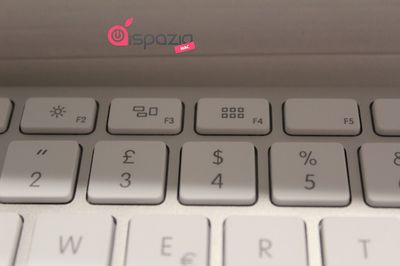
One minor change is a slight adjustment to the icon displayed on the F3 key to remove the frame around the collection of windows. The F3 key had been used to activate Exposé, but with that feature now being folded into the broader Mission Control feature in OS X Lion, the key now activates Mission Control.
In a larger change, the F4 key has now been repurposed since the previous Dashboard function has also been folded into Mission Control in Lion. Consequently, the F4 key is now used to invoke Launchpad, Lion's iOS-like application launching screen.
The new keyboard is billed as requiring Mac OS X 10.6.8 or later.
We don't know for certain that Apple has also updated its wireless keyboard with the same changes, as the company has not updated the images on its keyboard page or in its online store, but we do know that both the wired and wireless keyboards saw their model numbers transitioned to "/B" revisions alongside Wednesday's launch of OS X Lion. Consequently, it seems reasonable to conclude that both keyboards have been updated with the tweaked functionality.
















Top Rated Comments
Do what I did, change the shortcut key from System Prefs>Keyboard. Then do this:
Hacked for Launchpad (http://www.flickr.com/photos/65356661@N05/5965532030/) by akapp42 (http://www.flickr.com/people/65356661@N05/), on Flickr
FN + F12 still works :P
Ah thinking about it this could be because it doesnt have a backlit keyboard. As on Apple's portable options this gives the user the chance to turn the brightness down.