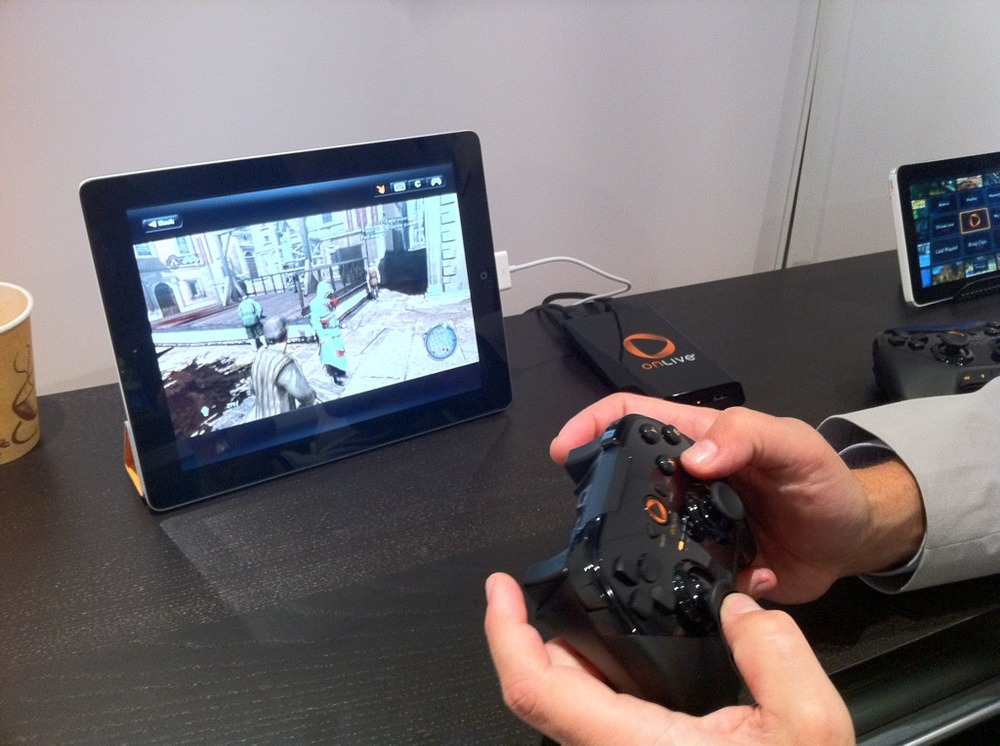
OnLive Announces iPad Support for Cloud Gaming with Optional Bluetooth Controller

D340F6BD E148 4E65 A33F 0F31879A91FA
At E3 this week, OnLive announced the coming of an iPad client App for the OnLive gaming service.

OnLive is pleased to announce the OnLive Player App for iPad and Android. Like the recently announced consoles, the OnLive Player App will enable gameplay of virtually all OnLive games on an iPad and Android tablet with touch or OnLive's new Universal Wireless Controller.

We previously covered OnLive demoing this as a "tech demo" but it seems they've progressed to a final product. OnLive has already delivered a viewer app so iPad users can watch live games. Today's announcement, however, extends that to actual gameplay from your iPad.

OnLive delivers console-quality games to Macs, PCs, your TV (and now your iPad) by remotely streaming the game from their central servers. The customer's home computer need not be fast enough to render high resolution graphics -- instead it simply has to play back what amounts to a video stream of the game, while user controls are sent back to the central server.

We spoke to TouchArcade's Eli Hodapp who had a chance to demo the new system which he said worked "amazingly well". The OnLive iPad client will offer a visual overlay so customers can control games using on-screen touch controls to replace the usual physical controller. They also are giving developers the opportunity to implement actual touch/swipe controls as seen in the video above. Finally, OnLive will be offering a physical game controller (photo above) that communicates directly to the iPad through wireless bluetooth. The physical controller is optional but significantly improves the gaming experience. Hodapp described the entire package as a "game changer". OnLive has not yet announced pricing for the optional controller, and had no comment about an iPhone version in the future.

This app seems like it would be find perfect usage for iOS 5's new AirPlay mirroring that would allow you to display the game on your HDTV.


Popular Stories

iOS 26

iOS 26.4 and iOS 27 Features Revealed in New Leak

Friday December 12, 2025 10:56 am PST by
Macworld's Filipe Espósito today revealed a handful of features that Apple is allegedly planning for iOS 26.4, iOS 27, and even iOS 28. The report said the features are referenced within the code for a leaked internal build of iOS 26 that is not meant to be seen by the public. However, it appears that Espósito and/or his sources managed to gain access to it, providing us with a sneak peek...
iOS 26

iOS 26.2 Coming Soon With These 8 New Features on Your iPhone

Thursday December 11, 2025 8:49 am PST by
Apple seeded the second iOS 26.2 Release Candidate to developers earlier this week, meaning the update will be released to the general public very soon. Apple confirmed iOS 26.2 would be released in December, but it did not provide a specific date. We expect the update to be released by early next week. iOS 26.2 includes a handful of new features and changes on the iPhone, such as a new...
iOS 26

Apple Releases iOS 26.2 With Alarms for Reminders, Lock Screen Changes, Enhanced Safety Alerts and More

Friday December 12, 2025 10:10 am PST by
Apple today released iOS 26.2, the second major update to the iOS 26 operating system that came out in September, iOS 26.2 comes a little over a month after iOS 26.1 launched. ‌iOS 26‌.2 is compatible with the ‌iPhone‌ 11 series and later, as well as the second-generation ‌iPhone‌ SE. The new software can be downloaded on eligible iPhones over-the-air by going to Settings >...
AirPods Pro Firmware Feature

Apple Releases New Firmware for AirPods Pro 2 and AirPods Pro 3

Thursday December 11, 2025 11:28 am PST by
Apple today released new firmware designed for the AirPods Pro 3 and the prior-generation AirPods Pro 2. The AirPods Pro 3 firmware is 8B30, up from 8B25, while the AirPods Pro 2 firmware is 8B28, up from 8B21. There's no word on what's include in the updated firmware, but the AirPods Pro 2 and AirPods Pro 3 are getting expanded support for Live Translation in the European Union in iOS...
macOS Tahoe 26 Thumb

Apple Releases macOS Tahoe 26.2 With Edge Light

Friday December 12, 2025 10:08 am PST by
Apple today released macOS Tahoe 26.2, the second major update to the macOS Tahoe operating system that came out in September. macOS Tahoe 26.2 comes five weeks after Apple released macOS Tahoe 26.1. Mac users can download the macOS Tahoe update by using the Software Update section of System Settings. macOS Tahoe 26.2 includes Edge Light, a feature that illuminates your face with soft...
AirTag 2 Mock Feature

Apple AirTag 2: Four New Features Found in iOS 26 Code

Thursday December 11, 2025 10:31 am PST by
The AirTag 2 will include a handful of new features that will improve tracking capabilities, according to a new report from Macworld. The site says that it was able to access an internal build of iOS 26, which includes references to multiple unreleased products. Here's what's supposedly coming: An improved pairing process, though no details were provided. AirTag pairing is already...
Apple Foldable Thumb

Leak Reveals Foldable iPhone Details

Monday December 15, 2025 9:09 am PST by
The first foldable iPhone will feature a series of design and hardware firsts for Apple, according to details shared by the Weibo leaker known as Digital Chat Station. According to a new post, via machine translation, Apple is developing what the leaker describes as a "wide foldable" device, a term used to refer to a horizontally oriented, book-style foldable with a large internal display....
ipados 26 1 slide over

Apple Releases iPadOS 26.2 With Multitasking Improvements

Friday December 12, 2025 10:09 am PST by
Apple today released iPadOS 26.2, the second major update to the iPadOS 26 operating system released in September. iPadOS 26.2 comes a month after iPadOS 26.1. The new software can be downloaded on eligible iPads over-the-air by going to Settings > General > Software Update. iPadOS 26.2 continues with the multitasking improvements that were added with iPadOS 26.1. You can now drag and...

Top Rated Comments

gorgeousninja Avatar
190 months ago
Well contrary to the doom-mongers and naysayers...this looks (in theory).. fantastic.
Score: 3 Votes (Like | Disagree)
DustinT Avatar
190 months ago
HOLY LAG BATMAN!

Bluetooth to iPad to wireless router to Onlive server back to wireless router to iPad to wireless to Apple TV to actual TV. Rinse and repeat.

WTH? That would be awful!
Score: 3 Votes (Like | Disagree)
KylePowers Avatar
190 months ago
I think Apple just needs to come up with a first party controller solution.

I realize they hate buttons, but with all the good games out (and only getting better) and external display options (wired, wireless), I think a sleek controller is the next logical step. It's really only the last thing that separates an iPad from a 360/PS3 (to an extent, of course).
Score: 2 Votes (Like | Disagree)
cRuNcHiE Avatar
190 months ago
Considering the lag I get from using vnc to my pc over local wifi, I can't see this being any use surely
Score: 2 Votes (Like | Disagree)
Hastings101 Avatar
190 months ago
That's really neat
Score: 2 Votes (Like | Disagree)
fswmacguy Avatar
190 months ago
Wouldn't this service require a very high fidelity connection? I couldn't imagine playing something like this on DSL. Seems like users would need a very fast connection at all times.
Score: 1 Votes (Like | Disagree)