

fancal

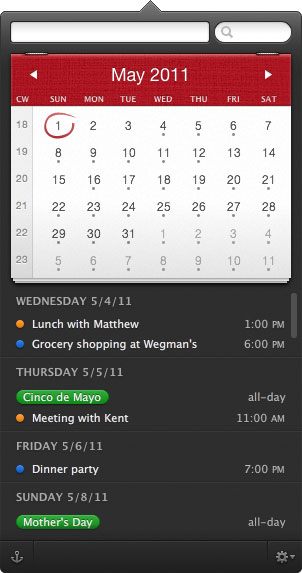
Flexibits has released their new calendar app for the Mac called Fantastical. This natural language calendar assistant allows you to create events by typing in your plans:

Using an advanced natural language engine, Fantastical is extremely expressive, allowing users enter event text in their own style. For example, enter a sentence such as "Lunch with John at 123 Main Street on Tuesday" and Fantastical will translate the sentence into an event and add it to their calendar.


The pre-release previews were very positive, commenting on the quick-access as a menu-bar item that lets you quickly enter new items.

What I like most about Fantastical is how quick and accessible it is. It lives in your Menu Bar and you invoke it via a global hotkey (I use command+option+c), or by clicking on the Menu Bar icon, and it appears instantaneously. It is both keyboard and mouse friendly. The power users in the room will be glad to know you can navigate and operate the app without leaving the keyboard — if it were not so then I certainly would not find the same amount of utility from the app.

And what blows me away every time I use it is the entry panel for an event — Fantastical uses a natural language parser in addition to the standard new-event, iCal interface. So far, in my usage, the natural language parsing has been superb; the best I’ve ever used.

Fantastical is available now through the Flexibits Store or the Mac App Store for an introductory price of $14.99 with a free trial on their website.


Top Rated Comments

Snypod Avatar
192 months ago
After using Fantastical for a few hours I'm happy to say that this is the menu bar calendar app I've been waiting for! For those wondering why anyone would choose this over the much cheaper QuickCal, I'll explain my personal reasoning...

1) First and foremost, it has a full calendar above the events list. The calendar provides visual context for the month and helps me comprehend much more quickly when events are in relation to today. This also helps when planning ahead since I can visually see when days fall in the month.
2) It shows the current date in the menu bar icon. I always disliked having the date written out long form like it is in the official OS X clock, so I'm happy to have this feature.
3) Great implementation of the events list. Hovering over an event highlights the date(s) on the calendar. Multi-day events appear on each of the days they are scheduled for as opposed to just the beginning date, something I've always wished iCal would do.
4) You can search your entire calendar, either manually or by keyword, without opening iCal.
5) The dark theme and great design choices are a nice alternative to the minimalistic, but still pretty, QuickCal. I guess this one comes down to personal choice.

There are some downsides to Fantastical at the moment... like no "To-Do" integration, you can't add notes to new events, you can't delete events, there is no option to have the calendar automatically return to the current date when the menu is opened, etc... so hopefully they will add this missing functionality in future updates.
Score: 5 Votes (Like | Disagree)
Weaselboy Avatar
192 months ago
Quickcal (http://smellypuppy.com/quickcal-desktop/) does much more than this and is $1.99. Quickcal also handles adding tasks with natural language.
Score: 4 Votes (Like | Disagree)
arn Avatar
192 months ago
Can Arn or somebody respond to this?
People always go on about paid reviews and stuff. It's an easy "go to" accusation when you don't like a product being talked about. We don't do paid reviews or posts. Neither do any of the other sites you've probably seen this on (unless it's clearly marked). Sometimes we do have promotions/affiliate items (the mac software bundles, for example), but those are all disclaimed in the post.

I don't generally respond to these accusations because it's pointless to respond to conspiracy theorists, as they never believe you.

It seems like today every Mac themed web site I read has a glowing recommendation of this app, and I just don't see what is so earth shattering about it. Even Daring Fireball is going on about it. :confused: It does look suspicious.
It would look more suspicious if most websites said it sucked and one said it was recommended.

arn
Score: 3 Votes (Like | Disagree)
nitschi Avatar
192 months ago
Quickcal (http://smellypuppy.com/quickcal-desktop/) does much more than this and is Quickcal also handles adding tasks with natural language.
2nd that. QuickCal seems to provide everything (minus some "eyecandy" in the menubar-menu) this (much more expensive) app offers.
Score: 2 Votes (Like | Disagree)
Weaselboy Avatar
192 months ago
Can Arn or somebody respond to this? It seems like today every Mac themed web site I read has a glowing recommendation of this app, and I just don't see what is so earth shattering about it. Even Daring Fireball is going on about it. :confused: It does look suspicious.
People always go on about paid reviews and stuff. It's an easy "go to" accusation when you don't like a product being talked about. We don't do paid reviews or posts. Neither do any of the other sites you've probably seen this on (unless it's clearly marked). Sometimes we do have promotions/affiliate items (the mac software bundles, for example), but those are all disclaimed in the post.

I don't generally respond to these accusations because it's pointless to respond to conspiracy theorists, as they never believe you.


It would look more suspicious if most websites said it sucked and one said it was recommended.

arn
Appreciate the response Arn. Thanks
Score: 1 Votes (Like | Disagree)
andi242 Avatar
192 months ago
I tried to extend FC with a small Applescript to provide a local URL handler.
You may type e.g. "fcal://Meeting with Bob at 12" into your favorite app launcher (or create a custom search like in Alfred.app).

I'm no good at apple scripting, but I hope this might work for you guys as well.

http://www.cl.ly/6s8v

This will be added in future releases of FC, though.
https://twitter.com/flexibits/status/70558665807101952

starting the .app will generate an error, but this may be necessary for registering the url handler.
Score: 1 Votes (Like | Disagree)

Popular Stories

Apple Logo Zoomed

Tim Cook Teases Plans for Apple's Upcoming 50th Anniversary

Thursday February 5, 2026 12:54 pm PST by
Apple turns 50 this year, and its CEO Tim Cook has promised to celebrate the milestone. The big day falls on April 1, 2026. "I've been unusually reflective lately about Apple because we have been working on what do we do to mark this moment," Cook told employees today, according to Bloomberg's Mark Gurman. "When you really stop and pause and think about the last 50 years, it makes your heart ...
wwdc sans text feature

Apple Rumored to Announce New Product on February 19

Thursday February 5, 2026 12:22 pm PST by
Apple plans to announce the iPhone 17e on Thursday, February 19, according to Macwelt, the German equivalent of Macworld. The report, citing industry sources, is available in English on Macworld. Apple announced the iPhone 16e on Wednesday, February 19 last year, so the iPhone 17e would be unveiled exactly one year later if this rumor is accurate. It is quite uncommon for Apple to unveil...

Finder Siri Feature

Why Apple's iOS 26.4 Siri Upgrade Will Be Bigger Than Originally Promised

Friday February 6, 2026 3:06 pm PST by
In the iOS 26.4 update that's coming this spring, Apple will introduce a new version of Siri that's going to overhaul how we interact with the personal assistant and what it's able to do. The iOS 26.4 version of Siri won't work like ChatGPT or Claude, but it will rely on large language models (LLMs) and has been updated from the ground up. Upgraded Architecture The next-generation...
iOS 26

iOS 26.3 and iOS 26.4 Will Add These New Features to Your iPhone

Tuesday February 3, 2026 7:47 am PST by
While the iOS 26.3 Release Candidate is now available ahead of a public release, the first iOS 26.4 beta is likely still at least a week away. Following beta testing, iOS 26.4 will likely be released to the general public in March or April. Below, we have recapped known or rumored iOS 26.3 and iOS 26.4 features so far. iOS 26.3 iPhone to Android Transfer Tool iOS 26.3 makes it easier...
maxresdefault

Apple Shows Off a Key Reason to Upgrade to the iPhone 17

Saturday February 7, 2026 9:26 am PST by
Apple today shared an ad that shows how the upgraded Center Stage front camera on the latest iPhones improves the process of taking a group selfie. "Watch how the new front facing camera on iPhone 17 Pro takes group selfies that automatically expand and rotate as more people come into frame," says Apple. While the ad is focused on the iPhone 17 Pro and iPhone 17 Pro Max, the regular iPhone...









































