

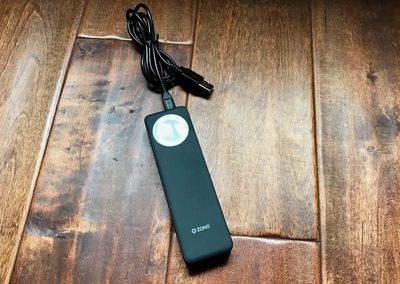
ZENS recently debuted its latest product, an iPhone/Apple Watch Power Bank that has a built-in Apple Watch charging puck and a USB port, allowing you to charge all of your devices at once.
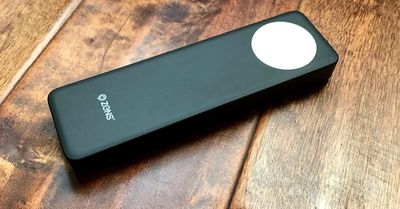
Priced at €69.99 (or $78.00) the 4,000 mAh ZENS Power Bank is about the size and shape of a chocolate bar, though perhaps a bit wider. Because it's neither short nor particularly flat, it doesn't fit well in a pocket, but it's a good size for a backpack or bag when traveling.
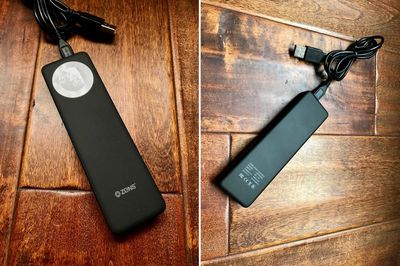
The Power Bank is sturdy and well-made, constructed from a soft-finish black plastic material. At one end, there's an Apple Watch charging puck built into the device, and at the top, there's a USB port for plugging in an iPhone or other USB-powered device, and a micro-USB port that's used for charging.
There's a single button that's used as an on/off switch, which needs to be pressed whenever the Apple Watch is placed on top of it to activate charging. The Power Bank has a single blue LED next to the micro-USB port so you can tell if it has charge left, but because there aren't multiple LEDs, there's no way to tell exactly how much charge is remaining.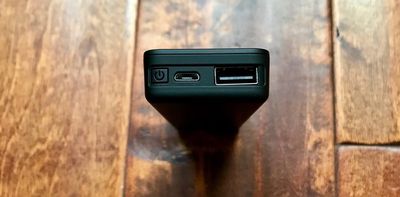
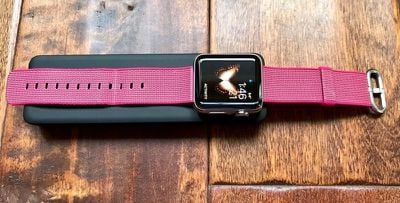
Due to the flat, skinny shape of the ZENS Power Bank, I sometimes had trouble getting my Apple Watch situated just right so it would charge, and a knock was enough to dislodge it if I happened to hit it when reaching for something on my nightstand in the middle of the night. That said, it does work with multiple bands and it's no less convenient than using the Apple Watch charger on its own.
I took the ZENS iPhone/Apple Watch Power Bank with me on a trip recently, and I can confirm that at 4,000 mAh, it has enough juice to keep an Apple Watch charged for a week. I used it for nine days straight to keep my 38mm Apple Watch charged, but I wasn't draining it every single day.
As for the iPhone, the ZENS Power Bank can do just about one full iPhone 7 Plus charge and one full Apple Watch charge, but that eats up a lot of the capacity because it's limited to 4,000 mAh, which is on the small side for portable iPhone batteries.
I was able to get it to charge my iPhone 7 Plus and my Apple Watch, but it was essentially drained after that. I don't have an iPhone 7 to test, but you could potentially get two charges out of the Power Bank because the iPhone 7 has a lower-capacity 1,960 mAh battery inside. It's worth noting that the Power Bank offers 2-amp charging, so the iPhone will charge at a decent speed.
Because it can only deliver a single charge to an iPhone 7 Plus and an Apple Watch simultaneously, this is only going to work for day trips when you need a little extra juice. Conferences, a long day at Disneyland, and a night camping will all work fine, but don't buy this for a longer trip unless you only need to charge your Apple Watch.
If you just want something to power the Apple Watch, this will work for a solid week of standard Apple Watch use. A little more if you're not using much battery, and a little less if you're draining your watch every day.
At home, the Power Bank is nice if you want an Apple Watch charger that has no cords and only needs to be charged once a week from a computer or USB power adapter (it doesn't come with one). It can sit on a desk without taking up too much room, and its neutral design will match most decor.
Bottom Line
The ZENS iPhone/Apple Watch Power Bank costs approximately $78, which is not a great price for a 4,000 mAh battery pack.
On Amazon, you can get a smaller 5,200 mAh battery pack for $15.99, or a 10,000 mAh battery pack for $30, but it won't have the built-in Apple Watch charger that's in the ZENS Power Bank.
If you don't want to carry around an Apple Watch charger and want a built-in solution, the ZENS iPhone/Apple Watch Power Bank will deliver it, but personally, I'd rather pay much less for more power, especially if I'm seeking something that's got enough juice to charge my iPhone. You're going to be carrying a micro-USB charging cord and a Lightning cord to charge the iPhone if you use the ZENS Power Bank anyway, so I'm not sure how much of a convenience factor it's adding.
If you want a cord-free desktop Apple Watch charging solution or need a way to power an Apple Watch alone for a week, however, the ZENS iPhone/Apple Watch Power Bank could be worth checking out.
Pros:
- Can keep Apple Watch charged for a week
- Built-in Apple Watch charging puck
Cons:
- Expensive
- Low capacity
- Not suitable for more than 1 iPhone 7 Plus charge
- Requires micro-USB cord for charging
- No way to determine charge level
How to Buy
The ZENS iPhone/Apple Watch Power Bank can be purchased from the ZENS website for €69.99 or about $78. It ships from the Netherlands to the United States and many other countries around the world.


















Top Rated Comments
[]USB]---------------3'6"---------------((puck))----6"----==lightning