North Carolina law students who purchased one of Apple's new MacBook Pro models that include a Touch Bar will need to disable much of its functionality to be able to use their MacBooks on the upcoming 2017 Bar Examination, according to a new notice put out today by the Board of Law Examiners of the State of North Carolina.

According to the notice, applicants will need to disable the Touch Bar's ability to be used with apps through the System Preferences before they can use their computers to take the test. The Touch Bar needs to be set to "Expanded Control Strip," which displays options like screen brightness and volume controls without allowing it to show app-specific content that shifts with each app.
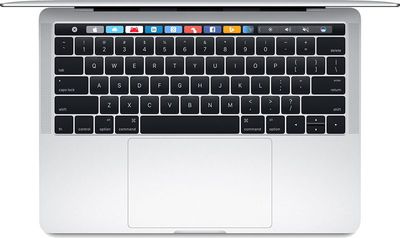
13inchmacbookprokeyboard

This is a notice for all applicants who will be using their laptop at the February 2017 North Carolina Bar Examination. If you are planning to use the newest version of the Mac Book Pro with Touch Bar, you will be required to disable the Touch Bar feature prior to entry into the Bar Examination Site.

To disable the Touch Bar:
From the Dock, open System Preferences, then double-click Keyboard, then open the drop-down menu for "Touch Bar Shows," and select Expanded Control Strip.

Please be advised that the Announcing Proctor will make an announcement at the start of the exam session asking anyone who is using a Mac Book Pro with Touch Bar to raise their hand so that a proctor or ExamSoft technician can come to their seat and ensure that the Touch Bar has been disabled.

The notice doesn't include the reason why Touch Bar functionality must be limited, but in a statement, a board staff member said that it has the potential to compromise security, perhaps leading to cheating. An anonymous source also told MacRumors that the ban stems from ExamSoft, the company responsible for making sure test takers have restricted access to the internet, apps, and files. One of the concerns ExamSoft has is the Touch Bar's predictive text feature, which suggests words to users. According to the source, the MacBook Pro is restricted from all tests administered by ExamSoft clients.

Update: It appears the Touch Bar ban expands beyond North Carolina and is even harsher in some states. In California, the Committee of Bar Examiners has decided that the MacBook Pro with Touch Bar can't be used at all on the February 2017 examination and sent out notices to test takers this morning.

The Committee of Bar Examiners has been advised that the MacBook Pro laptop with Touch Bar contains certain embedded features that makes it problematic for use during the upcoming February 2017 administration of the CBX. As a result, applicants will NOT be allowed to use the MacBook Pro laptop with Touch Bar during the February 2017 CBX.

According to the Committee of Bar Examiners, applicants will need to find a different laptop to use during the test. Those who attempt to use a MacBook Pro with Touch Bar will receive a score of zero for the session and will not be allowed to continue the exam.


Related Roundup: MacBook Pro
Buyer's Guide: MacBook Pro (Buy Now)
Related Forum: MacBook Pro

Top Rated Comments

Porco Avatar
117 months ago
That's a Touchy Bar Examination. :D
Score: 30 Votes (Like | Disagree)
oneMadRssn Avatar
117 months ago
From my experience taking the bar exam, the software they have you install reboots the computer into a sort of safe-mode where the OS loads the bare minimum to run the bar exam software, and nothing else. Then after you submit the exam, the computer reboots again as usual.

During the pseudo-safe mode of taking the bar exam, I noticed none of the text replacements I had set up in the settings worked (I had common law school stuff like pp=plaintiff, dd=defendant, ss=section symbol, etc.). Other typical OS X shortcuts and commands did not work either.

My guess is the touchbar doesn't actually pose any real threat to cheat yet, but their software vendor hasn't figured out all the ins and outs yet, and they are taking this step out of caution.
Score: 18 Votes (Like | Disagree)
coolfactor Avatar
117 months ago
To disable the Touch Bar:
From the Dock, open System Preferences, then double-click Keyboard, then open the drop-down menu for "Touch Bar Shows," and select Expanded Control Strip.
Instructions like this from "IT Department Experts" really annoy me. First, they call it the "Mac Book Pro", with a space between "Mac" and "Book". Second, they instruct you to open System Preferences from the Dock, but how many people leave that icon in the Dock? Choosing from the Apple menu would be far more consistent. And finally, they say to "double-click Keyboard"... ugh!
Score: 11 Votes (Like | Disagree)
adamjackson Avatar
117 months ago
I'm here for the puns. Please don't disappoint.
Score: 9 Votes (Like | Disagree)
casperes1996 Avatar
117 months ago
I usually don't comment on the main threads, but I've got to say, WHAT?

Their instructions for disabling the TouchBar's functionality is ridiculous! A) System Preferences isn't necessarily on the Dock of all Macs. Be better to say "The Apple menu", since it's always accessible from there, and "Double-click"? They've got to be kidding! I get the thing with disabling it, but their instructions are weird
[doublepost=1485817297][/doublepost]
If you're smart enough to code this, you probably don't need to cheat; albeit I'm sure that also means you're smart enough to make money off your creation by selling it to others.
What if you're just smart enough to download a tool from the internet that someone else made for cheating? That's a possibility
Score: 6 Votes (Like | Disagree)
Slix Avatar
117 months ago
The irony is that it's a Bar Examination. :P
Score: 6 Votes (Like | Disagree)

Popular Stories

iphone 17 models

No iPhone 18 Launch This Year, Reports Suggest

Thursday January 1, 2026 8:43 am PST by
Apple is not expected to release a standard iPhone 18 model this year, according to a growing number of reports that suggest the company is planning a significant change to its long-standing annual iPhone launch cycle. Despite the immense success of the iPhone 17 in 2025, the iPhone 18 is not expected to arrive until the spring of 2027, leaving the iPhone 17 in the lineup as the latest...
duolingo ad live activity

Duolingo Used iPhone's Dynamic Island to Display Ads, Violating Apple Design Guidelines

Friday January 2, 2026 1:36 pm PST by
Language learning app Duolingo has apparently been using the iPhone's Live Activity feature to display ads on the Lock Screen and the Dynamic Island, which violates Apple's design guidelines. According to multiple reports on Reddit, the Duolingo app has been displaying an ad for a "Super offer," which is Duolingo's paid subscription option. Apple's guidelines for Live Activity state that...
Low Cost A18 Pro MacBook Feature Pink

Apple's 2026 Low-Cost A18 Pro MacBook: What We Know So Far

Friday January 2, 2026 4:33 pm PST by
Apple is planning to release a low-cost MacBook in 2026, which will apparently compete with more affordable Chromebooks and Windows PCs. Apple's most affordable Mac right now is the $999 MacBook Air, and the upcoming low-cost MacBook is expected to be cheaper. Here's what we know about the low-cost MacBook so far. Size Rumors suggest the low-cost MacBook will have a display that's around 13 ...
govee floor lamp

CES 2026: Govee Announces New Matter-Connected Ceiling and Floor Lights

Sunday January 4, 2026 5:00 am PST by
Govee today introduced three new HomeKit-compatible lighting products, including the Govee Floor Lamp 3, the Govee Ceiling Light Ultra, and the Govee Sky Ceiling Light. The Govee Floor Lamp 3 is the successor to the Floor Lamp 2, and it offers Matter integration with the option to connect to HomeKit. The Floor Lamp 3 offers an upgraded LuminBlend+ lighting system that can reproduce 281...
airpods pro 3 glitter

AirPods New Year's Deals Include Up to $99 Off AirPods Max, AirPods Pro 3, and AirPods 4

Sunday January 4, 2026 8:04 am PST by
Now that the calendar has flipped over into January, steep discounts on popular Apple products have become more rare after the holidays. However, if you didn't get a new pair of AirPods recently and are looking for a model on sale, Amazon does have a few solid second-best prices this week. Note: MacRumors is an affiliate partner with some of these vendors. When you click a link and make a...
Belkin 25W Battery magnetic

CES 2026: Belkin Announces Magnetic Ring Power Bank, Modular Dock, and More

Sunday January 4, 2026 3:02 pm PST by
Belkin today announced a range of new charging and connectivity accessories at CES 2026, expanding its portfolio of products aimed at Apple device users. UltraCharge Pro Power Bank 10K with Magnetic Ring The lineup includes new Qi2 and Qi2.2 wireless chargers, magnetic power banks, a high-capacity laptop battery, and USB-C productivity accessories, with an emphasis on higher charging...
Low Cost MacBook Feature A18 Pro

Low-Price 12.9-Inch MacBook With A18 Pro Chip Reportedly Launching Early This Year

Friday January 2, 2026 9:08 am PST by
Apple plans to introduce a 12.9-inch MacBook in spring 2026, according to TrendForce. In a press release this week, the Taiwanese research firm said this MacBook will be aimed at the entry-level to mid-range market, with "competitive pricing." TrendForce did not share any further details about this MacBook, but the information that it shared lines up with several rumors about a more...
Clicks Communicator Feature

'Clicks Communicator' Unveiled — Will You Carry This With Your iPhone?

Friday January 2, 2026 6:35 am PST by
The company behind the BlackBerry-like Clicks Keyboard accessory for the iPhone today unveiled a new Android 16 smartphone called the Clicks Communicator. The purpose-built device is designed to be used as a second phone alongside your iPhone, with the intended focus being communication over content consumption. It runs a custom Android launcher that offers a curated selection of messaging...