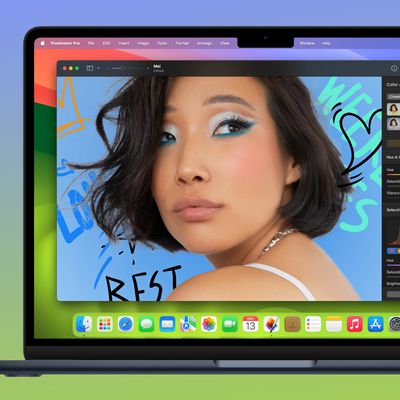
Popular Mac image editing app Pixelmator today received a major update that incorporates many features included in macOS Sierra and introduces support for the Touch Bar on the new MacBook Pro.

With macOS Sierra compatibility, Pixelmator supports tabs, so multiple windows can be combined for easier management, and it includes the Universal Clipboard feature introduced in Sierra, allowing for cross-device copy paste.

Pixelmator now works with P3 wide color gamut, so you'll see brighter, more vibrant colors when using the app with the new MacBook Pro or one of the new LG 4K or 5K displays. Most importantly, this version of Pixelmator includes support for the MacBook Pro's Touch Bar.
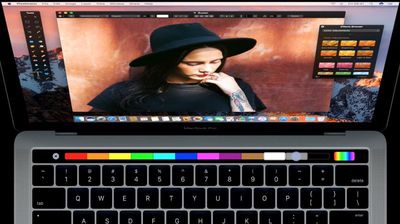
pixelmatortouchbar
End users won't be able to access Touch Bar features until the first MacBook Pro orders begin arriving next week, but Pixelmator is launching it early. The Touch Bar keeps the most useful Pixelmator tools right at your fingertips for quicker editing and streamlined workflows. It automatically changes based on what you're doing within the app, and it can be customized to suit your individual needs.

Touch Bar:
- Set the most useful tool options for your selected tool right in the Touch Bar.
- The Touch Bar is customizable, so you can choose exactly which tools you'd like to keep in it.
- Use the Touch Bar to change color, alignment, and other text properties.
- When previewing effects or adjustments, a Show Original button lets you take a peek at the original image.
- Use Rotate and Scale sliders to transform layers.
- And do a lot more!

Pixelmator also now includes a new content-aware Smart Refine feature that's designed to make selecting content quicker and more accurate. Smart Refine is able to detect object edges in an image to automatically refine a selection outline. It naturally smooths the edges of a selection for easier blending, and there's a new workflow for making quick edits to a selection through painting.

Pixelmator can be downloaded from the Mac App Store for $29.99. [Direct Link]

Top Rated Comments

TMRJIJ Avatar
121 months ago
Love this app!
Score: 6 Votes (Like | Disagree)
ILikeAllOS Avatar
121 months ago
Thank god Apple added the Touch Bar to replace the F keys that nobody ever uses!
Now apps like this can become even more powerful. :cool:
Score: 3 Votes (Like | Disagree)
nicho Avatar
121 months ago
End users won't be able to access Touch Bar features until the first MacBook Pro orders begin arriving next week, but Pixelmator is launching it early.
I thought you'd already reported on end users who'd had their MBPs delivered? Is this a scripted press release that got held back? :/
Score: 3 Votes (Like | Disagree)
netwalker Avatar
121 months ago
Also Affinity Designer just got TouchBar support.
Score: 2 Votes (Like | Disagree)
AFPoster Avatar
121 months ago
My favorite app! Glad to see this update go live.
Score: 2 Votes (Like | Disagree)
Jerion Avatar
121 months ago
I can't speak for Acorn or Affinity- I especially hear many great things about the latter- but for the level of graphics work I do (lightweight hobbyist), Pixelmator is a pretty-close-to-perfect blend of clean and friendly UI, capable tools, and fast performance. It's really nice to see them be on top of everything that MacOS has to offer.
Score: 1 Votes (Like | Disagree)

Popular Stories

maxresdefault

Apple Shows Off a Key Reason to Upgrade to the iPhone 17

Saturday February 7, 2026 9:26 am PST by
Apple today shared an ad that shows how the upgraded Center Stage front camera on the latest iPhones improves the process of taking a group selfie. "Watch how the new front facing camera on iPhone 17 Pro takes group selfies that automatically expand and rotate as more people come into frame," says Apple. While the ad is focused on the iPhone 17 Pro and iPhone 17 Pro Max, the regular iPhone...
apple wallet drivers license feature iPhone 15 pro

Apple Says These 7 U.S. States Plan to Offer iPhone Driver's Licenses

Monday February 9, 2026 6:24 am PST by
In select U.S. states, residents can add their driver's license or state ID to the Apple Wallet app on the iPhone and Apple Watch, and then use it to display proof of identity or age at select airports and businesses, and in select apps. The feature is currently available in 13 U.S. states and Puerto Rico, and it is expected to launch in at least seven more in the future. To set up the...
m5 macbook pro deal

Why You Shouldn't Buy the Next MacBook Pro

Tuesday February 10, 2026 4:27 pm PST by
Apple is planning to launch new MacBook Pro models as soon as early March, but if you can, this is one generation you should skip because there's something much better in the works. We're waiting on 14-inch and 16-inch MacBook Pro models with M5 Pro and M5 Max chips, with few changes other than the processor upgrade. There won't be any tweaks to the design or the display, but later this...
Apple Logo Zoomed

Apple Expected to Launch These 10+ Products Over the Coming Months

Tuesday February 10, 2026 6:33 am PST by
It has been a slow start to 2026 for Apple product launches, with only a new AirTag and a special Apple Watch band released so far. We are still waiting for MacBook Pro models with M5 Pro and M5 Max chips, the iPhone 17e, a lower-cost MacBook with an iPhone chip, long-rumored updates to the Apple TV and HomePod mini, and much more. Apple is expected to release/update the following products...
14 inch MacBook Pro Keyboard

New MacBook Pros Could Now Arrive in March

Sunday February 8, 2026 6:02 am PST by
New MacBook Pro models with the M5 Pro and M5 Max chips could arrive as soon as Monday, March 2, according to Bloomberg's Mark Gurman. In today's "Power On" newsletter, Gurman said that the release of new MacBook Pro models is tied to the release of macOS Tahoe 26.3. The launch is said to be slated for as early as the week of March 2. He added that the M4 Pro and M4 Max models on sale today...