

 Internet security software company Bitdefender's research lab has disclosed new malware targeting Macs called Backdoor.MAC.Eleanor [PDF]. Learn more about the malware and how to keep your Mac protected against attackers.
What is Backdoor.MAC.Eleanor?
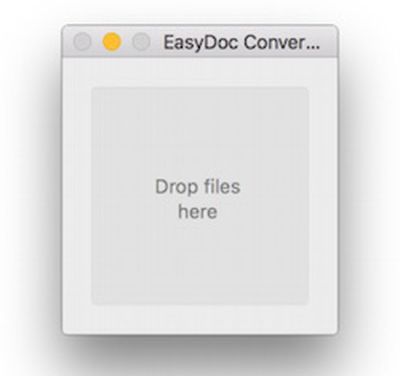
Backdoor.MAC.Eleanor is new OS X/macOS malware arising from a malicious third-party app called EasyDoc Converter, which poses as a drag-and-drop file converter.
What is EasyDoc Converter?
"EasyDoc Converter.app" is a third-party Mac app that poses as a drag-and-drop file converter. The app has the following fake description:
EasyDoc Converter is a fast and simple file converter for OS X. Instantly convert your FreeOffice (.fof) and SimpleStats (.sst) docs to Microsoft Office (.docx) by dropping your file onto the app. EasyDoc Converter is great for employees and students looking for a simple tool for quickly convert files to the popular Microsoft format. EasyDoc Converter lets you get to work quickly by using a simple, clean, drag-and-drop interface. The converted document will be saved in the same directory of the original file.
EasyDoc Converter was previously available on software download website MacUpdate, but the app was removed by July 5. It may remain available for download elsewhere online. The app was never available through the Mac App Store.
The app was created with Platypus, a developer tool used for native Mac apps from shell, Perl, Python or Ruby scripts.
How is Backdoor.MAC.Eleanor distributed?
Backdoor.MAC.Eleanor infects Macs with EasyDoc Converter installed. The app installs a malicious script that is registered to system startup and allows an attacker to anonymously access the infected Mac.
How does Backdoor.MAC.Eleanor put my Mac at risk?
Backdoor.MAC.Eleanor creates a Tor hidden service that provides attackers with full anonymous access to the infected Mac remotely through a PHP-based local web server dubbed Web Service – via a Tor-generated address.
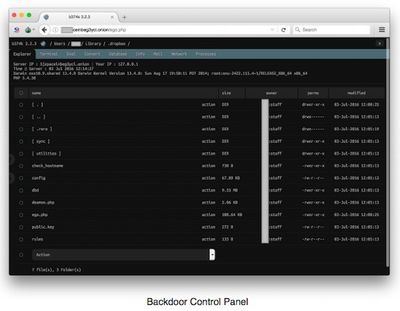
Attackers then have the ability to access and modify files, execute shell commands, capture images and videos from iSight or FaceTime webcams, and more through a web-based control panel:
• File manager (view, edit, rename, delete, upload, download, and archive files)
• Command execution (execute commands)
• Script execution (execute scripts in PHP, PERL, Python, Ruby, Java, C)
• Shell via bind/reverse shell connect (remotely execute root commands)
• Simple packet crafter (probe firewall rule-sets and find entry points into a targeted system or network)
• Connect and administer databases
• Process list/task manager (access the list of processes and apps running)
• Send emails with attached files
What is a Tor hidden service?
Tor is free software that allows for anonymous communication over a computer network, known as onion routing. The software essentially re-routes network traffic through a network of computers so that it cannot be traced back to its source IP address, allowing users to browse the internet without being identified.
Tor hidden services are websites or servers configured to accept inbound connections only when they are routed through the anonymity network. A hidden service is accessed through its "onion" address, such as XXXpaceinbeg3yci.onion, which the attacker can connect to to gain remote control of the infected Mac.
Which Macs are affected?
MacUpdate listed EasyDoc Converter's system requirements as Intel-based Macs running OS X 10.6 (Snow Leopard) or later. OS X Snow Leopard is compatible with Macs that have at least 1GB of RAM and 5GB of free disk space.
Backdoor.MAC.Eleanor is thereby capable of infecting mid 2007 or newer MacBook models, all MacBook Air and MacBook Pro models, mid 2007 or newer Mac mini and iMac models, and all Mac Pro models.
Identify your Mac model by clicking on the Apple logo in the top-left macOS menu bar and selecting "About This Mac."
How do I protect myself against Backdoor.MAC.Eleanor?
The most important and obvious preventative measure is to avoid downloading "EasyDoc Converter.app" from any source. Installing unfamiliar apps from unidentified developers is almost always a security risk.
Apple's default Gatekeeper security settings already prevent EasyDoc Converter from opening, unless you ignore the warning dialog and proceed to manually open the app under System Preferences > Security & Privacy.
Mac users can also download a trusted anti-malware app such as BlockBlock, which continually monitors common persistence locations and displays an alert whenever a persistent component is added to the system.
Users that already installed EasyDoc Converter can download anti-malware software Malwarebytes, which has already been updated to detect and remove Backdoor.MAC.Eleanor.
How will Apple deal with this malware?
Apple will likely update its "Xprotect" anti-malware system to block EasyDoc Converter.





















