

iOS 10 Tidbits: Individual Read Receipts, Wake Alarm, Music Storage Optimization, and More - MacRumors
Skip to Content

iOS 10 Tidbits: Individual Read Receipts, Wake Alarm, Music Storage Optimization, and More

Apple today announced iOS 10, the next major version of its iPhone, iPad, and iPod touch software platform. The update is available in beta for Apple developers starting today, allowing early adopters to update and take a closer look at what's new. A public beta will be available in July, followed by an official launch in the fall.

iOS 10 includes a number of changes that Apple neglected to mention in greater detail on stage during its WWDC 2016 keynote, including a new Wake Alarm in the Clock app, individualized read receipts, a new option in the Music app to optimize storage, and many other features outlined below.

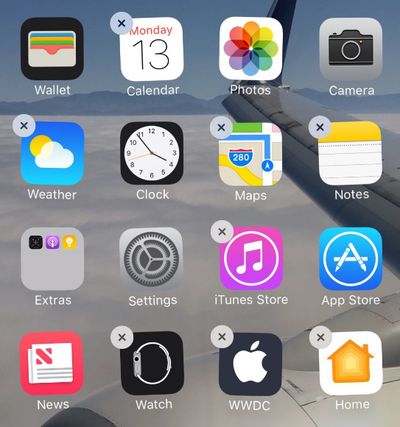
Remove Stock Apps
iOS-10-delete-stock-apps
iOS 10 enables users to remove the following built-in apps from the Home screen on iPhone, iPad, or iPod touch:


• Calendar
• Compass
• Contacts
• FaceTime
• Find My Friends
• Home
• iBooks

• iCloud Drive
• iTunes Store
• Mail
• Maps
• Music
• News
• Notes
• Podcasts

• Reminders
• Stocks
• Tips
• Videos
• Voice Memos
• Watch app
• Weather

The apps are now available as standalone downloads on the App Store, meaning that Apple can issue updates for each app independent of iOS updates.

If you have an Apple Watch paired with your iPhone, removing an app from your Home screen also removes that app from your Apple Watch.

Removing apps can unsurprisingly impact related functionalities such as CarPlay and Notification Center widgets.

Wake Alarm
Wake-Alarm-iOS-10
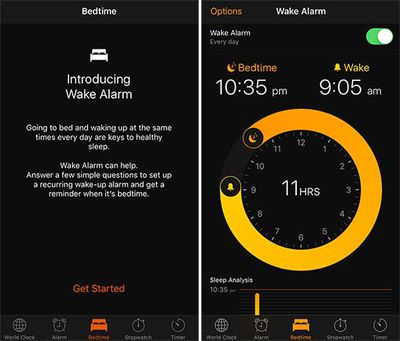
A new Bedtime tab has been added to the Clock app with a Wake Alarm function that can help you go to sleep and wake up at the same time every day. When enabled, the recurring wake-up alarm will remind you when it is time to sleep, track how many hours you slept, and provide detailed sleep analysis.

Individual Read Receipts
iOS-10-individual-read-receipts
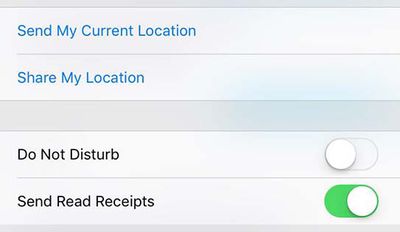
Read receipts can be toggled on a per-person or per-conversation basis on iOS 10, rather than be simply turned on or off entirely.

Music Storage Optimization
Music-Storage-Optimization-iOS-10
New Keyboard Sound

Other tidbits can be found in our iOS 10: All The Little Things and iOS 10 beta 1 discussion threads.

Related Forum: iOS 10

Popular Stories

iPhone Handoff iOS 27 Feature

T-Mobile to Charge $5 a Month for iOS 27 iPhone Handoff

Thursday September 10, 2026 3:58 pm PDT by
T-Mobile will charge customers $5 per month to use iPhone Handoff, an e-SIM feature that allows the same phone number to be used on two separate iPhones. iPhone Handoff requires carrier support, and at launch, only T-Mobile users in the U.S. and Deutsche Telekom users in Germany will be able to use it. T-Mobile says customers can use their number across two compatible iPhone models and...
iOS 27 Feature Dark

Apple Announces iOS 27 Release Date

Wednesday September 9, 2026 10:46 am PDT by
At its event today unveiling the iPhone 18 Pro, AirPods 5, Apple Watch Series 12, and more, Apple announced that iOS 27 will be released later this month. iOS 27 has already been available as a developer beta since June and as a public beta since July, and Apple today said that the update will be released for all users with a compatible iPhone model on Monday, September 14. iOS 27 is...
iphone duo

IMAX Reacts to iPhone Duo's 1:1.4 Aspect Ratio Displays

Friday September 11, 2026 4:42 am PDT by
Production theater company IMAX has responded in a mixed way to Apple's embrace of a 1:1.4 aspect ratio on the iPhone Duo's inner and outer displays. The boxier ratio happens to be very close to the classic "full-frame" IMAX 1.43:1 aspect ratio, which comes from the geometry of the company's original 15-perforation/70mm film system. In response to an X post from someone wondering if we'll see...

Top Rated Comments

Haxley Avatar
134 months ago
Now the flashlight has different intensities


Attachment Image
Score: 44 Votes (Like | Disagree)

ipodlover77 Avatar
134 months ago
YESSSSSSSSSSSSS YOU CAN FINALLY TAKE PHOTOS WITH MUSIC PLAYING. YES YES YES.
Score: 23 Votes (Like | Disagree)
Andres Cantu Avatar
134 months ago
Game Center has been removed!?! Whatever will gamers do now? ;)
Score: 22 Votes (Like | Disagree)
allanfries Avatar
134 months ago
Finally!! we can remove stock apps. Now thats reason to update right there. Celebration time!!
Score: 18 Votes (Like | Disagree)
Haxley Avatar
134 months ago
Sorry if this has already been asked; if you remove the maps app and have Google maps installed, will this essentially make google maps the default mapping app?

If so, will this also let us use Google maps in CarPlay?
Unfortunately, it will still try to open the Apple Maps app and prompt you to re-download it. I'm hoping they'll let you set default apps in the future.


Another note, when I re-downloaded the Apple Maps app from the AppStore, it was instant. This leads me to believe that you don't actually delete the apps, just hide them. It was seriously instant; I tapped the cloud-like download button, and the 'open' button instantly appeared.

UPDATE: I can confirm that the app isn't actually deleted and is instead hidden. You can test this yourself by having the Maps AppStore page open, delete the Maps app, go back to the AppStore page and see the cloud-like download icon, turn on airplane mode, still able to download the app instantly

Attachment Image
Score: 17 Votes (Like | Disagree)
134 months ago
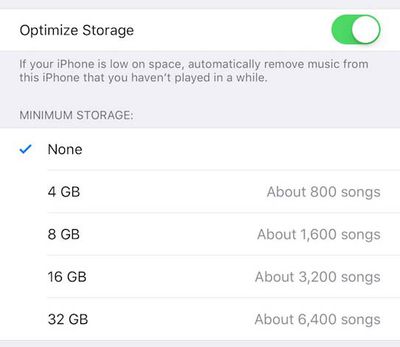
So instead of realizing that in 2016 flash memory is insanely cheap, Apple adds a "feature" to automatically delete stuff you haven't used in a while.
Score: 17 Votes (Like | Disagree)











































