

With OS X El Capitan available today to the public, some have begun discovering interesting tidbits and changes the new operating system has to offer. Twocanoes (via The Loop) has discovered that Boot Camp has gained the ability to install a Windows partition without a USB drive.
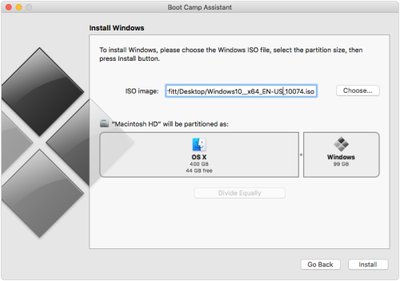
tumblr_inline_nv5uoowV4l1rw87o8_500

Image via Twocanoes

Boot Camp comes with a modified interface that places the ISO image selector and partitioning on a single screen, allowing a user to easily select an ISO image and partition their hard drive before installing Windows. Once Boot Camp Assistant completes its tasks, the computer restarts with the normal Windows installation processes.

The change comes from Apple reworking how many partitions Boot Camp Assistant creates, according to Twocanoes.

Boot Camp Assistant doesn’t just create a Boot Camp partition, but also creates an additional partition called “OSXRESERVED” that is FAT32 formatted.  It places this partition right after the recovery partition, and before the Boot Camp partition...

The "OSXRESERVED" partition includes all the installer files, Boot Camp drivers and EFI files required for to create and boot the Windows partition. Once Windows is installed and the user boots back into OS X, the "OSXRESERVED" partition is removed and the space reserved for that partition is added back to the OS X partition.

The only El Capitan-running Macs that support the new USB drive-less Windows installation are the 11- and 13-inch MacBook Air, the 13- and 15-inch MacBook Pro and the Mac Pro.


Related Forum: OS X El Capitan

Top Rated Comments

135 months ago
I would never put my Mac through the agonizing pain that is installing and running Windows.
Score: 14 Votes (Like | Disagree)
Pakaku Avatar
135 months ago
Why? Old Macs can't be partitioned?
I suppose with some clever partitioning, you could do the same thing manually through Disk Utility.

Bootcamp is nothing more than a glorified Disk Utility anyways.
Score: 12 Votes (Like | Disagree)
goobot Avatar
135 months ago
Seriously why would you install Windows on Mac?
Software or games not available on Mac.
Score: 12 Votes (Like | Disagree)
135 months ago
Seriously why would you install Windows on Mac?
Microsoft Project or Visio?
Vast majority of CAD software?
Majority of games?
Score: 7 Votes (Like | Disagree)
happyslayer Avatar
135 months ago
Weird that the new MacBook wasn't listed, especially since it's just a single port and it might be good to power the Mac while doing the install.
Score: 7 Votes (Like | Disagree)
Nermal Avatar
135 months ago
"... then press Install button". Shouldn't that be either "press Install" or "press the Install button"? It sounds strange to me as it stands.
Score: 6 Votes (Like | Disagree)

Popular Stories

maxresdefault

Apple Shows Off a Key Reason to Upgrade to the iPhone 17

Saturday February 7, 2026 9:26 am PST by
Apple today shared an ad that shows how the upgraded Center Stage front camera on the latest iPhones improves the process of taking a group selfie. "Watch how the new front facing camera on iPhone 17 Pro takes group selfies that automatically expand and rotate as more people come into frame," says Apple. While the ad is focused on the iPhone 17 Pro and iPhone 17 Pro Max, the regular iPhone...
apple wallet drivers license feature iPhone 15 pro

Apple Says These 7 U.S. States Plan to Offer iPhone Driver's Licenses

Monday February 9, 2026 6:24 am PST by
In select U.S. states, residents can add their driver's license or state ID to the Apple Wallet app on the iPhone and Apple Watch, and then use it to display proof of identity or age at select airports and businesses, and in select apps. The feature is currently available in 13 U.S. states and Puerto Rico, and it is expected to launch in at least seven more in the future. To set up the...
m5 macbook pro deal

Why You Shouldn't Buy the Next MacBook Pro

Tuesday February 10, 2026 4:27 pm PST by
Apple is planning to launch new MacBook Pro models as soon as early March, but if you can, this is one generation you should skip because there's something much better in the works. We're waiting on 14-inch and 16-inch MacBook Pro models with M5 Pro and M5 Max chips, with few changes other than the processor upgrade. There won't be any tweaks to the design or the display, but later this...
Apple Logo Zoomed

Apple Expected to Launch These 10+ Products Over the Coming Months

Tuesday February 10, 2026 6:33 am PST by
It has been a slow start to 2026 for Apple product launches, with only a new AirTag and a special Apple Watch band released so far. We are still waiting for MacBook Pro models with M5 Pro and M5 Max chips, the iPhone 17e, a lower-cost MacBook with an iPhone chip, long-rumored updates to the Apple TV and HomePod mini, and much more. Apple is expected to release/update the following products...
iOS 26

Apple Releases iOS 26.3 and iPadOS 26.3

Wednesday February 11, 2026 10:07 am PST by
Apple today released iOS 26.3 and iPadOS 26.3, the latest updates to the iOS 26 and iPadOS 26 operating systems that came out in September. The new software comes almost two months after Apple released iOS 26.2 and iPadOS 26.2. The new software can be downloaded on eligible iPhones and iPads over-the-air by going to Settings > General > Software Update. According to Apple's release notes, ...















