Apple Seeds First OS X 10.10.3 Yosemite Beta to Developers With Mac Photos App

Apple today seeded the first beta of OS X 10.10.3 Yosemite to developers, just over a week after releasing OS X 10.10.2 to the public. OS X 10.10.3 includes the much anticipated Photos app for Mac.

The new beta is available through the Software Update mechanism in the Mac App Store and through the Mac Dev Center.
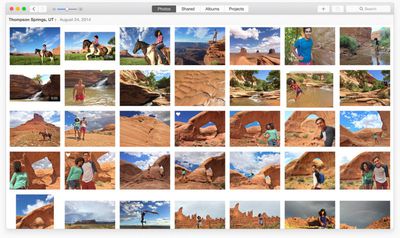
Photos for OS X
Recent rumors questioned the removal of mentions of the Photos app for Mac from Apple's website, suggesting it might be delayed, but today's beta release indicates that it is still on track for an early 2015 launch. 10.10.3's release notes offer details on the app:

All new for OS X, Photos automatically organizes your photo library and helps you perfect your photos with comprehensive editing tools. You can also store your photos and videos in the cloud using iCloud Photo Library, and access them on all your devices.

Photos lets you:
- Browse your photos by time and location in Moments, Collections, and Years views.
- Navigate your library using convenient Photos, Shared, Albums, and Projects tabs
- Store all of your photos and videos in iCloud Photo Library in their original format and full resolution
- Access your photos and videos stored in iCloud Photo Library from your Mac, iPhone, iPad, or iCloud.com with any web browser
- Perfect your photos with powerful and easy-to-use editing tools that optimize with a single click or slider, or allow precise adjustments with detailed controls
- Create professional-quality photo books with simplified bookmaking tools, new Apple-designed themes, and new square book formats
- Purchase prints in new square and panoramic sizes

Quite a few sites have been given preview access to Photos for Mac, giving us our first look at the app that is designed to replace both iPhoto and Aperture. Re/code, for example, has shared several screenshots of the app, and calls it "both refreshingly new and comfortably familiar."

Apple has also created a Photos preview page that walks users through the Photos experience. The Photos for Mac app takes on a Yosemite-style design, with an emphasis on translucency and flatness. Like Photos for iOS, the Mac app organizes images into Moments, Collections, and Years, in a format that's immediately recognizable to anyone who has used the iOS app.

Photos for Mac integrates with iCloud Photo Library (though iCloud Photo Library is not required), letting a user access all of their photos regardless of the device they were captured with, for a seamless photo editing and management experience. Beta Photos users will find that their existing iPhoto libraries will be updated for compatibility with the Photos app, and there's also an option to import Aperture libraries.

Edits made to a photo on iOS or on Mac through the now-universal Photos app are automatically synced to all devices if iCloud Photo Library is enabled, and the Mac app includes a range of editing tools. Enhance can be used to improve images with a single click, but there are also Smart Sliders for more customized adjustments.
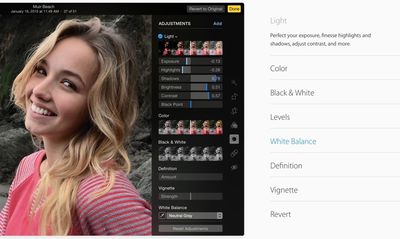
photosapptools
The app has somewhat more in-depth tools than were available in iPhoto, giving access to a histogram along with Light, Color, Black & White, Levels, White Balance, and Definition. Eight pre-defined filters are also included for adding quick effects, and there are options for printing Photo books and sharing images on sites like Facebook, Twitter, Flickr, and more.

Update: OS X 10.10.3 includes a new emoji picker that consolidates emoji into a single page with clear labels. In OS X, the emoji menu is brought up by pressing Control + Command + Space.
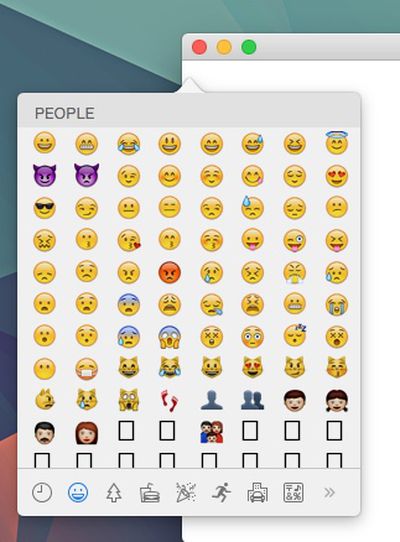
10103emoji
The update also includes new support for Google 2-step verification when setting up accounts in System Preferences.


Related Forum: OS X Yosemite

Popular Stories

iphone 16 apple intelligence

Apple Aiming to Release 'Breakthrough' New iPhone Accessory

Wednesday February 18, 2026 12:43 pm PST by
Apple is looking for a "breakthrough" with its push into wearable AI devices, including an "AirTag-sized pendant," according to Bloomberg's Mark Gurman. In a report this week, he said the pendant is reminiscent of the failed Humane AI Pin, but it would be an iPhone accessory rather than a standalone product. The pendant would feature an "always-on" camera and a microphone for Siri voice...
Multicolored Low Cost A18 Pro MacBook Feature

Low-Cost MacBook Expected on March 4 in These Colors

Wednesday February 18, 2026 5:42 am PST by
Apple will announce its rumored low-cost MacBook at its event on March 4, with the device coming in a selection of bold color options, according to a known leaker. Earlier this week, Apple announced a "special Apple Experience" for the media in New York, London, and Shanghai, taking place on March 4, 2026 at 9:00am ET. Posting on Weibo, the leaker known as "Instant Digital" said that the...
iphone 17 pro green

iPhone 17 Pro Max Curiously Becomes Most Traded-In Smartphone

Wednesday February 18, 2026 9:13 am PST by
New trade-in data indicates that Apple's iPhone 17 Pro Max has rapidly become the single most traded-in smartphone. According to a new report from SellCell, Apple's latest flagship iPhone has quickly risen to the top of the independent trade-in market, accounting for 11.5% of all devices appearing in the top-20 trade-in rankings just months after release. The analysis is based on SellCell...
CarPlay Liquid Glass Dark

iOS 26.4's New CarPlay Video Feature Shown in Action

Wednesday February 18, 2026 9:29 am PST by
Back at WWDC 2025, Apple revealed that it was planning to allow CarPlay users to watch video via AirPlay in their vehicles while they are not driving, and the first beta of iOS 26.4 suggests the feature may be nearing availability. There are several new references to CarPlay video streaming functionality within the iOS 26.4 beta's source code. The feature is not yet visible to users, but...
Dynamic Island iPhone 18 Pro Feature

10 Reasons to Wait for Apple's iPhone 18 Pro

Wednesday February 18, 2026 5:12 am PST by
Apple's iPhone development roadmap runs several years into the future and the company is continually working with suppliers on several successive iPhone models at the same time, which is why we often get rumored features months ahead of launch. The iPhone 18 series is no different, and we already have a good idea of what to expect for the iPhone 18 Pro and iPhone 18 Pro Max. One thing worth...

Top Rated Comments

144 months ago
"You cannot geotag photos, though you can see, sort, and search by where photos were taken."


whhhhyyyyyyyyyyyyyyyyyy
Score: 26 Votes (Like | Disagree)
cmChimera Avatar
144 months ago
Finally!
Score: 18 Votes (Like | Disagree)
ipedro Avatar
144 months ago
Professional Photographers: Photos is a platform for OSX, not just an app. The app is only the front end UI that Apple provides. Extensions are what will make this infinitely powerful for professionals. Imagine Pixelmator being able to natively tap into your Photos library and execute non destructive edits that will then become available to your library through Photos.app on your Mac, iPad and iPhone.

Other extensions will add power to those who need it. Need more fine tune control for your EXIF data? More automated importing? There'll be an extension for that. A whole ecosystem is going to pop up and it'll be a serious threat to Adobe's Photoshop/Lightroom monopoly.

Photo libraries are now supported at the operating system level. This is huge.
Score: 15 Votes (Like | Disagree)
kettle Avatar
144 months ago
I'm still smarting about Aperture and its non-future as a 'professional' app running on 'professional' hardware.

I don't think I want to even bother trying this - it'll end in disappointment in a couple of years.
Score: 15 Votes (Like | Disagree)
144 months ago
I'm inexplicably excited for the new Photos app. I hope it lives up to expectations.
Score: 14 Votes (Like | Disagree)
thewebb Avatar
144 months ago
Finally! The Photos app is coming
Score: 14 Votes (Like | Disagree)