

New Video Shows 'iOS in the Car' Functionality from iOS 7.0.3 in Action
Last week, app developer Steven Troughton-Smith shared a series of screenshots of what seemed to be Apple's "iOS in the Car" feature announced by Apple as "coming soon" to iOS 7 devices. The feature is intended to allow an iOS device to take over the in-dash display of a car, providing access to navigation, phone functions, messages, and music.
Troughton-Smith has now posted a video showing iOS in the Car in action, via a barebones implementation that is actually present in the already released iOS 7.0.3 but not accessible by default. The video shows the feature being run in the iOS Simulator software for developers, with the in-dash display represented by a separate 800x480 window.
In notes posted alongside the video, Troughton-Smith points out that the iOS in the Car feature supports multiple resolutions of external displays, touch input and hardware controls, and voice input.
- Supports Multiple Resolutions
- Supports touchscreens (presumably single-touch?), hardware buttons, wheels and touchpads
- Does not support multitasking - car display will always show same current on-screen app as iPhone (which can be locked/asleep)
- Whitelisted to specific Apple apps - no public API for developers [yet?]
- Has no keyboard UI - voice recognition as input
- UI clearly subject to change
- Missing functionality in video is due to iOS Simulator not containing all the stock iOS apps
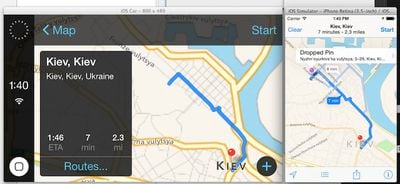
iOS in the Car from iOS 7.1 (Source: Twitter) Troughton-Smith does also point out that the user interface is subject to change, and while the demo shown in the video resembles the screenshots shown on Apple's site, his earlier screenshots and a
Twitter response indicate that the overall look has indeed seen a redesign for iOS 7.1, bringing more of the blue text and overall feel of iOS 7 to the in-vehicle display.

Popular Stories
Apple today shared an ad that shows how the upgraded Center Stage front camera on the latest iPhones improves the process of taking a group selfie.
"Watch how the new front facing camera on iPhone 17 Pro takes group selfies that automatically expand and rotate as more people come into frame," says Apple. While the ad is focused on the iPhone 17 Pro and iPhone 17 Pro Max, the regular iPhone...
In select U.S. states, residents can add their driver's license or state ID to the Apple Wallet app on the iPhone and Apple Watch, and then use it to display proof of identity or age at select airports and businesses, and in select apps.
The feature is currently available in 13 U.S. states and Puerto Rico, and it is expected to launch in at least seven more in the future.
To set up the...
Apple is planning to launch new MacBook Pro models as soon as early March, but if you can, this is one generation you should skip because there's something much better in the works.
We're waiting on 14-inch and 16-inch MacBook Pro models with M5 Pro and M5 Max chips, with few changes other than the processor upgrade. There won't be any tweaks to the design or the display, but later this...
Wednesday February 11, 2026 10:07 am PST by
Juli CloverApple today released iOS 26.3 and iPadOS 26.3, the latest updates to the iOS 26 and iPadOS 26 operating systems that came out in September. The new software comes almost two months after Apple released iOS 26.2 and iPadOS 26.2.
The new software can be downloaded on eligible iPhones and iPads over-the-air by going to Settings > General > Software Update.
According to Apple's release notes, ...
It has been a slow start to 2026 for Apple product launches, with only a new AirTag and a special Apple Watch band released so far. We are still waiting for MacBook Pro models with M5 Pro and M5 Max chips, the iPhone 17e, a lower-cost MacBook with an iPhone chip, long-rumored updates to the Apple TV and HomePod mini, and much more.
Apple is expected to release/update the following products...















