Apple's Plans to Enhance Touch ID with Trackpad Capabilities and Display Integration Revealed - MacRumors
Skip to Content

Apple's Plans to Enhance Touch ID with Trackpad Capabilities and Display Integration Revealed

Late last week, we highlighted a pair of Apple patent applications offering details on the company's implementation of its "Touch ID" fingerprint sensor in the iPhone 5s. The highly technical patent applications showed how the system works and revealed that Apple first moved to protect the ideas with the filing of several provisional patent applications in May 2012.

A third Touch ID-related patent application filed by Apple also quietly surfaced last week (via Unwired View) but has flown under the radar until now because it appears to have published on the World Intellectual Property Organization's database but not the U.S. Patent and Trademark Office's database.

This third patent application is the most revealing yet with regard to Touch ID, showing how Apple has envisioned expanding the feature to incorporate trackpad functionalities, tracking movements of a user's finger or thumb over the sensor to navigate through user interfaces on the device's screen. In one example, Apple shows how a user moving his or her finger right to left across the Touch ID home button could pan a map, with a subsequent upward movement across the home button triggering activation of a multitasking interface.
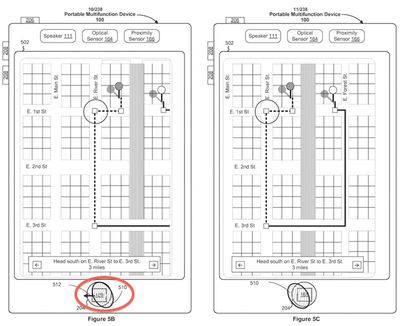
touch_id_map_pan

Panning a map by moving finger right to left over Touch ID home button

Other examples show how users could take advantage of "revolving" or "twisting" motions of their fingerprints on the Touch ID home button to initiate actions. Adding the ability to recognize presses of various durations for the Touch ID home button and even sensors for detecting how hard the button is being pressed could offer even more powerful user interface navigation capabilities right from the home button.

Moving beyond the home button, Apple addresses the possibility of integrating Touch ID right into a device's display, allowing any area of the screen to be dynamically designated as a sensing region for the user's fingerprint. In one example, the area of a display representing the device's email app could require a valid fingerprint touching the icon in order for authorization to be granted.
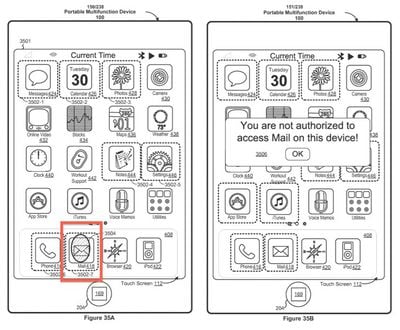
touch_id_mail_auth

Authorizing Mail app with Touch ID sensing integrated into device display

Overall, Apple's patent application is a massive 610-page document incorporating 464 claims covering a wide range of applications for Touch ID in the future. Beyond the examples highlighted here, the application covers a number of other areas including:

- Enhanced touch typing recognition through sensing which fingers are touching the keys
- Using pressure and movement sensing to turn the home button into a simple game controller
- Using revolving "scroll wheel" motions on the home button to navigate through multitasking app listings
- Using fingerprint verification to enforce parental controls on age-rated media content, restrict maximum device volume, or automatically increase font sizes for children, seniors, or visually-impaired users
- Autofilling web forms or loading personalized web pages based on fingerprint identification
- Supporting multi-user profiles including authorized and guest profiles through fingerprint authorization
- Authorizing location "check-ins", mobile payment information, or photo/document author tagging based on fingerprint identification
- Supporting simultaneous multi-user configurations by allowing users to define separate areas of a device's screen for drawings, notes, or other content based on fingerprint recognition

Apple's patent application was filed on May 20, 2013, but cites as priority several provisional patent applications dated as far back as May 2012.


Tag: Patent

Popular Stories

8 CarPlay Features in iOS 27 Feature

Which iOS 27 CarPlay Features Actually Work in Your Car?

Thursday September 17, 2026 4:17 am PDT by
In iOS 27, available now, CarPlay gets its biggest update in years, but some features depend on what type of car you have rather than your iPhone model. Some of the biggest additions won't do anything in the vast majority of vehicles on the road today. Here's how the new features pan out. Works in Any CarPlay Vehicle Custom widgets: In iOS 27, CarPlay is no longer limited to Apple's handful ...

Apple Watch New Charging Puck

Here's Why a New Apple Watch Charging Puck Was Just Released

Wednesday September 16, 2026 8:53 am PDT by
The new Apple Watch Series 12 and Apple Watch Ultra 4 have hardware changes that allow for faster charging, but you will need to use the new version of the Apple Watch Magnetic Fast Charger included in the box in order to achieve this boost. If you need extra ones for your own charging stands or travel or so forth, Apple released the new version of the charger on its online store last week, with...
ios272anniversary

iOS 27.2 Could Save Your Marriage

Wednesday September 16, 2026 1:32 pm PDT by
The iOS 27.2 beta that Apple released today adds a feature that reminds you it's your anniversary when you call someone, as long as you've added the date in the Contacts app. On the date of your anniversary, when you go to call the person, you'll see a reminder that it's an important day so you don't forget to say something. The anniversary alert uses Call Context, a feature Apple added in...

Top Rated Comments

167 months ago
"- Using revolving 'scroll wheel' motions on the home button to navigate through multitasking app listings"

Such a shame you can't just touch the screen and perform scrolling actions.
Score: 15 Votes (Like | Disagree)
167 months ago
Sometimes, due to my own experience, i almost feel like people are trolling when they say touchID doesn't work well for them. For me, the only time i have to scan my finger more than once for touchID to work is when my finger is moist. I would strongly suggest the people who are having problems scan each finger they want to use twice, if possible, and also make sure you are scanning from different angles when learning it into the device. i have had my device since launch and have never had issues.
Score: 13 Votes (Like | Disagree)
167 months ago
I would like to see it used so if I show someone a picture and they try and swipe left or right they get denied. "you are not authorized to see other photos"
Score: 9 Votes (Like | Disagree)
167 months ago
I wonder if these will be the icons for iOS 8.
Score: 7 Votes (Like | Disagree)
bbeagle Avatar
167 months ago
Call me a troll but other phones do a lot of that today. I even remember my BB800 working like that in 2005.

Read the patent. The patent is for detecting movement of a FINGERPRINT. No phones have ever done this.

Other phones have detected movement of a FINGER, but not a FINGERPRINT. I know, I know, very similar. But it IS different because this is an AUTHORIZED movement instead of a movement of a finger, which does lead to the possibility of innovations in knowing who is moving the finger on the phone.

What it does for Apple, is disallow anyone else from putting a fingerprint scanner and a movement detector in the SAME BUTTON. I understand why this is patentable (something new - nobody has done this before), but it also shows what a silly place patents are in today's world. If Apple would not have patented this, someone else would have, and Apple couldn't do what it wanted to do. Now Samsung comes along and wants to put both on the same button, they can't. They need to use 2 separate buttons.
Score: 6 Votes (Like | Disagree)
Rogifan Avatar
167 months ago
Cool idea about requiring a print per app for permission, but it all seems vaguely familiar.

The world's first retina density smartphone (the 2007 Toshiba Portégé G900) had a swipe fingerprint sensor.

The sensor supported scrolling, and launching different apps with different fingerprints.

The phone even allowed unlocking a nearby laptop over Bluetooth via the phone's sensor.

Wow if it did all that and did it well why isn't Toshiba ruling the smartphone world today?
Score: 6 Votes (Like | Disagree)