Adobe today announced the launch of a free public beta of Photoshop Lightroom 5 for both Mac and Windows, offering a peek at the next major version of the company's digital photo management and post-production software. The beta program runs through June 30, with the official release of Lightroom 5 planned for later this year.
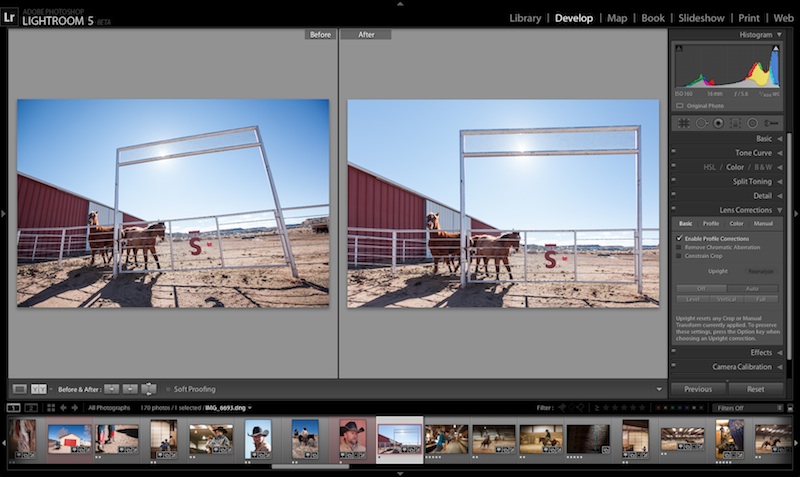
Lightroom 5 Upright tool (Click for full size)
Lightroom 5 beta offers photographers and enthusiasts many new features including:
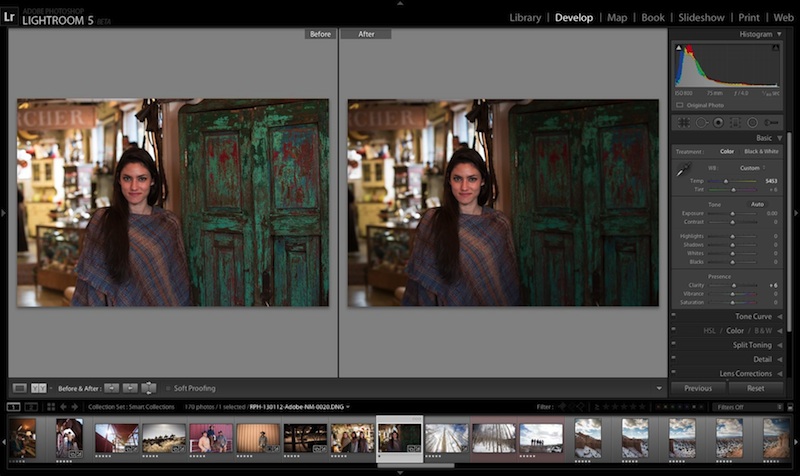
- Advanced Healing Brush allows customers to heal imperfections and remove distracting elements - Upright tool analyzes an image to automatically level horizons and straighten objects like buildings to correct a keystone effect - Radial Gradient tool creates off-center or multiple vignette effects - Smart Previews allow customers to edit images without needing the original raw file - Video slideshow enables customers to combine still images, video clips and music in a creative HD slideshow - Upgrades to the Book module enhancing the ability to create, customize and order elegant photo books using a variety of tailored templates
Lightroom 5 Radial Gradient tool (Click for full size)
Adobe's Sharad Mangalick has more on the new features in a blog post on the company's Photoshop.com Blog.
Adobe has yet to announce pricing or an exact release date for Lightroom 5, which will compete with Apple's Aperture software. Aperture 3 was released over three years ago, but Apple has continued to enhance the software with minor upgrades since that time and slashed the price to $79.99 with the launch of the Mac App Store in January 2011. Adobe responded a year later by cutting Lightroom's price in half to $149 with the launch of Lightroom 4.
Saturday April 11, 2026 9:14 am PDT by Joe Rossignol
Last year, Apple launched CarPlay Ultra, the long-awaited next-generation version of its CarPlay software system for vehicles. Nearly a year later, CarPlay Ultra is still limited to Aston Martin's latest luxury vehicles, but that should change fairly soon.
In May 2025, Apple said many other vehicle brands planned to offer CarPlay Ultra, including Hyundai, Kia, and Genesis.
CarPlay Ultra...
As we wait for WWDC to kick off next Monday, Apple today announced the winners of its annual Apple Design Awards, recognizing apps and games for their innovation, ingenuity, and technical achievement.
The 2025 Apple Design Award winners are listed below, with one app and one game selected per category:
Delight and Fun - CapWords (App) and Balatro (Game)
Innovation - Play (App) and PBJ -...
Tuesday April 14, 2026 4:39 am PDT by Tim Hardwick
Apple's iPhone development roadmap runs several years into the future and the company is continually working with suppliers on several successive iPhone models at the same time, which is why we often get rumored features months ahead of launch. The iPhone 18 series is no different, and we already have a good idea of what to expect for the iPhone 18 Pro and iPhone 18 Pro Max.
One thing worth...
Saturday April 11, 2026 9:14 am PDT by Joe Rossignol
Last year, Apple launched CarPlay Ultra, the long-awaited next-generation version of its CarPlay software system for vehicles. Nearly a year later, CarPlay Ultra is still limited to Aston Martin's latest luxury vehicles, but that should change fairly soon.
In May 2025, Apple said many other vehicle brands planned to offer CarPlay Ultra, including Hyundai, Kia, and Genesis.
CarPlay Ultra...
As we wait for WWDC to kick off next Monday, Apple today announced the winners of its annual Apple Design Awards, recognizing apps and games for their innovation, ingenuity, and technical achievement.
The 2025 Apple Design Award winners are listed below, with one app and one game selected per category:
Delight and Fun - CapWords (App) and Balatro (Game)
Innovation - Play (App) and PBJ -...
Tuesday April 14, 2026 4:39 am PDT by Tim Hardwick
Apple's iPhone development roadmap runs several years into the future and the company is continually working with suppliers on several successive iPhone models at the same time, which is why we often get rumored features months ahead of launch. The iPhone 18 series is no different, and we already have a good idea of what to expect for the iPhone 18 Pro and iPhone 18 Pro Max.
One thing worth...
3 Years on Aperture 3! I waited and waited, and moved to Lightroom a few months ago. Now the disparity is really becoming clear. Sure, lots of posts about Apple giving the pros the backseat - but isn't it becoming super clear? FCPX, Mac Pros with super long refresh cycles, and Aperture showing its age years ago... I love apple, but not as a professional anymore.
I don't need this. I'm a photographer who learned how to use Photoshop and do all my file management in Bridge.
I consider Lightroom and Aperture applications for the computer illiterate among us in the trade. Learn how to use your tools instead of settling for the "idiot version" people!
Wonderful that you've developed a workflow that works. For you. However, simply because other people don't use your method doesn't mean they're wrong and you're right.
What exactly are people "settling for" in their 'idiot versions'? We're using one piece of software, you're using two to do the same job? And we're the idiots?
I'd rather be a happy, friendly artist than an arrogant, grumbling technologist. But, hey, what do I know? I'm probably an idiot. ;)
3 Years on Aperture 3! I waited and waited, and moved to Lightroom a few months ago. Now the disparity is really becoming clear. Sure, lots of posts about Apple giving the pros the backseat - but isn't it becoming super clear? FCPX, Mac Pros with super long refresh cycles, and Aperture showing its age years ago... I love apple, but not as a professional anymore.
Well there are a lot of "professionals" or people who call themselves that..:rolleyes:.. that still get everything they need to get from Apple. Music and movie studios don't seem to be crying foul with Apple nor do large corporations of the arts that use Macs and Adobe certainly feels their professional software is still worth coding on Mac rather than making crap ports. I'm finding that more "Apple enthusiasts" tend to have this annoyance. Not make excuses here but to be honest about it you don't really need a Mac Pro to do any heavy work. The top iMac can handle Maya, AutoCAD and the like extremely well. I've been on Mac for well over 15 years and I know system software well enough.
I don't need this. I'm a photographer who learned how to use Photoshop and do all my file management in Bridge.
I consider Lightroom and Aperture applications for the computer illiterate among us in the trade. Learn how to use your tools instead of settling for the "idiot version" people!
I made a lot of money a few years ago, teaching dinosaurs like you how to use modern software to improve your workflow. Mostly grumpy technophobes who love nothing more than tweaking images to death, one by one, slowly, and safely.
File management and Bridge don't really go together seeing as bridge is really just a portal to your own file management. Put a folder here, etc.
'Learning' photoshop doesn't a genius make. Although it's an awesome program most of it isn't necessary to users of DAM software, where library management and batch processing is king.
Careful who you call idiots on here, please, especially when you come across as having no idea about what you so easily dismiss.
Professionals don't need to be told what software works best for their individual workflows, and most these days don't have the time to wang around on photoshop all day.
A degree of Computer illiteracy (if it were even that) is in this case preferable to not being out there being a 'professional photographer', even less so a cantankerous, old fashioned, presumptuous fool, with out of sync delusions of superiority.