OnLive Launches Premium 'Desktop Plus' with Flash and PDF-Enabled Web Browser
Last month, OnLive introduced its free OnLive Desktop service that allows users to run virtual instances of Microsoft Office apps streamed from OnLive's remote PCs to the users' iPads. The company has now added Adobe Acrobat Reader support to the service and introduced a paid "Desktop Plus" subscription service to provide enhanced functionality including priority access and a Flash- and PDF-enabled browser experience. OnLive Desktop Plus is priced at $4.99 per month.
The free OnLive Desktop App, currently available on iPad—and coming soon to Android, PC, Mac, TVs and monitors—delivers no-compromise, media-rich, instant-response Windows applications including Microsoft Word, Excel and PowerPoint software, and as of today, Adobe Reader for PDFs, along with 2GB of cloud storage. OnLive Desktop Plus, available for $4.99/month at www.desktop.onlive.com, provides all OnLive Desktop Standard features plus OnLive’s gigabit-speed accelerated browsing experience with full Flash player capability. With OnLive Desktop Plus, the iPad not only becomes 100% Flash compatible, it becomes the world’s fastest mobile Flash player.
As with the original OnLive Desktop service, there is some lag in responding to touch input and visual artifacts when moving quickly through documents or web pages. The lag made it somewhat difficult to work with interactive Flash-based content such as games in our testing, but the service does allow for decent viewing of Flash video content on the web.
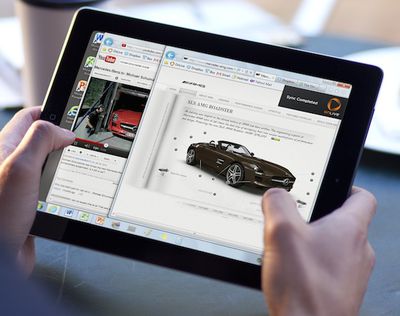
While that slight lag is a function of the time needed for data to transfer between OnLive's servers and the user's iPad, OnLive's PCs themselves are connected to the Internet with gigabit connections, making for very fast loading of content and data transfers, which is then optimized for the iPad's display and passed along to the user.
OnLive is planning yet another tier of service, a $9.99/month "Pro" level that will offer additional PC applications for use from the iPad and an upgrade from to 50 GB of storage, up from 2 GB on the regular and Plus levels.
Popular Stories
Last year, Apple launched CarPlay Ultra, the long-awaited next-generation version of its CarPlay software system for vehicles. Nearly a year later, CarPlay Ultra is still limited to Aston Martin's latest luxury vehicles, but that should change fairly soon.
In May 2025, Apple said many other vehicle brands planned to offer CarPlay Ultra, including Hyundai, Kia, and Genesis.
CarPlay Ultra...
As we wait for WWDC to kick off next Monday, Apple today announced the winners of its annual Apple Design Awards, recognizing apps and games for their innovation, ingenuity, and technical achievement.
The 2025 Apple Design Award winners are listed below, with one app and one game selected per category:
Delight and Fun - CapWords (App) and Balatro (Game)
Innovation - Play (App) and PBJ -...
Apple's iPhone development roadmap runs several years into the future and the company is continually working with suppliers on several successive iPhone models at the same time, which is why we often get rumored features months ahead of launch. The iPhone 18 series is no different, and we already have a good idea of what to expect for the iPhone 18 Pro and iPhone 18 Pro Max.
One thing worth...
Popular Stories
Apple has updated a wide range of products and accessories this month, but there is still no entry-level iPad 12 with Apple Intelligence support.
Fortunately, Bloomberg's Mark Gurman today said an iPad with an A18 chip for Apple Intelligence is "ready to go" and "still coming this year."
An earlier report from Macworld claimed that the iPad 12 will actually have an A19 chip.
No other...
Apple added the 14-inch MacBook Pro with M5 chip and the iPad 11 to its online store for refurbished products today, allowing customers to purchase like-new models at a discount. The refurbished devices are available in the U.S., Canada, UK, and many other European countries.
Pricing on the 14-inch MacBook Pro with M5 chip starts at $1,359 in the U.S. for the model with a 10-core CPU,...
Last year, Apple launched CarPlay Ultra, the long-awaited next-generation version of its CarPlay software system for vehicles. Nearly a year later, CarPlay Ultra is still limited to Aston Martin's latest luxury vehicles, but that should change fairly soon.
In May 2025, Apple said many other vehicle brands planned to offer CarPlay Ultra, including Hyundai, Kia, and Genesis.
CarPlay Ultra...