OS X Lion's HiDPI Modes Lay Groundwork for Retina Monitors - MacRumors
Skip to Content

OS X Lion's HiDPI Modes Lay Groundwork for Retina Monitors

With the release of Lion, users can now see some of the groundwork that Apple has laid down in OS X for ultra high resolution displays. We covered Apple's support of these new "HiDPI" modes while OS X Lion was still in beta.

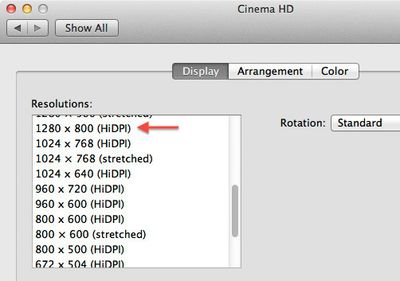
For those who have downloaded Apple's Xcode for Lion, you can enable "HiDPI" mode in the Quartz Debug application found in the Developer directory. Once enabled, OS X's Displays control panel offers additional 1/4 (and lower) resolution sizes as shown here on a 30" Cinema Display with a native resolution of 2560x1600:
hidpex
Unfortunately, there's not much to see yet. The 1280x800 HiDPI resolution shown here represents exactly 1/4 of the area of the native resolution of the 30" Cinema Display and simply offers you a zoomed in view on present day monitors.

The reasoning is that when displays do reach ultra high resolutions and dots per inch (DPI), simply drawing the OS X interface as-is would result in very small interface elements. Apple's solution is to scale all on-screen elements automatically by a factor of two (in each direction).

So, in the future, we might be using 2560x1600 (HiDPI) mode on a theoretical 30" 5120x3200 pixel display. All user interface elements would stay the same size as today's 30" Cinema Display, but when available, higher resolution textures would be used to render the graphics. This is the same way that it worked when Apple transitioned from the original iPhone resolution to the iPhone 4's retina display.

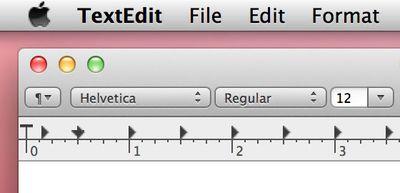
Arstechnica offers a good example screenshot showing this in effect. Fonts already render in the higher resolution while bitmapped graphics demonstrate a blocky effect as they have not yet been replaced with high resolution ("Retina") graphics.
textedit hidpi
The groundwork is there now, so when technology catches up, we could see double-DPI Retina displays in our future.


Popular Stories

macworld iphone 18 pro colors

iPhone 18 Pro's Four Rumored Colors Revealed, Including 'Dark Cherry'

Friday April 17, 2026 3:50 am PDT by
A source said to be familiar with Apple's supply chain today revealed the color options Apple is planning for the iPhone 18 Pro, iPhone 18 Pro Max, and the upcoming foldable iPhone. Image via Macworld. The information comes from Macworld, which says the signature new color for this year's Pro models will be Dark Cherry, a deep wine-like red. While other sources had previously reported on a...
ipad mini 7 feature red and blue

OLED iPad Mini: Release Date, Pricing, and What to Expect

Wednesday April 15, 2026 8:15 am PDT by
According to the latest rumors, Apple is close to launching its next-generation iPad mini. So what should we expect from the successor to the iPad mini 7 that Apple released over a year ago? Read on to find out. Processor and Performance Apple is working on a next-generation version of the iPad mini (codename J510/J511) that features the A19 Pro chip, according to information found in code...
Apple Event Logo

Apple to Unveil All-New Product Category Later This Year

Thursday April 16, 2026 7:21 am PDT by
Apple is aiming to enter a new product category by unveiling its first pair of smart glasses in late 2026 or early 2027, according to Bloomberg's Mark Gurman. In any case, he expects the glasses to be released at some point next year. Like the Meta Ray-Bans, Gurman said Apple's glasses will have built-in cameras that let users capture photos and videos. He also expects the glasses to have...

Top Rated Comments

arn Avatar
192 months ago
Why not go vector based? Then it will scale to whatever you like.

because it's hard to make all graphics into vectors?

arn
Score: 11 Votes (Like | Disagree)
gnasher729 Avatar
192 months ago
Why not go vector based? Then it will scale to whatever you like.

You're not a software developer, are you?
Scaling is not the problem. Scaling and not looking like ****, that is the problem.
Score: 7 Votes (Like | Disagree)
192 months ago
I can’t wait to say, “Oh, I don’t want to watch that 1080p video on my Mac, it’ll look like crap!”
Score: 6 Votes (Like | Disagree)
jessea Avatar
192 months ago
So, maybe you'd care to enlighten us ? Maybe I'm just nostalgic for the 80s and 90s, back when vector graphics were a possibility. Now that we have much more powerful CPUs and GPUs, it seems that vector graphics have become way too hard to handle... :rolleyes:


Only stuff that's required to scale. IE : the UI.

And games have been using vector graphics since the 80s and 90s, at least, games made with a little known technology called Flash. Or the above Sierra game, Conquest of Camelot ;) In fact, isn't that screenshot from a game that uses vector graphics ? (Plants vs Zombies ?).

Obviously, not all UI elements are needed to scale. The desktop wallpaper can remain a bitmap image, but things like icons, buttons, fonts and all UI controls would need to be scaled.

Think man, think.

Sure, I'll help enlighten. ;) Here are just a few points (some of which Arn has already pointed out):


* Photorealistic graphics. As stated multiple times, you can't use vector for this.
* Pixel-perfect designs. When you see a gorgeous iPhone or iPad app, it's because of this. You can't just resize a vector icon and expect it to look great at any size. It simply doesn't work like that.
* Processing power. Load a complicated piece of vector artwork in Illustrator. It takes time to process all the math in a vector illustration.
* File size. Making the assumption that vector is always smaller is wildly incorrect. Sometimes it is, sometimes it isn't.
* Textures. Wood, cloth, stone, grunge. Those detailed, fantastic textures aren't vector -- they're raster. Can you use vector for them? Yes, the simple ones. But to get the same depth of detail (and you never will, because textures are often photorealistic), you get back to hurting processing power.
* Effects rendering. Rasterizing an effect is much simpler than combining it with vector art. It's simple for the designer, prevents a developer from having to code the effect (which is no small task), and saves processing power.
* Development time. Coding for vector in everything can increase development time due to the shortcomings of vector-based art. Often it's just faster to use rasterized artwork. Keep in mind this doesn't mean a designer doesn't use vector in his workflow, it just means that he saves it to raster at the end.


These are just a few things off the top of my head. I'm sure there are many more, but I don't have time to write a short story. ;)
Score: 5 Votes (Like | Disagree)
TumbleDryer Avatar
192 months ago
Maybe, but I know for a fact vector file sizes are much larger

No they are much smaller. They contain less information.
Score: 5 Votes (Like | Disagree)
TumbleDryer Avatar
192 months ago
That's funny, I could have sworn you originally said:

Man up and admit you were wrong for goodness sakes.


I was replying to a generalisation of the fact. Someone stated they are bigger. I said they are not, in response to their generalisation. I could of gone all boring and started stating static vector filesizes and variable bitmap sizes for scaled images of each format but I didn't.

What is your problem anyway? I asked a question 'why cant vectors be used?'. Someone, maybe you, responded and I then asked a further question regarding the response? Are we not allowed to ask questions on forums these days without people looking for a fight? Why do I have to 'man up' when I have already stated I dont fully understand the concept?

I'm asking questions because I don't understand something. I don't pretend to understand things either unlike some people around here.
Score: 4 Votes (Like | Disagree)