

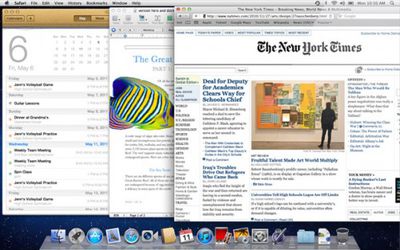
One of the big new features in the upcoming OS X Lion is auto-resume for all applications. The feature comes from iOS where the distinction between open and closed apps is blurred, as every app will resume right where you left off.
whatsnew resume screen
From Apple's OS X description of the Resume feature:

Now apps you close will reopen right where you left off, so you never have to start from scratch again. And when you install software updates, you no longer need to save your work, close your apps, and spend valuable time setting everything up again. With Resume, you can restart your Mac and return to what you were doing — with all your apps in the exact places you left them.

Jeremy Laurenson, however, writes about a potentially embarrassing situation he ran into while running OS X Lion. Laurenson reports that he and his wife had been watching his wife's delivery in Quicktime Player and later quit the application. In OS X Lion, this saved the state of the video and windows, leaving him a surprise when he later launched a movie for a colleague:

Imagine my surprise (and luckily nothing crazy was on screen) when I double-clicked to open a different video file to show a colleague and the ole “delivery video” popped right up as well.

Laurenson sees this causing "all kinds of issues" as people adjust to the new system.

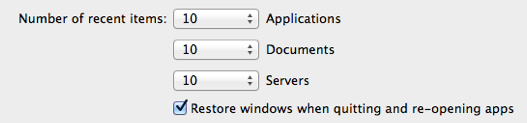
Update: Alternatively, you can now turn Resume off in Lion as a global setting, but not per app. This setting was added recently:

resume

Top Rated Comments

arn Avatar
191 months ago
obviously, swap "birth video" with "porn", and you see the possible large scale implications. :)

arn
Score: 44 Votes (Like | Disagree)
haruhiko Avatar
191 months ago
Luckily he didn't videotape the process of creating the baby. :D
Score: 29 Votes (Like | Disagree)
191 months ago
There goes all my porn watching activities.
Score: 22 Votes (Like | Disagree)
191 months ago
Maybe there should be a dialog box asking if you want to resume or restart an app, if that wouldn't be too much of a nuisance.
Yah, way too much of a nuisance! I hate dialogs that pop up like "Are you sure you want to quit?" YES, THAT'S WHY I ISSUED THE COMMAND! :p
Score: 19 Votes (Like | Disagree)
191 months ago
I think it's more of a cautionary tale of why you don't video your wife's freaking delivery. #notentertaining
Score: 19 Votes (Like | Disagree)
richard.mac Avatar
191 months ago
obviously, swap "birth video" with "porn", and you see the possible large scale implications. :)

arn
Luckily he didn't videotape the process of creating the baby. :D
rofl :D

you can turn off resume for all apps in the General preferences (unfortunately not a per app basis) or quit and discard windows (command+option+Q).. but i am just so used to quitting with command+Q.

i also found out a little trick in Lion; an applications saved state is stored in Saved Application State in the user library and locking a folder for one of the applications will keep its state from changing. so, lock it as a clean slate and the app will always launch as a clean slate.
Score: 15 Votes (Like | Disagree)

Popular Stories

maxresdefault

Apple Shows Off a Key Reason to Upgrade to the iPhone 17

Saturday February 7, 2026 9:26 am PST by
Apple today shared an ad that shows how the upgraded Center Stage front camera on the latest iPhones improves the process of taking a group selfie. "Watch how the new front facing camera on iPhone 17 Pro takes group selfies that automatically expand and rotate as more people come into frame," says Apple. While the ad is focused on the iPhone 17 Pro and iPhone 17 Pro Max, the regular iPhone...
m5 macbook pro deal

Why You Shouldn't Buy the Next MacBook Pro

Tuesday February 10, 2026 4:27 pm PST by
Apple is planning to launch new MacBook Pro models as soon as early March, but if you can, this is one generation you should skip because there's something much better in the works. We're waiting on 14-inch and 16-inch MacBook Pro models with M5 Pro and M5 Max chips, with few changes other than the processor upgrade. There won't be any tweaks to the design or the display, but later this...
iOS 26

Apple Releases iOS 26.3 and iPadOS 26.3

Wednesday February 11, 2026 10:07 am PST by
Apple today released iOS 26.3 and iPadOS 26.3, the latest updates to the iOS 26 and iPadOS 26 operating systems that came out in September. The new software comes almost two months after Apple released iOS 26.2 and iPadOS 26.2. The new software can be downloaded on eligible iPhones and iPads over-the-air by going to Settings > General > Software Update. According to Apple's release notes, ...
apple wallet drivers license feature iPhone 15 pro

Apple Says These 7 U.S. States Plan to Offer iPhone Driver's Licenses

Monday February 9, 2026 6:24 am PST by
In select U.S. states, residents can add their driver's license or state ID to the Apple Wallet app on the iPhone and Apple Watch, and then use it to display proof of identity or age at select airports and businesses, and in select apps. The feature is currently available in 13 U.S. states and Puerto Rico, and it is expected to launch in at least seven more in the future. To set up the...
Apple Logo Zoomed

Apple Expected to Launch These 10+ Products Over the Coming Months

Tuesday February 10, 2026 6:33 am PST by
It has been a slow start to 2026 for Apple product launches, with only a new AirTag and a special Apple Watch band released so far. We are still waiting for MacBook Pro models with M5 Pro and M5 Max chips, the iPhone 17e, a lower-cost MacBook with an iPhone chip, long-rumored updates to the Apple TV and HomePod mini, and much more. Apple is expected to release/update the following products...















