Apple Releases iTunes 10.3.1, Potentially Fixing iOS Device Syncing Bug [Updated] - MacRumors
Skip to Content

Apple Releases iTunes 10.3.1, Potentially Fixing iOS Device Syncing Bug [Updated]
itunes 10 3 1
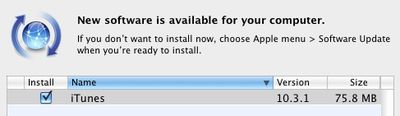
Just a day after releasing iTunes 10.3 to support some early iCloud features such as automatic downloads and access to previously purchased content, Apple has already pushed out iTunes 10.3.1 via Software Update and the company's software downloads page.

The documentation accompanying the release merely offers the same information as found with the original iTunes 10.3 release, providing no word on exactly what is addressed in what is presumably a minor bug fix update.

A number of users in Apple's support forums and elsewhere have reported issues with syncing iOS devices under iTunes 10.3, with iTunes reporting an "unknown error (-50)" when attempting to sync. Consequently, it seems reasonable to speculate that the iTunes 10.3.1 update addresses this issue, although we have yet to receive confirmation from users.

Update: In a new support document, Apple confirms that iTunes 10.3.1 addresses the "unknown error (-50)" syncing issue experienced by some users under iTunes 10.3.

Related Forum: Mac Apps

Popular Stories

Apple iCloud Plus expansion hero

iCloud+ Now Includes Apple TV, Apple Arcade, and Curated Apple Music Stations in Over 100 Countries

Tuesday September 15, 2026 1:43 am PDT by
Apple today announced a new subscription initiative that turns paid iCloud+ subscriptions into a broader services bundle in more than 100 countries. In select countries, Apple says every paid iCloud+ plan, including the cheapest 50GB tier, now includes Apple TV and Apple Arcade "at no additional cost," while family sharing extends the storage, TV and Arcade access to up to five people....

Everything New Your iPhone Can Do on iOS 27 Feature 1

50 New Things Your iPhone Can Do in iOS 27 - Out Now!

Monday September 14, 2026 10:48 pm PDT by
Apple released iOS 27 this week, and despite the company's focus this year on refining its flagship operating system and nixing bugs, there are still many additional features to explore, not least of which is Apple's new context-aware Siri, re-tooled for the generative AI era. Which iPhones Support Every iOS 27 Feature? This year's major iPhone software update isn't all about AI, though,...

iOS 27 Icon iPhone

iOS 27 Available Now With These 8 New Features

Monday September 14, 2026 9:00 am PDT by
Update — 10 a.m. Pacific Time: Apple has released iOS 27. During its iPhone 18 Pro and iPhone Duo event last week, Apple announced that iOS 27 will be released widely on Monday, September 14. iOS 27 should be available around 10 a.m. Pacific Time / 1 p.m. Eastern Time today via the Settings app, under General → Software Update. Below, we have highlighted eight new features and...

Top Rated Comments

Hallivand Avatar
199 months ago
Looks like it's a very fat universal binary. it not only has Intel/PPC, but also Intel part is 32/64 bit. 32 bit for Leopard and Snow Leopard and 64 bit for Lion. That's at least what i think is going on here.

Is it just me, or does anyone else find it incredible that Apple is still supporting the last vestiges of PowerPC Macs running Leopard.

Now just hoping that Apple is still releasing 10.5 or whatever version have you as a Universal Binary that would support WiFi syncing with my original iPad :D.

Heres to another few years with the Power Mac G5 :p
Score: 3 Votes (Like | Disagree)
199 months ago
No update here, yet.
Score: 2 Votes (Like | Disagree)
199 months ago
I wish Apple would properly streamline iTunes on PC so that it was smaller and ran faster. It would certainly shut a lot of of the moaners up.
Score: 2 Votes (Like | Disagree)
199 months ago
I wish Apple would give more information.
Score: 2 Votes (Like | Disagree)
Amazing Iceman Avatar
199 months ago
no no, it's iTunes and only with some calendars some duplicated and some tripled:

Image (http://homepage.mac.com/xsimon/diversos/calendars.png)

if I uncheck one both appear unchecked after syncing and vice versa

I see the problem... If your iOS device already logs into MobileMe, there's no need to sync anything related to MobileMe via iTunes. your iOS device will synchronized directly with MobileMe over the internet.

Otherwise, you'll get duplicated entries from:
- MobileMe Calendars (directly accessed)
- MobileMe Calendars (synchronized via iTunes)

You should disable calendar sync via iTunes, and most likely do the same for Contacts and email
Score: 1 Votes (Like | Disagree)
199 months ago
At last! A use for that philosophy degree!

I prefer to watch a new version come out, let other people find any potential problems, then upgrade after everything seems stable across a wide swath of users.

Kant's categorical imperative teaches us that what you're doing is bad.
Score: 1 Votes (Like | Disagree)