

Got a tip for us? Share it...

Adobe Considers Possibilities for iPhone and iPad Integration With Photoshop

For several months, Adobe has been thinking about how it can involve the iPad and other tablet devices in the workflows of Photoshop users, asking users for feedback on what sorts of capabilities they might like to see.
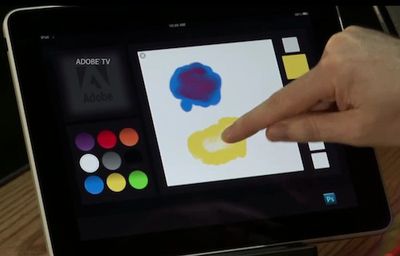

Demo of color-mixing palette tool on iPad

Building on that feedback, the company has now taken its first steps in that direction, as evidenced by a pair of brief demos at last week's Adobe MAX conference in which Adobe Chief Technology Officer Kevin Lynch showed off the company's content-aware fill tool running on a Samsung Galaxy Tab and a color-mixing paint palette application running on an iPad.
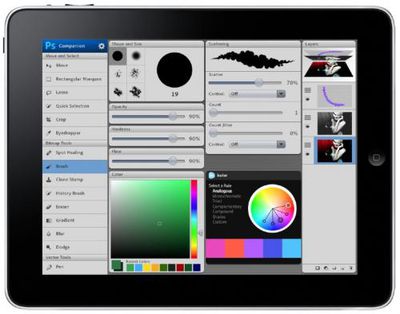

Mockup of Photoshop tools on iPad

Adobe's John Nack has also noted that the company's designers have begun mocking up other tools that could allow the iPhone and iPad to serve as extensions of Photoshop running on a desktop or notebook computer.

In a nutshell, you get:

- groups of task-based tools & commands (e.g. all your photography/retouching tools & buttons on one page, or all your painting ones, 3D ones, etc.)
- interactive, task-based tutorials that drive Photoshop, helping you get things done

Among the ideas presented in a PDF summary of the team's efforts are custom toolsets accessible by tapping on a companion iPhone application, tutorials with tool accelerators to help quickly walk users through certain tasks, and companion iPad applications housing many of the commonly-used tools for easy access while also allowing for limited image editing (such as liquifying, painting, and drawing) using the multi-touch interface.
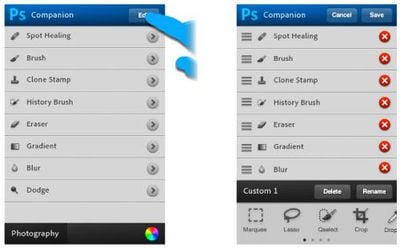

Mockup of Photoshop toolset on iPhone

All of these latter concepts appear to simply be mockups at this point, but Adobe is clearly thinking about how best to take advantage of multi-touch functionality to enhance the Photoshop's functionality without attempting to replicate a full Photoshop experience directly on the touch device without the precision and power available on a traditional desktop or notebook.


Top Rated Comments

(View all)

17 months ago
I think that would be fantastic just to have as an illustration tool. I'd love to do photo retouch on an ipad. May need a stylus pen though. This is a great addition and I hope they do well with it.
Rating: 0 Positives / 0 Negatives
17 months ago
Adobe will have written entirely new code. No legacy crap or UI carry overs from windows.
Rating: 0 Positives / 0 Negatives
17 months ago
I don't think they intend to port all of photoshop to the iPad.

I think what they are doing here is moving a lot of the UI onto the iPad.

Instead of your screen being filled with a half dozen tool palettes, you can move a bunch of those onto your iPad freeing up your main screen for your illustration work.
Rating: 0 Positives / 0 Negatives
17 months ago
Looks good. I can't wait. The current PS Express on the iPhone isn't really that useful.
Rating: 0 Positives / 0 Negatives
17 months ago
I wonder how much they'll charge.
Rating: 0 Positives / 0 Negatives
17 months ago
You'd think that they could use pen tablets which they have years of experience supporting as a baseline for how users might want to interact with the entire CS suite. In fact, I'd think Illustrator is a prime candidate for a iPad version, too.
Rating: 0 Positives / 0 Negatives
17 months ago
It certainly looks intriguing but it would not be the tool of choice for photographers or designers for quite a while. Still, I like the direction they're thinking and there clearly is some potential here.
Rating: 0 Positives / 0 Negatives
17 months ago
Funny to see how Apple makes Adobe jump. Nice to see Shantanu Narayen accepting the Apple reality rather than fighting it.
Rating: 0 Positives / 0 Negatives
17 months ago
If you read closely, they're talking about "extending" Photoshop running on your desktop by letting you use your iPhone/iPad as a kind of touch pad remote control.

This is not about running Photoshop or Illustrator on iPad or iPhone.

So, for instance, you could mix paint colors on your iPad -- but drawing would still be done on your desktop.

You could flick your "Layers" menu onto your iPhone -- to free up screen space on your desktop. The Menu would be on your iPhone, but the drawing itself would stay on your desktop (or Laptop) running Mac OS X Photoshop.
Rating: 0 Positives / 0 Negatives
17 months ago
Fantastic.

However it shows up the current iPad screens shortcomings.

Too small, Too low res and chunky finger painting.

I wait for the day you can use a OPTIONAL stylus and run a proper paint program for retouching and painting on a Tablet device.
Rating: 0 Positives / 0 Negatives

[ Read All Comments ]













