Got a tip for us? Share it...

256GB SSD Upgrades for New MacBook Air Announced


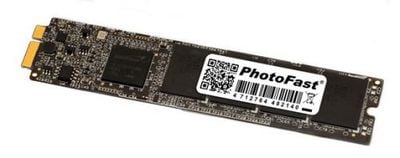
Taiwanese company Photofast has announced the first 3rd party SSD storage upgrade kit for the new MacBook Air. (via Engadget) The new MacBook Air is the first Apple laptop to use a special SSD card rather than a traditional hard drive enclosure. While the new SSD storage card allows Apple to further reduce the size of the MacBook Air's enclosure, upgrade parts are less readily available. Photofast is the first of likely many vendors who will fill this void.
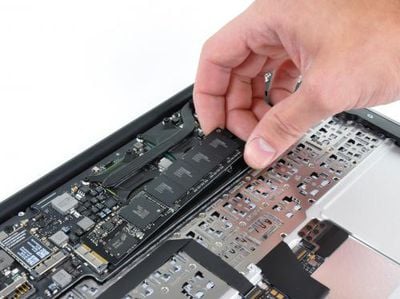

SSD card in MacBook Air from iFixIt

Photofast plans on offering 64GB / 128GB / 256GB SSD aftermarket upgrades based on the SandForce controller. This gives 11.6" MacBook Air owners the option of upgrading to a maximum of 256GB -- a configuration not available from Apple. The upgrade promises speeds of 250MB/s for sequential reads and writes, a notable increase from Apple's offerings which bench around 150-160MB/s for the same metric. Overall performance improvements are said to be in the 30% range. In a particularly elegant twist, Photofast will allow you to convert your MacBook Air's existing SSD card into a USB storage device. This storage device then allows you to transfer your existing data over to your Mac.

Unfortunately, no pricing or availability has been announced, but we expect we'll see similar products from other companies in the near future.

Top Rated Comments

(View all)

21 months ago


............I have to wonder why Apple missed on the inclusion of cell networking, it would be perfect for AIR.


Because that would be Apple giving something that their customers would see as useful. Weve all come to learn that Steve knows what is best for us

Steve: "You do not need 3G here"

Apple sheeple: "Yes oh masterful one, we do not need mobile networking"

Steve: "Good move along nothing to see here"

LOL!
Rating: 1 Positives / 0 Negatives
21 months ago
I guess the USB drive is not applicable here, all we are interested in is what's inside, stick that in you MBA and off you go
Rating: 0 Positives / 0 Negatives
21 months ago
I wonder how much that little jewel cost? I'm going to venture a guess and say 399.99. Given the dollar current weakness against other currencies, such as the NT (its about 30NT to 1 US dollar) this will not be cheap.
Rating: 0 Positives / 0 Negatives
21 months ago
yes it does say USB3....
Rating: 0 Positives / 0 Negatives
21 months ago
this must be usb3 device, usb2 doesn't support transfer speeds declared in the article, so not for this version of macbook air
Rating: 0 Positives / 0 Negatives
21 months ago

I guess the USB drive is not applicable here, all we are interested in is what's inside, stick that in you MBA and off you go


the USB drive is so you can copy your existing data onto the new SSD drive you just installed. Plus you have a (64GB / 128GB) SSD USB drive if you want (backups, perhaps)

this must be usb3 device, usb2 doesn't support transfer speeds declared in the article, so not for this version of macbook air


apparently the picture of the USB drive is confusing people (I removed it). The 250MB/s transfer speeds are for the SSD card you are putting internally in your MacBook Air. The USB thing is just to get data off your old SSD card.

arn
Rating: 0 Positives / 0 Negatives
21 months ago
Nice!

Is the SSD connector on the new MacBook Air SATA 3 Gbit/s, SATA 6 Gbit/s, or something else entirely? What is the maximum data transfer rate for whatever that hard drive connector is?
Rating: 0 Positives / 0 Negatives
21 months ago
Im not sure some of you understand all this. Basically the idea is this company swap the default Apple SSD storage with a much bigger one. They then give you the Apple one with a USB enclosure so you can transfer data back across to the air. The USB doent always have to be in. Youll have the bigger SSD storage already in the MacBook so you just use the USB as an external drive.
Rating: 0 Positives / 0 Negatives
21 months ago

MacBook Air = Sleek, Elegant, Minimalist, etc.

Then you go and stick a diving board on the side of it!!!


My thought exactly. I don't think it will be popular solution. MBA is for those who can benefit from fast wireless network. Other people without it should rather focus on MBP instead.
By the way; thats remind me USB 1 which I have found at my work:D
Rating: 0 Positives / 0 Negatives
21 months ago

the USB drive is so you can copy your existing data onto the new SSD drive you just installed. Plus you have a (64GB / 128GB) SSD USB drive if you want (backups, perhaps)


apparently the picture of the USB drive is confusing people. The 250MB/s transfer speeds are for the SSD card you are putting internally in your MacBook Air. The USB thing is just to get data off your old SSD card.

arn


aaah now it make sense - where did we get through out the years, i still remember the time when i was proud owner of 250MB hdd :)
Rating: 0 Positives / 0 Negatives

[ Read All Comments ]