

It came as a surprise to everyone tonight when Apple announced that they would be live streaming video of their September media event across the web. The news, however, was somewhat dulled by the fact that Apple announced that the stream will only be viewable on an OS X 10.6 Mac or an iOS device (iPhone, iPod Touch, iPad). The reason for the limitation isn't entirely arbitrary, as Apple is using a new streaming technology called HTTP Live Streaming which was introduced alongside Snow Leopard's QuickTime X and iOS 3.0.
While the protocol has been proposed as a standard, so far Apple is one of a few companies who has implemented it. As a result, the video will only be easily viewable on the specified platforms. There seem to be some advantages to the system over existing streaming technologies. Notably, there should be no router/firewall issues as the stream is sent over standard HTTP protocols.
If you're not sure you will be able to view stream, you can try loading this HTTP Live sample stream that Apple has provided.
For non-supported readers who are desperate to watch the stream close to live, it seems likely that you will be able to watch it -- at least in stops and starts. The HTTP Live Stream protocol is based on very standard technologies. The stream is simply provided in an MPEG2 playlist (m3u file) that is added to as the stream continues. These standard playlists will load in VLC for both Mac and Windows. VLC, for example, will play the above sample stream using this url (Note: the url will be different for the actual stream):
http://devimages.apple.com/iphone/samples/bipbop/gear1/prog_index.m3u8
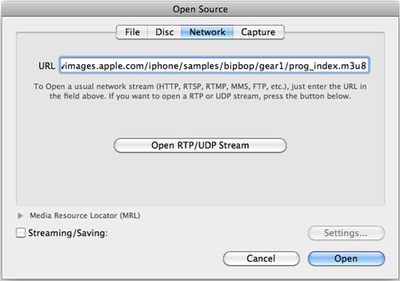
VLC will load all parts of the stream into its own playlist. It works fine for this pre-recorded stream as the entire playlist is already constructed. The catch for tomorrow's live transmission is that VLC doesn't know that more will be coming, so it looks like you'll have to repeatedly reload the playlist manually to get the next few segments. It's not an elegant solution, but with some persistence, it seems like it will work.
Of course, if you're not so desperate, you can watch our text coverage here, on Twitter, or wait for the official stream to be posted later in the day.
Update: VLC does not work with the live stream. This UStream account is rebroadcasting the video, however.
















