Latest iPhone OS 4 Beta Gains Orientation Lock and iPod Controls in Multitasking Interface
9 to 5 Mac reports that the latest iPhone OS 4 beta,
released earlier today, includes several new features as part of its
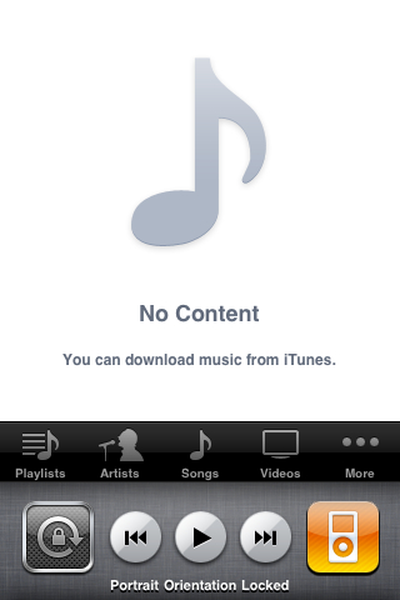
multitasking capabilities, including quick access to iPod controls, as well as an option for locking the screen orientation in either portrait or landscape mode.
The new features are accessed via a left-swipe from the multitasking "dock" manager in much the same way that the Spotlight search screen is accessed from the first home screen in iPhone OS 3. The iPod options include the traditional iPod icon to allow quick access to the iPod player functionality, as well as play/pause and track navigation buttons.
The screen orientation lock is a much-requested feature that is particularly handy for users attempting to use their devices while lying down or reclining. The feature receives prominent attention on the iPad, with the device's originally-planned "mute" switch being replaced before launch by a dedicated hardware button to enable screen rotation lock.
Update: Users are reporting that the screen orientation lock feature can currently only lock the screen in a portrait orientation.
Popular Stories
Apple today announced a new subscription initiative that turns paid iCloud+ subscriptions into a broader services bundle in more than 100 countries.
In select countries, Apple says every paid iCloud+ plan, including the cheapest 50GB tier, now includes Apple TV and Apple Arcade "at no additional cost," while family sharing extends the storage, TV and Arcade access to up to five people....
Apple released iOS 27 this week, and despite the company's focus this year on refining its flagship operating system and nixing bugs, there are still many additional features to explore, not least of which is Apple's new context-aware Siri, re-tooled for the generative AI era.
Which iPhones Support Every iOS 27 Feature?
This year's major iPhone software update isn't all about AI, though,...
Update — 10 a.m. Pacific Time: Apple has released iOS 27.
During its iPhone 18 Pro and iPhone Duo event last week, Apple announced that iOS 27 will be released widely on Monday, September 14.
iOS 27 should be available around 10 a.m. Pacific Time / 1 p.m. Eastern Time today via the Settings app, under General → Software Update.
Below, we have highlighted eight new features and...