A Closer Look at Snow Leopard's Wake on Demand Feature [Updated]
MacUser provides an in-depth look at one useful new feature in Mac OS X 10.6 Snow Leopard: Wake On Demand.
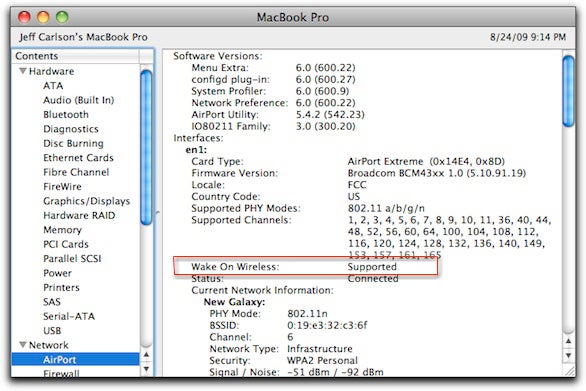
There is a specific combination of hardware that is required to accomplish these tasks, however. Apple says you need an AirPortExtreme Base Station (2007 or more recent) or Time Capsule (2008 or more recent) with the latest firmware. MacUser found that in order to wake your Mac by Wi-Fi alone, you would need a 2009 Mac. To see if your Mac supports this 'Wake on Wireless' option, you can look at your System Profiler.
Apple details how this could be used to offer full-time support for iTunes Sharing, Printer Sharing, Back to My Mac, and more. Mac OS X 10.6 Snow Leopard was officially launched today.
Update: Readers are finding the requirements are less strict than thought. There has been success with older Macs for the Wireless Wake feature and the use of an Airport Express.
Update 2: To clear up some confusion surrounding the Wake on Demand feature, readers should note that computers running earlier Mac OS X versions and connected via Ethernet can be awakened remotely using such third-party utilities as WakeOnLan, but Snow Leopard builds that functionality into the operating system and extends that ability to computers connected via Wi-Fi.
While the simple "Wake on Wireless" functionality appears to be available with any wireless router for compatible machines running Snow Leopard and can be triggered using utilities such as WakeOnLan, the Bonjour Sleep Proxy feature needed for the advanced functionalities of broadcasting information about the sleeping machine requires the use of an Apple AirPort or Time Capsule base station running firmware 7.4.2 or later.

[Wake On Demand] is Apple's name for a new networking feature that lets a Snow Leopard Mac go to sleep while a networked base station continues to broadcast Bonjour messages about the services the sleeping computer offers. The base station essentially acts as a proxy for the slumbering Mac. Advertised Bonjour services includes file sharing, screen sharing, iTunes library sharing, and printer sharing among others.
Prior to Snow Leopard, you would have to make your Mac never go to sleep if you wanted it to provide file or print sharing services at any time. This new feature will wake your Mac over Ethernet or even Wi-Fi networks.There is a specific combination of hardware that is required to accomplish these tasks, however. Apple says you need an AirPort
Apple details how this could be used to offer full-time support for iTunes Sharing, Printer Sharing, Back to My Mac, and more. Mac OS X 10.6 Snow Leopard was officially launched today.
Update: Readers are finding the requirements are less strict than thought. There has been success with older Macs for the Wireless Wake feature and the use of an Airport Express.
Update 2: To clear up some confusion surrounding the Wake on Demand feature, readers should note that computers running earlier Mac OS X versions and connected via Ethernet can be awakened remotely using such third-party utilities as WakeOnLan, but Snow Leopard builds that functionality into the operating system and extends that ability to computers connected via Wi-Fi.
While the simple "Wake on Wireless" functionality appears to be available with any wireless router for compatible machines running Snow Leopard and can be triggered using utilities such as WakeOnLan, the Bonjour Sleep Proxy feature needed for the advanced functionalities of broadcasting information about the sleeping machine requires the use of an Apple AirPort or Time Capsule base station running firmware 7.4.2 or later.
Top Rated Comments
(View all)32 months ago
Think this will work with simplify media at some point? That would be great!
32 months ago
The wake on wireless looks intriguing... I've been using WoL with my Macs for some time now, but it has always been a "two-step" process, involving sending a WoL packet from somewhere on the (wired) network to the machine's MAC address. dd-wrt routers have a WoL broadcaster so it's easy enough to set up Macs that sleep but are still remotely accessible.
IMHO, the points of this feature are:
1) Simplicity; Turning a two-step process into just one.
2) Equivalency of wireless/wired networking, assuming you have all the right gear.
IMHO, the points of this feature are:
1) Simplicity; Turning a two-step process into just one.
2) Equivalency of wireless/wired networking, assuming you have all the right gear.
32 months ago
Well I've got a mid-2008 24" iMac and the Wake on Demand works over ethernet AND Airport - this contradicts the MacUser findings...ymmv!
32 months ago
Cool feature, but seriously, all those pre-reqs? I doubt my 2007 MBP qualifies.
32 months ago
This would be the perfect solution when i stream to my 360. Was gonna hold off on Leopard for a few weeks but im gonna go buy it right now. I think i overlooked this feature cause this is the first ive read about it...
32 months ago
I've got a 2007 imac connected via wireless - and wake on demand seems to work pretty well with it.
32 months ago
I would say this is a cool feature. Especially for a leopard based car puter that can wirelessly sync files with a home computer on demand.
[ Read All Comments ]

Analytics firm Chitika today released a report showing that by its metrics iOS has now surpassed OS X in overall web traffic share in the United States. Chitika's methodology involves an analysis...
One of the most frequent reasons for an iPhone to go on a trip to the Apple Store's Genius Bar is because of water damage. Typically, a water damaged iPhone can be replaced for a flat $199...
TheVerge's Joshua Topolsky summarizes the iPad 3 casing findings reported earlier today, but also adds his own sources regarding some details of the iPad 3.
Image from RepairLabs
As...
Last July, Apple discontinued the white MacBook from its consumer lineup, pushing consumers toward the company's popular MacBook Air line or the 13-inch MacBook Pro. The company didn't kill...
Popular iPhone Twitter client Tweetbot has finally arrived on the iPad, with a user interface instantly familiar to any current Tweetbot user. Designed for the Twitter power-user, Tweetbot packs a...