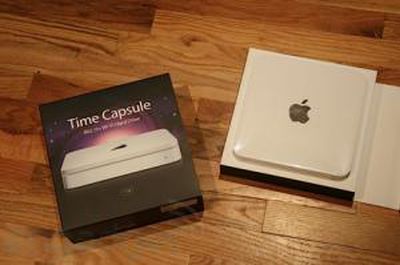
Time Capsule Arrives, Early Notes
Image from Engadget
The first Time Capsules have started arriving, and some Apple Stores already have the new wireless backup solution in stock.
First impressions from Gizmodo and Engadget provide the following observations:
- New AirPort Utility software with easy to use step-by-step
- USB Drives connected to Time Capsule are available for backup
- Initial backup takes a while.
- An Apple Tech note recommends not interrupting your first backup. and notes that you can use an Ethernet connection for your initial backup.
- Can't transfer an existing Time Machine backup to Time Capsule.
- "so far it works as billed, clean and easy."
Apple has posted (PDF) the Time Capsule setup guide which provides detailed instructions on the the product's usage.
Time Capsule is a wireless backup accessory for the Mac that allows you to backup your computer's data. It was announced by Apple at Macworld San Francisco 2008 and is available in 500GB ($299) and 1TB ($499) models.
Top Rated Comments
(View all)52 months ago
Hahaha how are you supposed to backup the MacBook Air then? It's got no ethernet. Good going, Steve.
52 months ago
Time capsule really appeals to me using an older macbook. I can't wait to see what people think after a week or so.
52 months ago
Hahaha how are you supposed to backup the MacBook Air then? It's got no ethernet. Good going, Steve.
Its just a suggestion, noob. You can still backup over wifi.
52 months ago
Well I cancelled my order on the 1TB because I got sick of waiting. Hopefully this fixes the Airdisk and I will buy one. Anyone see updates on the Airport software for AEBS or is this just Time Capsule airport software that is included?
Please post once anyone confirms that the Air Disk works aside from just back up for Time Machine. Does it mount drive right away, etc?
52 months ago
Hahaha how are you supposed to backup the MacBook Air then? It's got no ethernet. Good going, Steve.
haha - good point. Though it's only a recommendation... :rolleyes:
52 months ago
Pretty weak that you need Time Capsule to support Time Machine backups to USB drives...
52 months ago
- USB Drives connected to Time Capsule are available for backup
Article Link
I will be interested to see what those who breakdown the parts if there is a new controller for the external drive. If not it should just be a firmware update to the old AEBS to get USB drives to work. That being said, I wouldn't put it past Apple to disable this simply to "keep the lines separate". (and make an extra buck off loyal customers)
52 months ago
The reason not to use WiFi for the ONE big transfer is that it's slower than Ethernet--especially if interrupted--but it does work.
If USB drives CAN be connected to TC (if not Airport Extreme--yet) and fully utilized for Time Machine, then it could make sense to buy the 500, wait until you NEED more, and then get 1 or 2 TB external down the road, at prices cheaper than today. (I realize that drive might not be "server grade" like the TC's is, but I haven't seen any details on what that entails.)
52 months ago
me still thinks this is waste of money....what is so difficult about plugging your External Drive onto your USB or Firewire? 500gb external USB drives cost around $120 and if 1TB ATA drive prices fall, you can just buy the drive and replace it in the external closure.
of course, that voids the warranty for external drive but i thought warranties for those external drives were useless since you can't get back what you lost during the damage anyway.
I guess if you have no airport extreme then $299 for 500GB is reasonable but noway in earth $499 for 1TB is reasonable.
of course, that voids the warranty for external drive but i thought warranties for those external drives were useless since you can't get back what you lost during the damage anyway.
I guess if you have no airport extreme then $299 for 500GB is reasonable but noway in earth $499 for 1TB is reasonable.
[ Read All Comments ]

Analytics firm Chitika today released a report showing that by its metrics iOS has now surpassed OS X in overall web traffic share in the United States. Chitika's methodology involves an analysis...
One of the most frequent reasons for an iPhone to go on a trip to the Apple Store's Genius Bar is because of water damage. Typically, a water damaged iPhone can be replaced for a flat $199...
TheVerge's Joshua Topolsky summarizes the iPad 3 casing findings reported earlier today, but also adds his own sources regarding some details of the iPad 3.
Image from RepairLabs
As...
Last July, Apple discontinued the white MacBook from its consumer lineup, pushing consumers toward the company's popular MacBook Air line or the 13-inch MacBook Pro. The company didn't kill...
Popular iPhone Twitter client Tweetbot has finally arrived on the iPad, with a user interface instantly familiar to any current Tweetbot user. Designed for the Twitter power-user, Tweetbot packs a...