

Zagg's newest Slim Book is its first product designed specifically for the iPad Pro. Following in the footsteps of its previous Slim Books for other iPads, the Slim Book for iPad Pro features a protective case that snaps around the iPad and fits into an accompanying full-sized keyboard.
The Slim Book is one of the few keyboard cases available for the iPad Pro, and it essentially turns the iPad Pro into a full-fledged laptop, plus it is versatile because it's able to serve as a standalone case or a case that offers full protection. That might sound appealing, but as I've discovered testing it for the last week, there are some downsides to Zagg's latest offering.
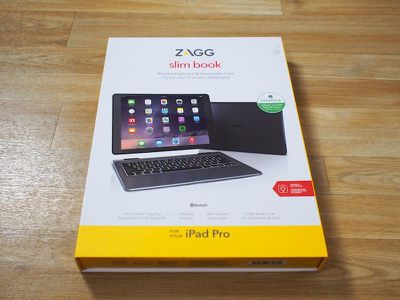
Design
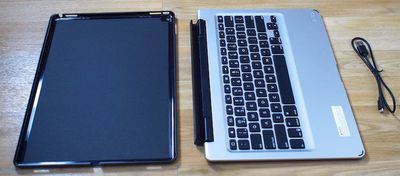
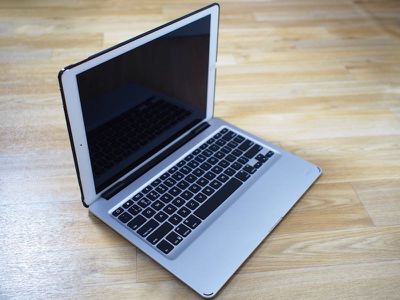
The Slim Book consists of two pieces: a black plastic shell that fits around the back of the iPad Pro and a matching silver aluminum keyboard with black MacBook-style keys and a matching black plastic exterior. The shell piece that fits around the iPad Pro is relatively slim, snapping into place to protect the back of the iPad. It doesn't feel cheaply made, but it also doesn't feel as premium as an Apple product given all the plastic.
All of the ports on the iPad Pro are left open with the shell on, leaving everything from the headphone jack to the Lightning port accessible. Because the shell fits so tightly to the iPad Pro, it's difficult to remove. This is not a shell that I would want to be taking off my iPad on a regular basis, because it takes a lot of force to get it off. It also makes the volume and the sleep/wake buttons on the iPad Pro more difficult to press because it causes them to be recessed.
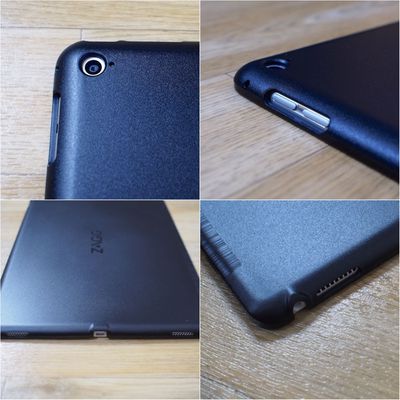
For a while after I put it on, I wasn't even sure my iPad Pro would ever come out, so expect a tight fit there. Given the amount of force it took to get that shell off, I'm concerned about future breakage, especially at weak spots near ports. If you get this case, you're going to want to leave the back shell on all the time, so that's something to keep in mind. On the plus side, it does offer some rear protection from scratches and dings.
The shell is thin enough that it doesn't add a lot of bulk on its own, but the whole setup gets a lot heavier when the keyboard is added. On the left side of the shell, the plastic is slightly thicker, which allows it to fit into grooves on the keyboard portion of the case. It's necessary for the holes in the shell up with the mounts in the keyboard groove, but this sounds more difficult than it is -- things just kind of snap in place when you go to set the iPad and shell on the keyboard, but it can take a minute to line up both pieces.
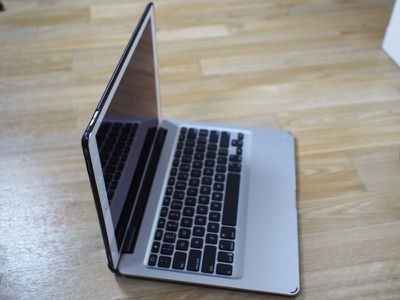
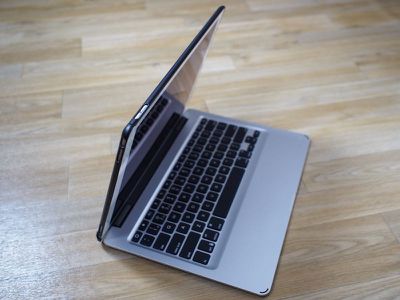
On the keyboard, the slot that the iPad Pro sits in is attached to a hinge, which rotates forwards and backwards so the iPad Pro can be set at a user's preferred viewing angle. The hinge action is smooth with little friction, and the hinge itself reliably stays in the correct position. The hinge can be positioned backwards to 135 degrees, but it closes completely in the front to serve as a protective clamshell case for the iPad Pro when not in use. When closed, the Slim Book is approximately three quarters of an inch thick at its thickest point (excepting the hinge area, which is about an inch thick) and with its black plastic exterior, it more closely resembles a bulky Windows laptop than a MacBook. Thickness wise, it's a bit thicker than a Retina MacBook Pro.
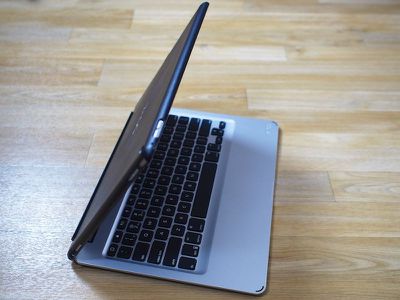
When I first received the package containing the Slim Book, my first thought was "Wow, this is heavy." I thought it might just be the packaging that was adding weight, but no, the Slim Book itself weighs quite a bit. The iPad Pro on its own weighs a hefty 713 grams, or 1.57 pounds. Attached to the Zagg Slim Book, my iPad Pro weighed 1814 grams, equivalent to nearly four pounds. For comparisons sake, that's heavier than the 13-inch Retina MacBook Pro and nearly as heavy as the 15-inch Retina MacBook Pro, which weighs 4.49 pounds. In fact, it feels heavier than a 15-inch Retina MacBook Pro simply because the weight is distributed over a smaller surface area.
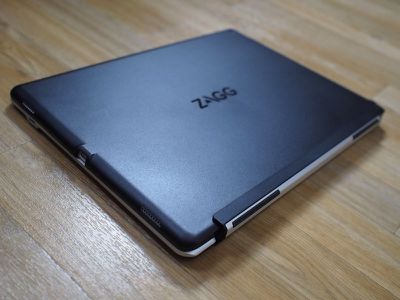
The iPad Pro can also be positioned backwards in the keyboard, allowing it to serve as a stand for reading or watching videos. When backwards, the keyboard can be folded flat under the iPad Pro, though I'm not sure why you would want to use it this way because it's just added bulk.
Keyboard
Zagg's Slim Book isn't a lightweight solution, but that weight does allow it to sport a full-sized keyboard. The keys on the Zagg Pro mimic the keys of a Retina MacBook Pro, offering excellent key feel and travel. Of the iPad Pro keyboards I've tested so far, including the Logitech CREATE Keyboard Case, the Zagg Messenger Universal, and Apple's own Smart Keyboard, the Zagg Slim Book has the best keys. The typing experience was almost identical to the typing experience on my Retina MacBook Pro (with slightly more travel), and the keys were neither too clicky nor overly noisy. If you like the way a Retina MacBook Pro or MacBook Air keyboard feels underneath your fingers, you will like the keyboard of the Zagg Slim Book.
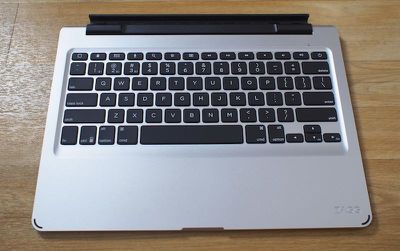
Like most keyboards at this price point, the Zagg Slim Book offers backlighting. It goes a step beyond some other keyboards, though, allowing users to cycle through a range of different LED colors like aqua, green, yellow, red, purple, white, and deep blue. There are also three levels of brightness to choose from, along with an option to turn the backlighting off. Customizable backlighting was one of the features that I enjoyed most during the time that I tested the Zagg Slim Book.
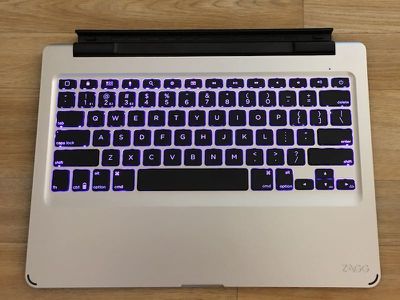
At the top of the keyboard, there are function keys that correspond to specific iPad shortcuts. Using these keys, it's possible to lock the iPad, access the home screen, open the app switcher, access search, bring up a Siri search, bring up the on-screen keyboard, adjust volume, and control media playback. Missing are keys for controlling screen brightness, so that will need to be done manually on the iPad.
The keyboard is detachable from the iPad Pro, so it can potentially be used with other devices. The Slim Book can switch between three different connected Bluetooth devices using the function key along with the first three number keys. Switching between devices is smooth and quick.
Keyboards like the Logitech CREATE and the Smart Keyboard connect to the iPad Pro using its Smart Connector, but the Zagg Slim Book connects via Bluetooth like any other Bluetooth device. That means it requires charging (via an included micro-USB cable), but according to Zagg, it only needs to be charged once every two years with regular usage. I had no issues with Bluetooth with the Slim Book. It connected quickly and stayed connected.
Bottom Line
The Zagg Slim Book has appealing features like multi-color backlighting, good key feel, and a smooth hinge with adjustable viewing angles, but it's more than doubling the weight of the iPad Pro. That's a deal breaker for me because it cuts down on the portability of Apple's larger tablet. If I'm going to carry four pounds around, I might as well be carrying my Retina MacBook Pro.
For customers who purchased an iPad Pro for its portability or to use in place of a MacBook while traveling, this case probably isn't the best option, but for customers who are using the iPad Pro as a complete laptop replacement, it may be more viable. The Slim Book is heavy, but it turns the iPad Pro's tablet form into a MacBook-style design. Figuring out whether the Zagg Slim Book is for you basically comes down to deciding if you want to sacrifice portability for a keyboard.
As someone who is thoroughly invested in the Apple ecosystem and prefers products that match the aesthetic of Apple devices, the Zagg Slim Book would not be my first accessory choice. I am not a fan of the overwhelming black plastic, but the look may not bother those who are looking for function over form.
Pros:
- Great keyboard
- Multi-color backlighting
- RMBP-style key feel
- Connects to and switches between multiple iOS devices
- Hinged design with multiple viewing angles
Cons:
- Super heavy
- Shell is very difficult to remove
- Black plastic design doesn't really match Apple devices
- Makes volume/sleep/wake buttons harder to press
How to Buy
The Zagg Slim Book for iPad Pro is available from the Zagg website for $139.99.














































Top Rated Comments
MAKE AN APPLE "SURFACE PAD", PLEASE. For F sake, all this iOS crap belongs on a PHONE. Give users a real portable OS X and stop with the scaled up apps and stupid multitasking that I personally don't even bother using because it's such a waste of time. It's really ironic because apple fires Scott Forestall and throws all his hard work out the window but then with these limited use iPads they force developers to fit a square peg in a round hole. The iOS apps are great and they belong in the smartphone but now you got a giant 13" iPhone that really wastes a lot of screen real estate and iOS being so limited, you really can't do much with the 13" model.
Throw in this keyboard case and the damn thing is as heavy as a real macbook. Except you get real stuff done on a macbook.
I'm a super heavy iPad user and non of my iPads rear enclosures have been damaged from throwing them into the laptop sleeve in my backpack.
Please just make a simple/thin magnetic screen cover/keyboard combo like the old Logitech ultra slim keyboards.
I just received my SB for iPad Pro yesterday and it was worth the 3-week shipping wait.
This is exactly what I need for my iPad Pro. Zagg is known for their high quality and functional keyboards and this does not disappoint. The keyboard is fantastic even with MacBook/Laptop feel, movement and sound. I'm typing this entire review on it and it's easy. It came already charged and easy to pair. Comes on very fast and any keys you type while it is coming on are saved and then displayed (from sleep mode). The case part of this set up is also much better than what I expected. It is made of thicker plastic than the versions for iPad Air 2 and Mini, which I have read and heard many complaints can concerns about being too flimsy and breaking. This iPad Pro version is much thicker and not flimsy. It adds good protection and easy access to all buttons, speakers and plugs. The headphone jack does also support 90 degree type connectors like those of my Bose Quietcomfort Headphones, it plugs in no problem.
The iPad Pro snaps into the case very solidly and once in, there is no movement or loose parts of the case. I would not try to take it out and put it back in a lot however as the fit is very tight and snug. The case part is very easy to insert into the hinge and it works great. Movement is easy and controlled and it's easy to remove the case from the hinge.
The main reason I got this was for the multiple viewing angles in keyboard mode, video mode and case mode. Also book mode is fine but it would be heavy to carry around since the Slim Book does double the weight of the iPad Pro. However this works well and it's nice to have the keyboard with you at all times in case you need it when out and about.
Overall, I give this a 5 out of 5. Solidly built and very versatile. I also made a short video review as well and here is the link:
DIsclaimer: I do not work for Zagg or anyone associated with them. I use my MacBook Pro and iPad Pro for home and business use.
Who knows whether the development time poured into this lame faux Surface would have been put into some Mac updates, but I really would love to have some more options as I look into upgrading my machines.