

Belkin was one of the first companies to come out with a faster 7.5W wireless charger for the iPhone X, iPhone 8, and iPhone 8 Plus after wireless charging launched, and the company has now had time to create a second round of wireless chargers with a more refined design.
Released this spring, the $60 Belkin Boost Up Bold Wireless Charging Pad and the $70 Belkin Boost Up Wireless Charging Stand are Belkin's newest wireless chargers designed for the iPhone, offering up the same 7.5W charging capability in a better package.
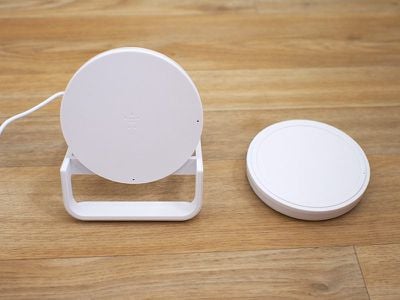
Both of these chargers are 7.5W, which means they're able to charge an iPhone with Qi wireless charging capabilities at a faster speed than traditional 5W chargers. I tested Belkin's two new chargers with an iPhone drained to 1 percent, and both charged up to right around 40 percent after an hour, which is in line with other summertime 7.5W charging speeds that I've seen.
Belkin advertises these chargers as 10W, but 7.5W is the maximum charging speed for iPhones. So if you have a Samsung device or something else that also charges via Qi and can charge at a faster speed, Belkin's charging pad and stand can charge those electronics at their maximum charging speed too.
Wireless charging speeds can vary quite a bit depending on factors like temperature, so you're not always going to see a lot of difference between 5W and 7.5W chargers as explained in our wireless charging guide.
For example, the original Belkin charger I have can charge my iPhone to about 46-48 percent in an hour during the wintertime (when it's ~65 degrees), but those speeds drop when the ambient temperature is higher in my apartment in the summer and I see a smaller difference between 5W and 7.5W.
In general, I've found it's better to use a 7.5W charger to eke out every bit of speed that you can, but on the whole, there's not going to be a huge difference between 5W charging speeds and 7.5W charging speeds, and bells and whistles like fans and power management options (Belkin claims optimized performance via "premium shielding" and "precision resistors") don't seem to make a noticeable difference.
With performance not drastically different between wireless chargers - and to be clear, Belkin's are charging at 7.5W - choosing a charger comes down to factors like price point and design. Belkin's not going to win in the former category, but when it comes to design, these are well thought out.
Belkin's Boost Up Bold Wireless Charging Pad
The Belkin Boost Up Bold Wireless Charging Pad is similar to the original Belkin Boost Up Wireless Charging Pad sold at Apple retail stores in that it offers the same simple, round shape, but it's smaller, which makes it easier to use.
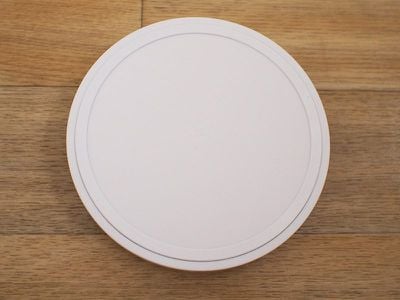
I've used an original Belkin Boost Up Wireless Charging Pad on my nightstand for months, and it's been a frustrating experience just because it's so large. Finding the sweet spot on the charger to get my iPhone X to charge is one of my absolute least favorite late night activities, and with a smaller area for the Bold Charging Pad, I am able to get my iPhone X situated in the dark much more quickly.
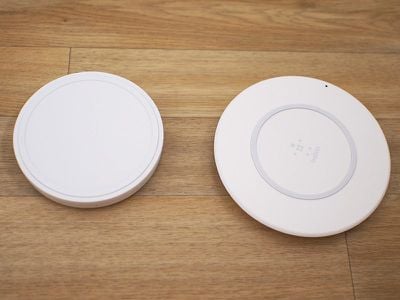
Belkin sells the Boost Up Wireless Charging Pad in pink, black, or white, and each is made from plastic and rubber. At the base, there's a rubber bottom to keep the Charging Pad in place on a desk or a nightstand, and there's a matching rubber ring at the top to prevent the iPhone from slipping when it's placed on the charger.
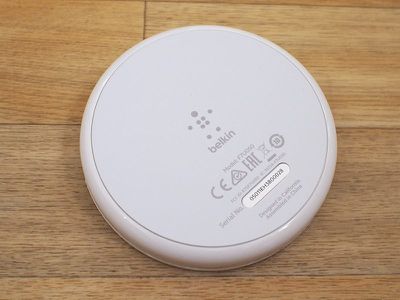
The rest of the top of the charger is a soft, smooth material that has a subtle Belkin logo, and all in all, it's a clean, attractive charger with no obvious branding.
The side of the Charging Pad is made from a shinier plastic that goes well with the matte top, and an unobtrusive LED at the side comes on when the iPhone is in the right spot, which lets you confirm that it's being charged. I like the soft light that's included on the charger - it's not overly bright while providing me with charging status at a glance.
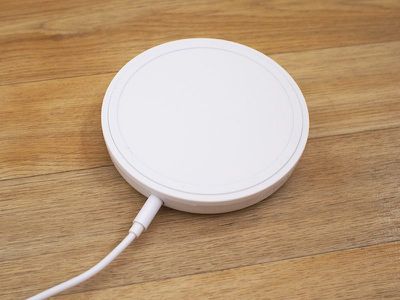
This same LED will light up if a foreign object like keys or coins are placed on the charger that could potentially affect wireless charging speeds.
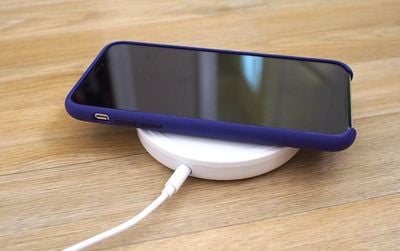
At the back of the Charging Pad, there's a single hole for the power source. All 7.5W chargers need ~18W+ power adapters to charge at maximum speeds, so Belkin has included its own 22.5W adapter. The adapter has a rather large power brick for a wireless charger, which may be of concern if you have limited plug space. It otherwise has a long 1.5m cord that can reach a power strip underneath a desk.
Belkin's Boost Up Wireless Charging Stand
Belkin's Boost Up Wireless Charging Stand, available in black or white, is the first stand-style wireless charging device that Belkin has designed for the iPhone. Rather than laying flat, the iPhone sits upright in Belkin's Charging Stand in either portrait or landscape orientation.
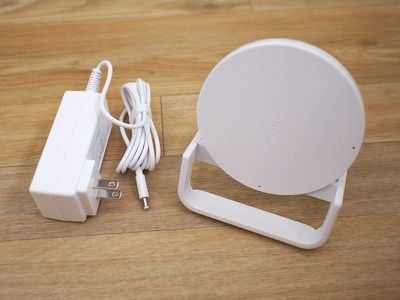
Design wise, the Charging Stand looks similar to the Boost Up Bold Charging Pad, but with a plastic frame to hold it upright. The charging surface of the stand is just a bit larger than the pad's surface, but the overall footprint is larger because of the design of the frame.
The frame extends several inches behind the charger and about an inch in front of it to provide stability. Each portion of the stand that makes contact with a desk or a nightstand is covered in a grippy rubber material to keep it in place, while the front of the stand and the charging portion are both covered in a soft, smooth silicone-style material.
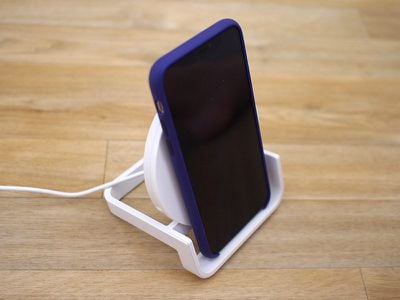
An iPhone can either rest on the bottom of the stand's frame while in Portrait orientation, or lay across the top of the frame while in landscape orientation. While the iPhone isn't going to go anywhere on its own, it's not as stable as a flat design just because the iPhone is in an upright position. That said, though, the design of the frame means that it's not going to move from slight bumps.
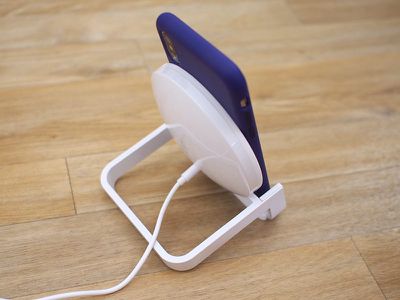
There are two LEDs on the Charging Stand's surface, one visible when the iPhone is in portrait orientation and one visible when it's in landscape orientation. These use the same soft light as the Charging Pad, providing a way for you to tell if your device is charging without a glaringly bright LED drawing your eye at night.
The Boost Up Wireless Charging Stand ships with the same 22.5W adapter and power cord that comes with the Charging Pad.
Though the Charging Stand has a larger footprint than the Wireless Charging Pad and other similar flat wireless charging options, I liked that it was impossible to place my iPhone in the wrong spot. That made it perfect for nightstand use, because I can just drop my iPhone in place without needing to worry that it's not getting power overnight.
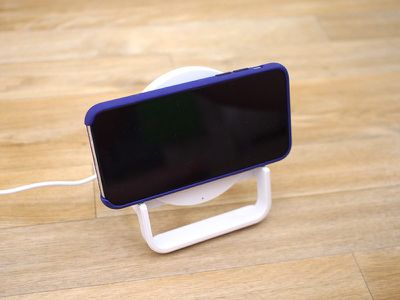
I was also able to glance over and unlock it with Face ID in some situations without even picking up the iPhone, just because of its upright position.
It would be nice if Belkin had made the stand adjustable in some way to let people change the angle of the iPhone if desired, but by default, it's in an ideal position for movie watching in landscape mode if you also want your Charging Stand to double as a regular stand.
Bottom Line
At $60 for the Boost Up Wireless Charging Pad and $70 for the Boost Up Wireless Charging Stand, Belkin is charging a lot more than some other companies. At this point, you can get a 7.5W charger for $20 to $40 from Amazon. Not all of those are Apple certified, of course, which is worth noting.
Belkin does have Apple approval for its wireless chargers, and both the pad and the stand come with the Belkin Connected Equipment Warranty. Belkin says if your device is damaged by an electrical charge while properly connected to the charger, it will repair or replace it up to a value of $2,500. I don't know of anyone who has had an iPhone damaged by a wireless charger, but I guess it could happen.
Clear Apple certification is one benefit of the Wireless Charging Pad and the Wireless Charging Stand, but design is another. Most of the cheap chargers on Amazon all look and function the same. Belkin's Wireless Charging Stand, though, offers a unique, hassle-free design that looks nice on a desk and provides the convenience of not having to fuss with positioning.
The Wireless Charging Pad isn't quite as unique looking, but it features a solid build with grippiness in all the right places, along with a size that isn't overwhelming to also make for easier positioning.
These chargers aren't going to be for everyone because there are much cheaper options on the market, but for customers who want the peace of mind of Apple certification or more thoughtful design elements, the Belkin Boost Up Wireless Charging Pad and the Boost Up Wireless Charging Stand may be worth paying a premium for.
How to Buy
You can buy the Boost Up Wireless Charging Pad ($60) and the Boost Up Wireless Charging Stand ($70) from the Belkin website.
Note: Belkin provided MacRumors with a Boost Up Wireless Charging Pad and a Boost Up Wireless Charging Stand for the purpose of this review. No other compensation was received.


































Top Rated Comments