

Skip to Content

How to Fix Wi-Fi 'Blocking Encrypted DNS Traffic' Warning Message on iOS

by

Since iOS 14, Apple has supported encrypted DNS, which in a nutshell makes it much harder for snoopers on the same Wi-Fi network as you to see the domain names of the websites you are visiting.
settings
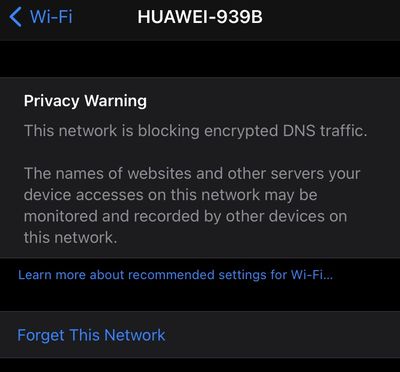
Because Apple's mobile operating system supports domain name encryption, sometimes you might see a warning that the Wi-Fi network you're connected to is blocking encrypted DNS traffic.

This privacy warning appears in the information screen for a Wi-Fi network in Settings -> Wi-Fi. (You can get to this screen by tapping on the circled 'i' next to a listed network).

If you see the warning message, don't panic -- it's actually normal behavior if the network you're connected to doesn’t meet the security standards recommended by Apple.

Given that there are many different Wi-Fi routers and network setups, it's difficult to offer the specific steps involved in changing settings for your particular situation to make the warning message go away. That said, some users have found one of the following actions to work for them:

  • Restart your iOS device.
  • Opt to Forget This Network on your iOS device, then reconnect.
  • Restart your Wi-Fi router.
  • Make sure your router's firmware is up-to-date.

If you're comfortable digging into the settings on your Wi-Fi router using an app or a browser, Apple maintains a support article called "Recommended settings for Wi-Fi routers and access points" that's worth referencing. If you set up your router in alignment with Apple's recommendations, you shouldn’t see the encrypted DNS warning message on your iOS device again.


Popular Stories

Apple Event Logo

Apple Released Seven New Products Today

Wednesday March 11, 2026 7:05 am PDT by
Starting today, the seven new Apple products that were announced last week are available at Apple Stores and beginning to arrive to customers. The colorful MacBook Neo and all of the other new products are on display at most Apple Store locations around the world starting today. Apple Stores have inventory of the new products for both walk-in customers and Apple Store pickup, but...
ios 26 4 yellow

Everything New in iOS 26.4 Beta 4

Monday March 9, 2026 3:50 pm PDT by
Apple is continuing to test the iOS 26.4 beta, and the latest update is now available for developers and public beta testers. As testing goes on, there are fewer new features in each beta, but today’s release adds new emoji characters and a few other changes. New Emoji Apple added new emoji characters, including trombone, treasure chest, distorted face, hairy creature, fight cloud, orca,...
Apple 50 Years of Thinking Different

Apple Announces 50th Anniversary Plans

Thursday March 12, 2026 6:10 am PDT by
Apple today announced that it will celebrate the company's 50th anniversary over the coming weeks, but it has yet to reveal any specific plans. Apple was founded on April 1, 1976, so the company will turn 50 on April 1, 2026. "While Apple is known for looking forward, this milestone offers a special moment to reflect on the journey that has brought the company here, to celebrate the...















