 In iOS 13, Apple's Reminders app allows you to create a reminder for just about anything. Not only can you schedule and prioritize reminders, you can add notes and websites to them to give you more context. You can even share your reminder lists with other people. Keep reading to learn how.
As with the previous version of Reminders, you can make as many lists as you need in the Reminders app. You can have separate lists for family, friends, work, or for other custom categories.
The redesigned interface also incorporates all of your reminders across all of your lists into four views – Today, Scheduled, All, and Flagged – with your separate lists listed below.
To create a new list, tap Add List at the bottom-right corner of the screen.
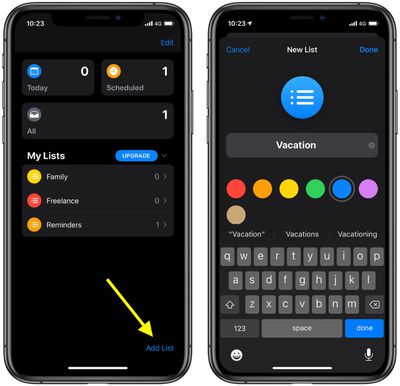
You'll be invited to give your new list a name and select a color for it, to help distinguish it from any other lists you keep. Tap Done in the top-right corner, and your list is created.
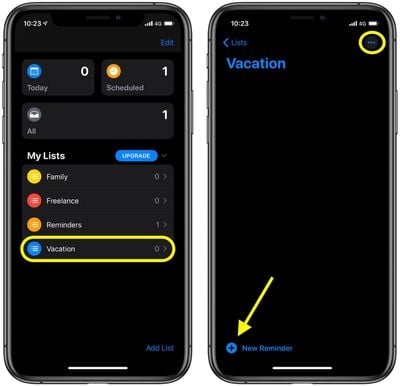
Your new list automatically appears in the Reminders home screen under My Lists. Tap its name to start working with it. With the new list open, you can tap the plus icon in the bottom-left corner of the screen to add reminders. To share the list with someone, tap the ellipsis button in the top-right corner.
Select Add People from the pop-up menu that appears, and you'll be invited to enter the email address of the person(s) you want to share the list with. Once you've done that, tap Add, then tap Done.