Skip to Content

Here's How to Temporarily Fix the macOS High Sierra Bug That Gives Full Admin Access to Your Mac Sans Password [Updated]

by

A newly discovered bug in macOS High Sierra enables the root superuser on a Mac with a blank password and no security check, essentially giving anyone full access to your Mac.

Apple is likely already working on a fix, but in the meantime, there's a temporary workaround -- enabling the root user with a password. Here's how:

  1. Open Spotlight and search for Directory Utility. directory utility spotlight
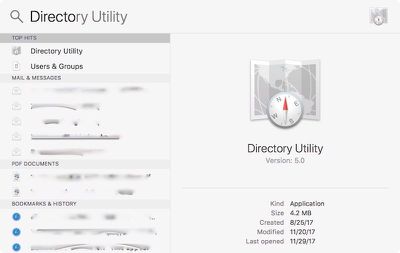
  2. Double click on the app result to open.
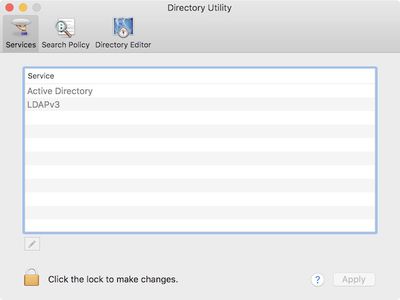
  3. Click on the lock at the bottom of the window to make changes and enter your username and password for an administrator account on your computer. directory utility
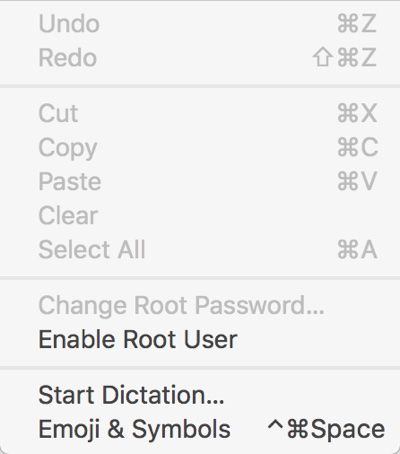
  4. In the menu bar at the top of the screen, choose "Edit." macoshighsierrarootbugeditmenu
  5. Select "Enable Root User."

From there, you can enter a password for the root user account, which prevents it from being accessed with a blank password, which is what the current bug allows to happen.
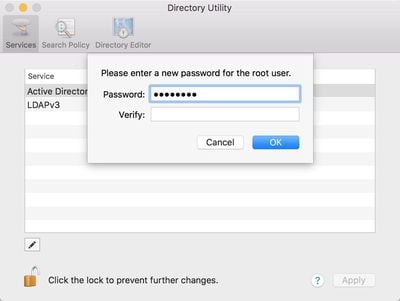
macoshighsierrarootbugpassword
Disabling the root user account again follows the same steps, but at the "Edit" portion of the process, you'll select "Disable Root User" to remove the option. Until the bug is fixed, though, you'll want to leave the root user account intact to prevent it from being accessed without a password.

To further protect your Mac, you can also disable guest accounts, though this is not a necessary step with a root password enabled. Guest accounts can be disabled by going to System Preferences > Users & Groups and choosing "Guest User" after entering your admin password. Disable "Allow guests to log in to this computer."

Update: Apple has released a security update to fix this issue, and all macOS High Sierra users should apply the update as soon as possible to ensure they are protected.


Related Forum: macOS High Sierra

Top Rated Comments

108 months ago
This is such a fundamental and major security flaw, it's mind-blowing how it managed to get through Apple's QA

A critical vulnerability that allows root access to all macs with a single click. We'd be laughing at Microsoft if this had occurred with Windows
Score: 27 Votes (Like | Disagree)
rpmurray Avatar
108 months ago
Now the new backdoor that Apple added for the government has been blown.
Score: 12 Votes (Like | Disagree)
108 months ago
Or, you know, don't leave your laptop sitting around unlocked. As more or less 100% of your critical info is under your user account anyway, probably even in the easy to find Documents folder, it's almost useless to spend time (as a theif) monkeying with root accounts. Just yoink what you need directly. Creating a root password (as a theif) presumes future access to the Mac, in which case it's been lifted already, and there are ways to get at your info, anyway, if it's unencrypted, as most Macs are.

Pretty dumb flaw, yes, but you deserve what you get if you leave your unattended, unlocked laptop lying around where people can physically get at it in the first place.
Laptop? How about all the schools and Universities that use iMacs with admin accounts? This is a HUGE flaw and shouldn’t be downplayed.
Score: 9 Votes (Like | Disagree)
KvR Avatar
108 months ago
Much easier (if your comfortable with the terminal) fix:

sudo passwd root

Just set a password on your root account.
Score: 8 Votes (Like | Disagree)
miniyou64 Avatar
108 months ago
Unbelievable. This is not Steve’s Apple.
Score: 5 Votes (Like | Disagree)
Doctor Q Avatar
108 months ago
A faster way to launch Directory Utility is to type "directory utility" in Spotlight, then press return. (This assumes that you have "Applications" enabled in Spotlight's preferences.)

Make sure you choose a secure root password. Leaving root enabled with an easily guessed password defeats the purpose.
Score: 5 Votes (Like | Disagree)

Popular Stories

Apple Event Logo

Apple Released Seven New Products Today

Wednesday March 11, 2026 7:05 am PDT by
Starting today, the seven new Apple products that were announced last week are available at Apple Stores and beginning to arrive to customers. The colorful MacBook Neo and all of the other new products are on display at most Apple Store locations around the world starting today. Apple Stores have inventory of the new products for both walk-in customers and Apple Store pickup, but...
iOS 27 Mock Quick

10+ New Features Coming in iOS 27

Friday March 13, 2026 2:13 pm PDT by
We're only three months away from Apple's WWDC 2026 event, which will see the company unveil iOS 27. With the fully revamped version of Siri possibly delayed until September, iOS 27 is shaping up to be the update we wanted iOS 26 to be. There will be new Apple Intelligence features, updates for the iPhone Fold, and more, with the latest rumors summarized below. Foldable iPhone Features...
iOS 27 Mock Quick

iOS 27 Will Reportedly Be Like Mac OS X Snow Leopard

Sunday March 15, 2026 9:42 am PDT by
In his Power On newsletter today, Bloomberg's Mark Gurman reiterated that iOS 27 will be similar to 2009's Mac OS X Snow Leopard, in the sense that one of Apple's biggest priorities is bug fixes for improved performance and stability. During WWDC 2008's State of the Union, Apple showed a slide that said Mac OS X Snow Leopard had "0 new features," as it opted to focus on performance and...