safari iconQuite often when browsing the web in Safari, you'll see pop-ups asking you for permission for websites to use data about you, such as your location. There can be good reasons for this – if you're searching for local information such as the nearest grocery store or restaurant, then it makes sense for you to share your location data to get the most relevant results for your area.

On the other hand, you might visit a website that asks you for your location data for no obvious good reason, in which case it's understandable that you might be disinclined grant permission. Fortunately, there's a way to disable these location data requests altogether on both iOS devices and Macs. Keep reading to learn how it works.

How to Stop Safari Asking for Location Data in iOS

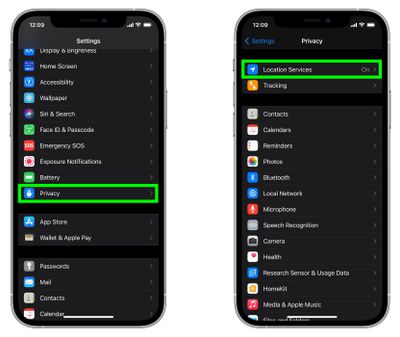
  1. Launch the Settings app on your iPhone or iPad.
  2. Scroll down and tap Privacy.
  3. Tap Location Services.
    settings

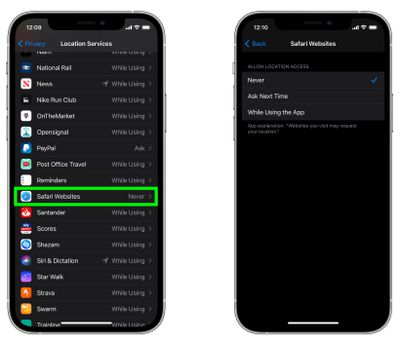
  4. Scroll down and tap Safari Websites.
  5. Tap Never.
    settings

How to Stop Safari Asking for Location Data in macOS

In Safari on Mac, the settings are a lot more fine-grained, and you can set up location request options for individual websites. Here's how to go about it.

  1. Launch Safari browser on your Mac.
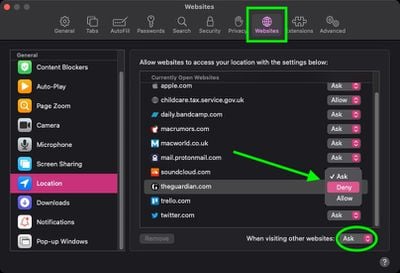
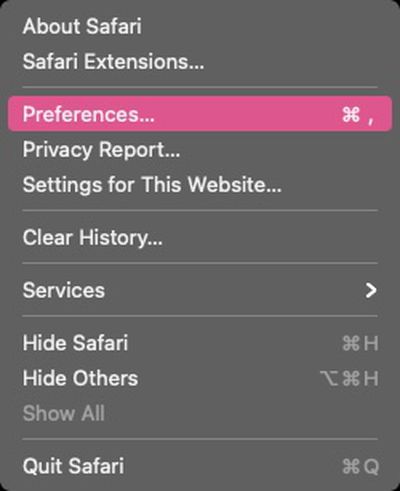
  2. Select Safari -> Preferences from the menu bar.
    safari

  3. Click the Websites tab.
  4. Click Location under "General" in the sidebar.
  5. Use the dropdown menus alongside the individual websites listed to change their location data access. You can set each one to Ask, Deny, or Allow.
    safari

Note that you can select websites in the list and remove them, which will expose them to the global setting you choose in the When visiting other websites dropdown menu at the bottom of the window.


Tag: Safari

Popular Stories

imac video apple feature

Apple Unveils First New Products of 2026

Monday January 26, 2026 1:55 pm PST by
Apple today introduced its first two physical products of 2026: a second-generation AirTag and the Black Unity Connection Braided Solo Loop for the Apple Watch. Read our coverage of each announcement to learn more:Apple Unveils New AirTag With Longer Range, Louder Speaker, and More Apple Introduces New Black Unity Apple Watch BandBoth the new AirTag and the Black Unity Connection Braided...
iPhone 5s

iPhone 5s Gets New Software Update 13 Years After Launch

Monday January 26, 2026 3:56 pm PST by
Alongside iOS 26.2.1, Apple today released an updated version of iOS 12 for devices that are still running that operating system update, eight years after the software was first released. iOS 12.5.8 is available for the iPhone 5s and the iPhone 6, meaning Apple is continuing to support these devices for 13 and 12 years after launch, respectively. The iPhone 5s came out in September 2013,...
Apple Creator Studio

Apple's Next Launch is Today

Tuesday January 27, 2026 2:39 pm PST by
Update: Apple Creator Studio is now available. Apple Creator Studio launches this Wednesday, January 28. The all-in-one subscription provides access to the Final Cut Pro, Logic Pro, Pixelmator Pro, Motion, Compressor, and MainStage apps, with U.S. pricing set at $12.99 per month or $129 per year. A subscription to Apple Creator Studio also unlocks "intelligent features" and "premium...
Apple Logo Black

Apple Just Made Its Second-Biggest Acquisition Ever After Beats

Thursday January 29, 2026 10:07 am PST by
Apple today confirmed to Reuters that it has acquired Q.ai, an Israeli startup that is working on artificial intelligence technology for audio. Apple paid close to $2 billion for Q.ai, according to sources cited by the Financial Times. That would make this Apple's second-biggest acquisition ever, after it paid $3 billion for the popular headphone and audio brand Beats in 2014. Q.ai has...
Second Generation AirTag Feature

Apple Unveils New AirTag With Longer Range, Louder Speaker, and More

Monday January 26, 2026 6:07 am PST by
Apple today introduced the second-generation AirTag, with key features including longer range for tracking items and a louder speaker. For those who are not familiar, the AirTag is a small accessory that you can attach to your backpack, keys, or other items. Then, you can track the location of those items in the Find My app on the iPhone, iPad, Mac, Apple Watch, and iCloud.com. The new...