

How to Share Passwords With Friends and Family on iPhone and iPad - MacRumors
Skip to Content

How to Share Passwords With Friends and Family on iPhone and iPad

by

In iOS 17 and iPadOS 17, Apple has added the ability to securely share passwords and passkeys with friends and family members using a new shared password function. Here's how to use it.
iOS 17 Privacy and Security Improvements Feature
Family Passwords allows you to create a group of trusted contacts that you can share passwords and passkeys with across devices. (Passkeys let users sign in to apps and sites the same way they unlock their devices: With a fingerprint, a face scan or a screen lock PIN.)

Using the new feature, passwords and passkeys for shared media accounts, utilities, bills, and more can be provided to multiple people, and each person in the group can access, add to, and change passwords that are shared.

Here's how to create your first Family Passwords group in iOS 17 and iPadOS 17.

  1. Open the Settings app on your iPhone or iPad.
  2. Scroll down and tap Passwords.
  3. Under the "Family Passwords" card, tap Get Started.
  4. Tap Continue.
  5. Add a Group Name for your shared group, then tap the Add People option to select trusted people from your contacts.
  6. When you're done, tap Create.
  7. Choose the passwords and passkeys you would like to move to the newly created group, then tap Move.
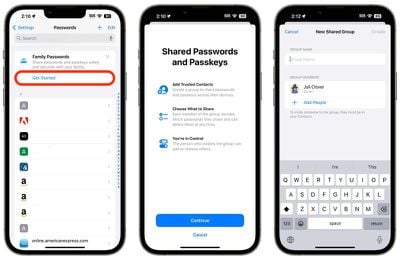
settings

Once you've moved passwords to the group, you can access them any time on your device by going to Settings -> Passwords -> Family Passwords. Here you can also manage the shared passwords, add or remove people from the group, and delete the group if it's no longer needed.

Note that the contacts you add to the group will need to have their devices updated to iOS 17 or iPadOS 17 and later before they can access Shared Password Groups.


Popular Stories

apple lock security bug vulnerability fix privacy

Apple Warns Canada's Bill C-22 Could Force Encryption Backdoors

Friday May 8, 2026 4:22 am PDT by
Apple and Meta have opposed a Canadian bill that the companies say could force them to create backdoor access to encrypted user data, should it pass through the country's parliament. Proposed by Canada's ruling Liberal Party, Bill C-22 contains provisions that could be similar ​to a UK data access provision order sent to Apple last year, depending on how they are implemented. Back in Feb...
Dynamic Island iPhone 18 Pro Feature

11 Reasons to Wait for the iPhone 18 Pro

Monday May 11, 2026 9:01 am PDT by
We're only four months out from the launch of Apple's premium next-generation smartphone lineup, and while we're not expecting a sea change in terms of functionality, there are still several enhancements rumored to be coming to the iPhone 18 Pro and iPhone 18 Pro Max. One thing worth noting is that Apple is reportedly planning a major change to its iPhone release cycle this year, adopting a...
iOS 26

iOS 26.5 Features: Everything New in iOS 26.5

Monday May 11, 2026 5:09 pm PDT by
Apple released iOS 26.5 after a few months of beta testing, and while it doesn't have the Siri features we were hoping for since those are being held until iOS 27, there are a handful of useful changes worth knowing about. Subscribe to the MacRumors YouTube channel for more videos. End-to-End Encryption for RCS Support for end-to-end encryption (E2EE) for RCS messages between iPhone and...













