

How to Set Up Home Theater Audio with HomePod and Apple TV 4K - MacRumors
Skip to Content

How to Set Up Home Theater Audio with HomePod and Apple TV 4K

by

If you have an Apple TV 4K and own a HomePod or a stereo pair, you can create a theater experience with Dolby Atmos or surround sound right in your home.
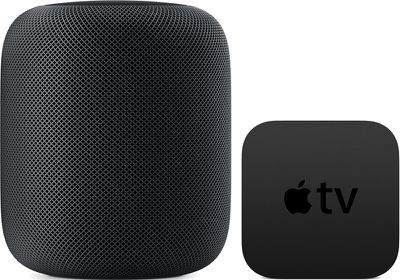
homepodappletv
Note that this feature is reliant on the directional and spatially aware capabilities of the original ‌‌HomePod‌‌, so it is not available on the ‌HomePod mini‌. Here's what you need.

Home Theater Audio: What You'll Need

  • An ‌Apple TV‌ 4K updated to tvOS 16.3 or later
  • One or two ‌HomePod‌ speakers updated to ‌HomePod‌ 16.3 software or later
  • An iPhone or iPad updated to iOS or iPadOS 16.3 or later

How to Set Up Home Theater Audio

  1. Using the Home app on your iOS device, put your ‌Apple TV‌ and ‌HomePod‌ in the same room. If you want to use two ‌HomePod‌ speakers, create a stereo pair, then put the stereo pair in the same room as your ‌Apple TV‌ in the Home app.
  2. Turn on your ‌Apple TV‌.
  3. A screen will appear asking if you want to use ‌HomePod‌ as TV Speakers. Select Use as TV Speakers to turn on home theater audio.
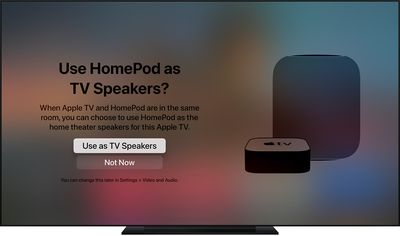
tvos14 use homepod as tv speaker
If you don't see the setup screen on your ‌Apple TV‌, you can manually enable home theater audio on ‌Apple TV‌ or using your iOS device.

On Apple TV:

  1. From the Home screen on ‌Apple TV‌, select Settings -> Video.
  2. Select Audio > Default Audio Output.
  3. Select the room with your ‌HomePod‌ or stereo pair.

On iPhone, iPad, or iPod touch:

  1. In the Home app, press and hold the ‌Apple TV‌ pane.
  2. Scroll down and tap Default Audio Output.
  3. Select the room with your ‌HomePod‌ or stereo pair.
  4. Tap Back, then tap Done.

You should now be able to enjoy a more immersive home theater experience when playing content on your ‌Apple TV‌ 4K. An additional benefit of using HomePods as home theater speakers is that it fixes a relatively common issue where ‌‌Apple TV‌‌ sometimes forgets that HomePods are the preferred speakers for audio output.

Related Roundup: HomePod
Buyer's Guide: HomePod (Neutral)

Popular Stories

Apple Event Logo

Apple to Launch These 15+ New Products Later This Year

Friday March 27, 2026 2:03 pm PDT by
March has been an incredibly busy month for Apple, with the company unveiling more than 10 new products and accessories. We said hello to the MacBook Neo at the start of the month, and we bid farewell to the Mac Pro at the end of it. Nevertheless, there is still a lot more to come this year. Beyond the usual annual updates to iPhones and Apple Watches, Apple's all-new smart home hub is...
iOS 26

iOS 26.4 Adds Two New Features to CarPlay

Tuesday March 24, 2026 1:55 pm PDT by
iOS 26.4 was released today, and it includes a couple of new features for CarPlay: an Ambient Music widget and support for voice-based chatbot apps. To update your iPhone 11 or newer to iOS 26.4, open the Settings app and tap on General → Software Update. CarPlay will automatically offer the new features so long as the iPhone connected to your vehicle is running iOS 26.4 or later....
Mac Pro Feature Teal

Apple Confirms Mac Pro Is Dead, No Future Models Planned

Thursday March 26, 2026 2:04 pm PDT by
Apple has discontinued the Mac Pro and has removed the machine from its website, reports 9to5Mac. Apple said it does not plan to design a new version of the Mac Pro, and no new model will be coming in the future. The Mac Pro was last updated in 2023, which was when Apple added an M2 Ultra Apple silicon chip, but the chassis has not been refreshed since 2019. Apple redesigned the Mac Pro to...
















