Skip to Content

iOS 17.2: How to Set a Journaling Schedule on iPhone

by

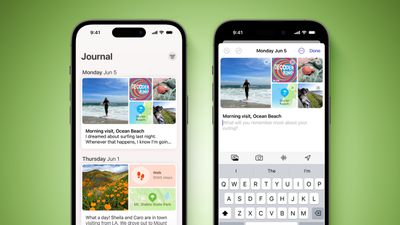
Apple in iOS 17.2 added its long-awaited Journal app to iPhone. This article explains how to set a journaling schedule and get reminders for when it's time to write.
Journal App iOS 17 Feature Green
Apple announced in June 2023 announced it was bringing its own journaling app to iOS 17, and it has since been confirmed that the app is included in iOS 17.2, which is currently available to download as a beta.

Apple's Journal app lets you record your daily thoughts and activities, incorporating data like photos, music listened to, workouts, and more, plus it suggests topics to write about.

Of course, anyone can start a journal with the best intentions, but many people find journaling with any frequency hard to sustain. Thankfully, Apple understands that staying consistent with journaling can be difficult, which is why it has included a scheduling feature.
journal notification
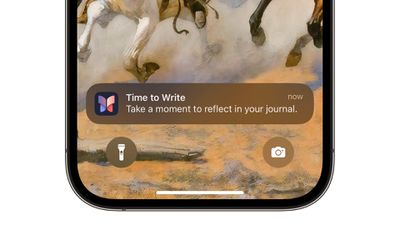
When the feature is enabled, you will receive helpful notifications on the days you have chosen for when it is time to write on your iPhone. The following steps show you how to set it up in iOS 17.2.

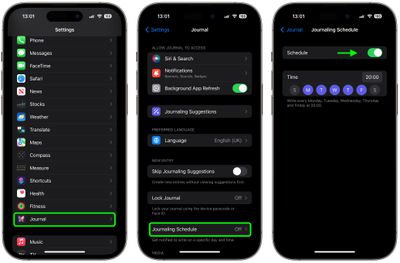
  1. Launch the Settings app on your iPhone.
  2. Scroll down and tap Journal.
  3. Tap Journaling Schedule, then toggle on the Schedule switch if it isn't already enabled.
  4. Choose a time to write.
  5. Tap the days of the week that you want to be notified when it's time to write.
settings

That's all there is to it. The scheduling option isn't just a reminder – it's about building a habit. So whether it's a gentle reminder notification that you need in the morning or a prompt before bed, you can adapt the feature to your personal routine.


Popular Stories

Apple Event Logo

Apple Released Seven New Products Today

Wednesday March 11, 2026 7:05 am PDT by
Starting today, the seven new Apple products that were announced last week are available at Apple Stores and beginning to arrive to customers. The colorful MacBook Neo and all of the other new products are on display at most Apple Store locations around the world starting today. Apple Stores have inventory of the new products for both walk-in customers and Apple Store pickup, but...
ios 26 4 yellow

Everything New in iOS 26.4 Beta 4

Monday March 9, 2026 3:50 pm PDT by
Apple is continuing to test the iOS 26.4 beta, and the latest update is now available for developers and public beta testers. As testing goes on, there are fewer new features in each beta, but today’s release adds new emoji characters and a few other changes. New Emoji Apple added new emoji characters, including trombone, treasure chest, distorted face, hairy creature, fight cloud, orca,...
Apple MacBook Pro M4 hero

Apple Planning 'MacBook Ultra' With Touchscreen and Higher Price

Sunday March 8, 2026 8:05 am PDT by
Apple is planning to launch an all-new "MacBook Ultra" model this year, featuring an OLED display, touchscreen, and a higher price point, Bloomberg's Mark Gurman reports. Gurman revealed the information in his latest "Power On" newsletter. While Apple has been widely expected to launch new M6-series MacBook Pro models with OLED displays, touchscreen functionality, and a new, thinner design...