Ever been startled by unexpectedly loud audio blasting from your iPhone? A new feature in iOS 18.2 lets you cap the maximum volume of your device's built-in speaker, allowing you to avoid awkward moments in quiet spaces.
iphone on table
The new Volume Limit feature in iOS 18.2 is particularly useful if you're a parent or guardian and share your device with children, but it's also handy if you frequently find yourself in situations where sudden loud audio could be disruptive. Whether you're in an office environment, at the library, or simply prefer more controlled audio levels, setting a volume limit can help prevent accidental sound blasts.

The volume limit affects all media playback through the iPhone's speaker, including music, videos, and app audio. However, it won't impact essential sounds like phone calls, FaceTime, emergency alerts, or Find My sounds, so you won't miss important communications.

Here's how to set it up:

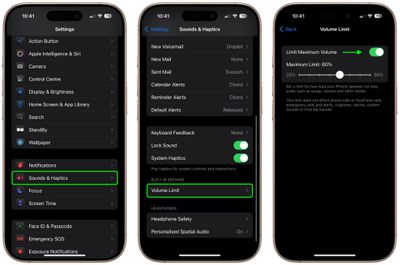
  1. Open Settings on your iPhone.
  2. Tap Sounds & Haptics.
  3. Scroll down to the "Built-in Speaker" section and tap Volume Limit.
  4. Toggle on the switch next to Limit Maximum Volume.
  5. Use the slider to set your preferred maximum volume level (anywhere from 20% to 90%).
settings

Once that's done, your iPhone's speaker won't exceed your chosen volume limit during media playback.


Popular Stories

imac video apple feature

Apple Unveils First New Products of 2026

Monday January 26, 2026 1:55 pm PST by
Apple today introduced its first two physical products of 2026: a second-generation AirTag and the Black Unity Connection Braided Solo Loop for the Apple Watch. Read our coverage of each announcement to learn more:Apple Unveils New AirTag With Longer Range, Louder Speaker, and More Apple Introduces New Black Unity Apple Watch BandBoth the new AirTag and the Black Unity Connection Braided...
Second Generation AirTag Feature

Apple Unveils New AirTag With Longer Range, Louder Speaker, and More

Monday January 26, 2026 6:07 am PST by
Apple today introduced the second-generation AirTag, with key features including longer range for tracking items and a louder speaker. For those who are not familiar, the AirTag is a small accessory that you can attach to your backpack, keys, or other items. Then, you can track the location of those items in the Find My app on the iPhone, iPad, Mac, Apple Watch, and iCloud.com. The new...
iPhone 5s

iPhone 5s Gets New Software Update 13 Years After Launch

Monday January 26, 2026 3:56 pm PST by
Alongside iOS 26.2.1, Apple today released an updated version of iOS 12 for devices that are still running that operating system update, eight years after the software was first released. iOS 12.5.8 is available for the iPhone 5s and the iPhone 6, meaning Apple is continuing to support these devices for 13 and 12 years after launch, respectively. The iPhone 5s came out in September 2013,...
Apple Logo Spotlight

Apple to Launch These 20+ Products This Year

Sunday January 25, 2026 6:02 pm PST by
2026 promises to be yet another busy year for Apple, with the company rumored to be planning more than 20 product announcements over the coming months. Beyond the usual updates to iPhones, iPads, Macs, and Apple Watches, Apple is expected to release its all-new smart home hub, which was reportedly delayed until the more personalized version of Siri is ready. Other unique products rumored for ...
M5 MacBook Pro

Apple Reportedly Aiming to Upgrade the MacBook Pro Twice This Year

Sunday January 25, 2026 11:46 am PST by
Apple plans to release new MacBook Pro, MacBook Air, Mac Studio, and Studio Display models in the first half of this year, according to Bloomberg's Mark Gurman. In his Power On newsletter today, Gurman added that redesigned MacBook Pro models with an OLED touch screen "should be hitting toward the end of 2026," meaning that the MacBook Pro line would be upgraded twice this year. First up...