In 2022, Apple added a new feature to the stock Notes app on iPhone and iPad that allows you to quickly scan printed or handwritten text and save it in digital text format. Keep reading to learn how it works.
iOS 17 General Notes Feature
On earlier versions of iOS and iPadOS, scanning text into Apple's Notes app required tapping on a note's text field and tapping the Live Text option in the popup menu. However, Apple in 2022 made it even easier to digitize real-world notes.

The following steps show you how it's done on an device running iOS 15.4 or iPadOS 15.4 and later.

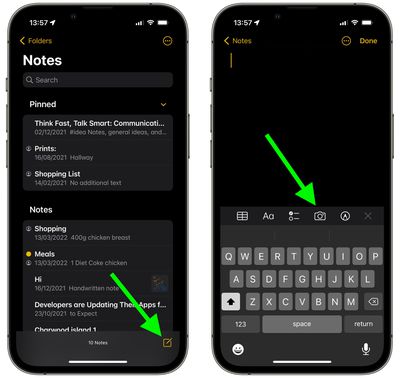
  1. On your iPhone or iPad, open the Notes app.
  2. Create a new note by tapping the icon in the bottom-right corner of the interface, or choose an existing note from the list.
  3. Tap the Camera icon above the onscreen keyboard.
    notes

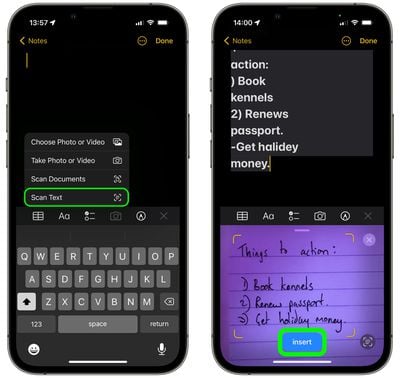
  4. Select Scan Text from the popup submenu.
  5. Position the printed or handwritten text in the camera's viewfinder.
  6. When the text has been recognized it should appear in the note – tap the blue Insert button that appears to in the viewfinder to save it inside the note. Manually correct any textual errors if necessary.scan handwritten notes app2

Note that this new text scanning option has also been added to the Reminders app, so you can now scan your real-world notes into individual reminders.

Popular Stories

M3 iPad Air

Apple's Next Two Products Are Coming Soon

Thursday February 12, 2026 11:17 am PST by
Apple plans to release an iPhone 17e and an iPad Air with an M4 chip "in the coming weeks," according to the latest word from Bloomberg's Mark Gurman. "Apple retail employees say that inventory of the iPhone 16e has basically dried out and the iPad Air is seeing shortages as well," said Gurman. "I've been expecting new versions of both (iPhone 17e and M4 iPad Air) in the coming weeks."...
Apple Sales Coach App

Apple Launching New 'Sales Coach' App

Friday February 13, 2026 2:01 pm PST by
Apple plans to launch a rebranded "Sales Coach" app on the iPhone and iPad later this month, according to a source familiar with the matter. "Sales Coach" will arrive as an update to Apple's existing "SEED" app, and it will continue to provide sales tips and training resources to Apple Store and Apple Authorized Reseller employees around the world. For example, there are articles and videos...
Coffee Burgundy and Purple iPhone 18 Pro Mock

Five iPhone 18 Pro Features Revealed in New Report

Friday February 13, 2026 8:43 am PST by
While the iPhone 18 Pro and iPhone 18 Pro Max are still seven months away, an analyst has revealed five new features the devices will allegedly have. Rumored color options for the iPhone 18 Pro models In a research note with investment firm GF Securities on Thursday, analyst Jeff Pu outlined the following upgrades for the iPhone 18 Pro models: Smaller Dynamic Island: It has been rumored...
iOS 26 Home Feature

Three New Apple Home Products Rumored for 2026

Friday February 13, 2026 4:18 pm PST by
Apple has a long list of new products rumored for 2026, including a series of home products that will see the company establishing more of a presence in the smart home space. Robots are on the horizon for 2027, but the 2026 releases will be a little tamer. HomePod mini We're expecting a new HomePod mini 2 to launch at any time. Apple isn't going to update the device's design, but we could...
m5 macbook pro deal

Why You Shouldn't Buy the Next MacBook Pro

Tuesday February 10, 2026 4:27 pm PST by
Apple is planning to launch new MacBook Pro models as soon as early March, but if you can, this is one generation you should skip because there's something much better in the works. We're waiting on 14-inch and 16-inch MacBook Pro models with M5 Pro and M5 Max chips, with few changes other than the processor upgrade. There won't be any tweaks to the design or the display, but later this...