In iOS 16, Apple began deploying security updates to iPhones and iPads without having to update the entire operating system. If you're experiencing issues with your device after having installed a security update, keep reading to learn how to remove it.

Rapid Security Response Feature 1
In the past, some of Apple's most important point releases of its iOS mobile operating system have been linked to critical security updates that are designed to keep you and your private data safe and secure online.

When a user opts to install them, the entire operating system must be updated and restarted, which is why in iOS 16 Apple introduced Rapid Security Response updates. These smaller updates get important security improvements to your devices even faster, but Apple recognizes that there may be rare occasions when an unexpected issue is experienced after the update, which is why it also provides a way to remove them.

You can follow the steps below to remove a Rapid Security Response, after which you can reinstall the update at a later date, or wait for it to be installed permanently as part of a standard software update.

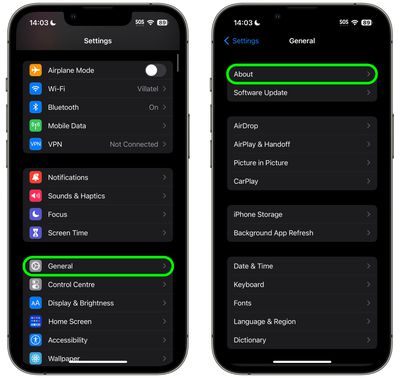
  1. Launch the Settings app on your iOS device.
  2. Tap General -> About.
    settings

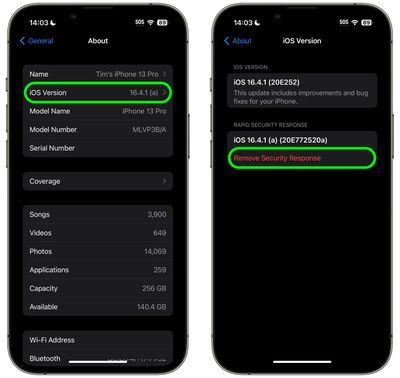
  3. Tap iOS Version or iPadOS version.
  4. Tap Remove Security Response.
    settings

  5. Tap Remove in the prompt to confirm.

The Rapid Security Response update will now be automatically removed from your device. Bear in mind that your iPhone or iPad will now be potentially vulnerable to whatever exploit or security issue the update was designed to fix, so it's best practice to use this as an opportunity to research and resolve the problem that began when you originally installed it. When you have done so, you'll be able to install the update again to ensure your device is protected.


Popular Stories

Apple Logo Black

Apple Just Made Its Second-Biggest Acquisition Ever After Beats

Thursday January 29, 2026 10:07 am PST by
Apple today confirmed to Reuters that it has acquired Q.ai, an Israeli startup that is working on artificial intelligence technology for audio. Apple paid close to $2 billion for Q.ai, according to sources cited by the Financial Times. That would make this Apple's second-biggest acquisition ever, after it paid $3 billion for the popular headphone and audio brand Beats in 2014. Q.ai has...
imac video apple feature

Apple Unveils First New Products of 2026

Monday January 26, 2026 1:55 pm PST by
Apple today introduced its first two physical products of 2026: a second-generation AirTag and the Black Unity Connection Braided Solo Loop for the Apple Watch. Read our coverage of each announcement to learn more:Apple Unveils New AirTag With Longer Range, Louder Speaker, and More Apple Introduces New Black Unity Apple Watch BandBoth the new AirTag and the Black Unity Connection Braided...
iPhone 5s

iPhone 5s Gets New Software Update 13 Years After Launch

Monday January 26, 2026 3:56 pm PST by
Alongside iOS 26.2.1, Apple today released an updated version of iOS 12 for devices that are still running that operating system update, eight years after the software was first released. iOS 12.5.8 is available for the iPhone 5s and the iPhone 6, meaning Apple is continuing to support these devices for 13 and 12 years after launch, respectively. The iPhone 5s came out in September 2013,...


Apple Creator Studio

Apple's Next Launch is Today

Tuesday January 27, 2026 2:39 pm PST by
Update: Apple Creator Studio is now available. Apple Creator Studio launches this Wednesday, January 28. The all-in-one subscription provides access to the Final Cut Pro, Logic Pro, Pixelmator Pro, Motion, Compressor, and MainStage apps, with U.S. pricing set at $12.99 per month or $129 per year. A subscription to Apple Creator Studio also unlocks "intelligent features" and "premium...
apple silicon 1 feature

Apple Responds to Skyrocketing RAM and Storage Chip Prices

Thursday January 29, 2026 2:40 pm PST by
On an earnings call with equity analysts today, Apple CEO Tim Cook responded to fast-rising RAM and SSD storage chip prices in the supply chain. Prices for RAM and NAND storage chips are surging lately due to high demand from companies building out AI servers, resulting in supply constraints. Cook said that rising memory chip prices had a "minimal impact" on Apple's gross margin in the...