Apple includes an App Library feature in iOS and iPadOS that shows you all of the apps that are installed on your iPhone or iPad in one place, both in an icon view organized into smart categories and in an alphabetical list. Since all of the apps are listed in the App Library, app icons and Home Screen pages can be hidden for a cleaner look.
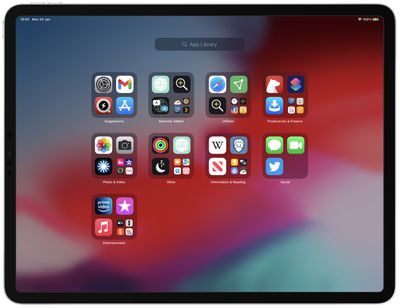
iPad
On ‌iPad‌, Apple adds an App Library icon to the dock that displays the last four hidden apps you used, and tapping on the icon opens the App Library. The idea is to give you quick access to the feature, but if you don't use it that often, it just ends up taking up dock space. Fortunately, you can remove it very easily by following the steps below.

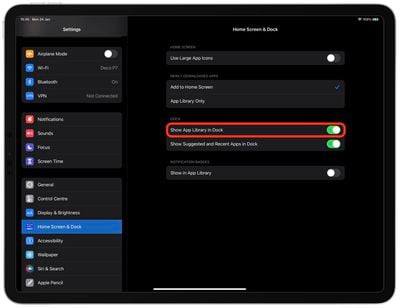
  1. Launch the Settings app.
  2. Scroll down the left-side menu and tap Home Screen & Dock.
  3. Under the "Dock" section, toggle off the switch next to Show App Library in Dock.
    settings

That's all there is to it. If you decide you want the App Library back in the dock, simply repeat the above steps and toggle the setting back on.

Even with the App Library removed from the dock, you can still access it. Just swipe leftwards on your ‌iPad‌'s Home screen and keep swiping to the last page of apps, then swipe once more and the App Library will automatically open. To exit, simply swipe in the opposite direction.

Popular Stories

iPhone Top Left Hole Punch Face ID Feature Purple

iPhone 18 Pro Launching Later This Year With These 12 New Features

Thursday January 15, 2026 10:56 am PST by
While the iPhone 18 Pro and iPhone 18 Pro Max are not expected to launch for another eight months, there are already plenty of rumors about the devices. Below, we have recapped 12 features rumored for the iPhone 18 Pro models, as of January 2026: The same overall design is expected, with 6.3-inch and 6.9-inch display sizes, and a "plateau" housing three rear cameras Under-screen Face ID...
iPhone Top Left Hole Punch Face ID Feature Purple

New Leak Reveals iPhone 18 Pro Display Sizes, Under-Screen Face ID, and More

Wednesday January 14, 2026 7:09 am PST by
While the iPhone 18 Pro models are still around eight months away, a leaker has shared some alleged details about the devices. In a post on Chinese social media platform Weibo this week, the account Digital Chat Station said the iPhone 18 Pro and iPhone 18 Pro Max will have the same 6.3-inch and 6.9-inch display sizes as the iPhone 17 Pro and iPhone 17 Pro Max. Consistent with previous...
2024 iPhone Boxes Feature

Apple Adjusts Trade-In Values for iPhones, Macs, and More

Thursday January 15, 2026 11:19 am PST by
Apple today updated its trade-in values for select iPhone, iPad, Mac, and Apple Watch models. Trade-ins can be completed on Apple's website, or at an Apple Store. The charts below provide an overview of Apple's current and previous trade-in values in the United States, according to the company's website. Most of the values declined slightly, but some of the Mac values increased. iPhone ...
Apple MacBook Pro M4 hero

These 5 Apple Products Will Reportedly Be Upgraded With OLED Displays

Friday January 16, 2026 7:07 pm PST by
Apple plans to upgrade the iPad mini, MacBook Pro, iPad Air, iMac, and MacBook Air with OLED displays between 2026 and 2028, according to DigiTimes. Bloomberg's Mark Gurman previously reported that the iPad mini and MacBook Pro will receive an OLED display as early as this year, but he does not expect the MacBook Air to adopt the technology until 2028 at the earliest. A new iPad Air is...
Verizon New

Verizon Offering $20 Credit After Major Outage, Here's How to Get It

Thursday January 15, 2026 7:37 am PST by
Verizon today announced it will be offering customers a $20 account credit after a major outage on Wednesday, and action is required to receive it. The carrier said affected customers can accept the credit by logging into the My Verizon app, but it might take some time before this option shows up in the app. Affected customers will receive a text message when the credit is available. On...