Skip to Content

How to Disable Night Mode on Your iPhone's Camera

by

When using the Camera app on iPhones, the ‌Night Mode‌ feature comes on automatically when the camera sensor registers an indoor or outdoor scene that is dark enough to warrant brightening, resulting in natural colors and reduced noise. That's the idea, anyway. The reality is that ‌Night Mode‌ won't always capture the kind of nighttime image that you want.
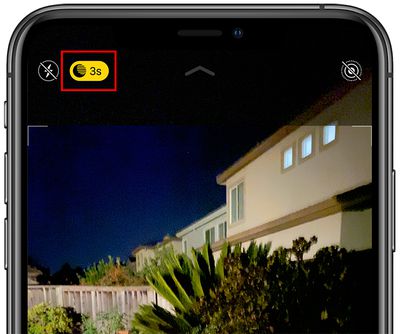
nightmodebutton
If you're aiming to shoot an authentic evening scene in which any sources of light remain subdued, for example, it's better to turn off ‌Night Mode‌ to prevent extreme light exposure and a blown out picture.

If you don't want ‌‌Night Mode‌‌ engaged when you're shooting in low light environments, you can turn it off by tapping the yellow ‌‌Night Mode‌‌ button when it appears at the top of the viewfinder. The problem is, when you open the Camera app again and the sensor detects low light, ‌Night Mode‌ will automatically enable itself again.

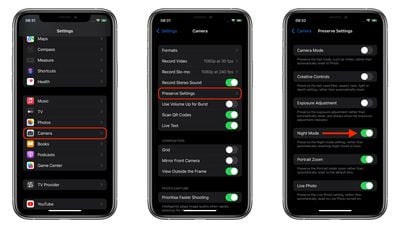
In iOS 14, there was no way to disable ‌Night Mode‌ for good – you had to manually switch ‌Night Mode‌ off every time you relaunch the Camera. But in iOS 15 and later, you can turn off ‌Night Mode‌ and ensure that it stays off whenever you subsequently open the Camera app. Here's how.

  1. Launch the Settings app on your iPhone.
  2. Tap Camera.
  3. Tap Preserve Settings.
  4. Toggle the Night Mode switch to the green ON position.
settings
Turning on this switch makes the Camera remember that you disabled ‌Night Mode‌ last time you were shooting. You can still manually enable ‌Night Mode‌ in the Camera app in the usual way, but now you're in control of when it's active.

Popular Stories

Apple Event Logo

Apple Released Seven New Products Today

Wednesday March 11, 2026 7:05 am PDT by
Starting today, the seven new Apple products that were announced last week are available at Apple Stores and beginning to arrive to customers. The colorful MacBook Neo and all of the other new products are on display at most Apple Store locations around the world starting today. Apple Stores have inventory of the new products for both walk-in customers and Apple Store pickup, but...
ios 26 4 yellow

Everything New in iOS 26.4 Beta 4

Monday March 9, 2026 3:50 pm PDT by
Apple is continuing to test the iOS 26.4 beta, and the latest update is now available for developers and public beta testers. As testing goes on, there are fewer new features in each beta, but today’s release adds new emoji characters and a few other changes. New Emoji Apple added new emoji characters, including trombone, treasure chest, distorted face, hairy creature, fight cloud, orca,...
Apple MacBook Pro M4 hero

Apple Planning 'MacBook Ultra' With Touchscreen and Higher Price

Sunday March 8, 2026 8:05 am PDT by
Apple is planning to launch an all-new "MacBook Ultra" model this year, featuring an OLED display, touchscreen, and a higher price point, Bloomberg's Mark Gurman reports. Gurman revealed the information in his latest "Power On" newsletter. While Apple has been widely expected to launch new M6-series MacBook Pro models with OLED displays, touchscreen functionality, and a new, thinner design...