

macOS: Share a Link That Jumps to a Specific Line on a Webpage - MacRumors
Skip to Content

macOS: Share a Link That Jumps to a Specific Line on a Webpage

by

Sometimes when you share a webpage link with someone, you just want to bring their attention to a specific passage or sentence to make your point, rather than have them read through the entire article.

safari icon blue banner
In 2020, Google added a function to its Chrome browser called Scroll to Text Fragment (STTF) that helps you achieve this. It allows URLs to link directly to any visible text on a page. You may have seen it work in Google Search, where clicking on a link in your returned results takes you to a highlighted passage of text further down the page.

Google later added the feature to the Chromium codebase, so most other popular Chromium browsers like Edge, Opera, Brave, and Vivaldi also support it. Here's how it works.

Copy Link With Highlight in Safari

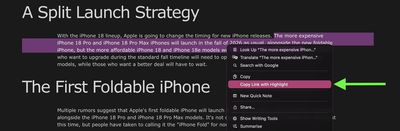
Apple added full support for text fragment links in Safari 18, and the feature is available in Safari on macOS Sequoia and later. To use the feature, visit a web page and simply highlight the text you want to create a link to, then right-click (Ctrl-click) and choose Copy Link with Highlight from the dropdown menu.
safari

The "Copy Link to Highlight" option

This will generate a special URL that includes a hash (#) symbol and "text" element, followed by a few words that bookend the selected text. All you need to do is share the link with someone, and when they click it they will be sent directly to that part of the webpage with the specific passage highlighted, as shown below.

highlighted text shared safari

The shared link as the recipient sees it

That's all there is to it. The Copy Link to Highlight option is also available in Safari on iPhone and iPad, though we have found it to be buggy and inconsistent in iOS 26.3. Hopefully Apple can fix it soon. At least on Mac, it makes it easier for you to direct the recipient of the link to the content you actually want them to focus on.

Bear in mind that the look of highlighted text can differ depending on whether the page author has styled it to look a certain way. Also, text fragment linking does not work in PDFs. Since July 2025, Copy Link to Highlight has also been introduced in Firefox.


Tag: Safari

Top Rated Comments

NightFox Avatar
27 weeks ago
I will mentally add this to my 'useful things that I won't be able to remember how to do when I eventually want to do them' list
Score: 9 Votes (Like | Disagree)
GtrDude Avatar
27 weeks ago
This was available on Microsoft IE since about when the internet was invented.

Glad to know though that we're only 6 years behind Google.
Score: 6 Votes (Like | Disagree)
DrwMDvs Avatar
27 weeks ago
How do we remove the highlighted text once we visit the link? It can be pretty jarring when you're trying to read through it.
Score: 5 Votes (Like | Disagree)
TuffLuffJimmy Avatar
27 weeks ago

This was available on Microsoft IE since about when the internet was invented.
Glad to know though that we're only 6 years behind Google.
Not the way it’s implemented here. It was possible to #link specific sections of an html document as long as the page was created with that in mind. This, however, allows one to link to a specific line even if the page was not written with this in mind.
Score: 4 Votes (Like | Disagree)
27 weeks ago

This was available on Microsoft IE since about when the internet was invented.
Glad to know though that we're only 6 years behind Google.
I can't find any reference to this in old IE docs, and I don't remember ever seeing it (other than by using standard HTML anchor links, which didn't highlight anything, and which all browsers did and do support). But I'll take your word for it.

Until it's a W3C standard it's a bit of a risk adding it at all, and I'm kind of surprised they have. I guess they figured it's been in the CSS4 draft spec for long enough at this point.
Score: 4 Votes (Like | Disagree)
27 weeks ago
I’m annoyed by this as often as I’m helped by it. Half the links from Google that I copy have this text when I don’t want it, and Apple always thinks the last part of the link is a word to check the spelling on, so it takes 5-10 taps just to remove the part of the link I don’t want.
Score: 3 Votes (Like | Disagree)

Popular Stories

Apple Skipping iPhone 18 This Year

Apple Skipping iPhone 18 Launch This Year

Wednesday August 12, 2026 6:59 am PDT by
Apple supplier Pegatron today indirectly confirmed that the standard iPhone 18 model will not be released until next year, according to a new report. Subscribe to the MacRumors YouTube channel for more videos. Pegatron held an earnings call for the second quarter of 2026 today. On the call, Taiwan's Economic Daily News said Pegatron indicated that one of its customers will be changing its...
iPhone 18 Pro Rumored Colors

What's Coming in September: New iPhones, Apple Watches and More

Thursday August 13, 2026 4:20 pm PDT by
Apple will introduce at least five new devices at its iPhone-centric event next month, and it's also possible we'll get devices waiting on Siri AI like the Apple TV. iPhone 18 Pro The iPhone 18 Pro is going to look like the iPhone 17 Pro, but with a smaller Dynamic Island. It's getting some internal updates, including a new Wide camera with a variable aperture for more control over lighting ...
Apple Event Logo

Apple Working on All-New Operating System

Tuesday August 11, 2026 1:11 pm PDT by
Apple is developing an all-new operating system that is essentially a mix of tvOS, watchOS, and iOS, according to Bloomberg's Mark Gurman. In a recent report, he said the operating system will feature a grid of icons, widgets, and apps, along with customizable clock faces. The new software platform is intended for Apple's long-rumored smart home hub. With built-in facial recognition, the...









































