iOS 26: Restore Safari's Old Layout From iOS 18 - MacRumors
Skip to Content

iOS 26: Restore Safari's Old Layout From iOS 18

by

Missing the familiar Safari design from iOS 18? In iOS 26, currently in beta, Apple has learned from past criticism and made it easy to ditch the new Compact layout in favor of the classic tab layouts you may well prefer.
safari iphone
iOS 26 introduces a new "Compact" Safari design as the default, but Apple has included two additional layout options that essentially restore the iOS 18 experience. Here's how to get your old Safari back in just a few taps.

How to Switch to the iOS 18 Layouts

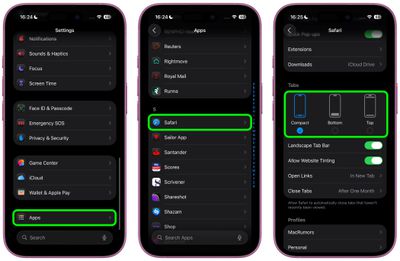
  1. Open Settings on your iPhone.
  2. Scroll down and tap Apps, then locate and tap Safari in the alphabetical list.
  3. Scroll down to the "Tabs" section.
  4. Select either Bottom or Top instead of Compact.
safari tabs settings ios

Both the Bottom and Top options function exactly like the Safari tab bar layouts from iOS 18, so you don't need to relearn how to navigate between tabs or access your bookmarks.

What's the Difference?

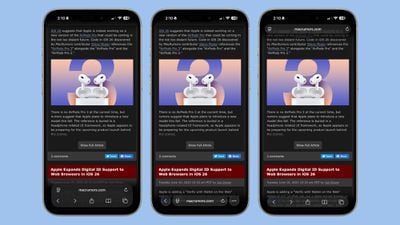
  • Compact Layout (Default): Hides the share, bookmark, and tab settings behind a three-dot button on the right side of the URL bar. It saves screen space but requires an extra tap to access frequently used features.
  • Bottom Layout: Places all Safari controls at the bottom of the screen, making them easily reachable with your thumb during one-handed use.
  • Top Layout: Keeps the traditional desktop-style layout with controls at the top of the browser.
ios 26 safari design dark mode

iOS 26's three Tab options from left to right: Bottom, Compact, Top

All three options now feature Apple's new Liquid Glass translucent design that blends the URL bar and buttons into the background of whatever webpage you're viewing. The translucent effect works in both Light and Dark Mode, and auto-adapts to match the webpage's color scheme.

Apple Learned From Its Mistake

This isn't the first time Apple has rethought Safari's design after user feedback. During iOS 15's beta testing, Apple initially changed Safari's design without providing layout alternatives and received full-throated negative feedback in return. It ultimately added options to revert to the original design. This time, Apple has gotten ahead of potential complaints by building choice directly into iOS 26, which will see a general release in September 2025.


Tag: Safari

Top Rated Comments

9 months ago
I just want to know which layout doesn't drain my battery by 1% every minute just reading MacRumors content.
Score: 8 Votes (Like | Disagree)
longofest Avatar
9 months ago

What lunatic puts the address bar to the bottom when every browser since Netscape 1.0 had it placed at the top.
The lunatics that realized that on a phone, your fingers/thumbs are at the bottom of the screen and so its easier to tap on the URL bar when its at the bottom of the window rather than the top for mobile browsers.
Score: 6 Votes (Like | Disagree)
n-evo Avatar
9 months ago
I’m really bummed out by the fact Safari for Mac doesn’t have a compact option anymore.
Score: 6 Votes (Like | Disagree)
9 months ago
Thank you, Apple, for giving us a choice in this matter. Now give us the choice to fully revert Photos to the iOS17 layout.

Again, thank you.
Score: 6 Votes (Like | Disagree)
ForkHandles Avatar
9 months ago
Gotta say, the new design is much cleaner. Everything gets out of your way.

I’m not too sure how those who must have the address bar at the top manage, for me everything is within access of my thumb.

Good work.
Score: 4 Votes (Like | Disagree)
9 months ago
Good to see that users are given an option to choose from. I prefer the top version, however don't mind the compact version too.
Score: 3 Votes (Like | Disagree)

Popular Stories

iOS 26

iOS 26.4 Adds Two New Features to CarPlay

Tuesday March 24, 2026 1:55 pm PDT by
iOS 26.4 was released today, and it includes a couple of new features for CarPlay: an Ambient Music widget and support for voice-based chatbot apps. To update your iPhone 11 or newer to iOS 26.4, open the Settings app and tap on General → Software Update. CarPlay will automatically offer the new features so long as the iPhone connected to your vehicle is running iOS 26.4 or later....
Apple Business hero

Apple Unveils 'Apple Business' All-in-One Platform

Tuesday March 24, 2026 8:53 am PDT by
Apple today announced Apple Business, a new all-in-one platform that unifies device management, productivity tools, and customer outreach features. The service is designed to be a consolidated replacement for several of Apple's existing business-focused offerings, including Apple Business Essentials, Apple Business Manager, and Apple Business Connect. It provides organizations with a single...
AirPods Pro Firmware Feature

Apple Releases New Firmware for AirPods Pro 3, AirPods Pro 2 and AirPods 4

Tuesday March 24, 2026 12:31 pm PDT by
Apple today released new firmware for the AirPods Pro 2, AirPods Pro 3, and the AirPods 4. The firmware has a version number of 8B39, up from 8B34 on the AirPods Pro 3, 8B28 on the AirPods Pro 2, and 8B21 on the AirPods 4. There is no word on what's included in the firmware, but Apple has a support document with limited notes. Most updates are limited to bug fixes and performance...