Over 100 million new users joined encrypted messaging app Telegram in January 2021. The stunning growth in the platform's user base was linked to an exodus from rival chat app WhatsApp, which concerned many of its users with a confusing privacy policy update that seemed to imply that more of their data would be shared with Facebook.

WhatsApp tried to deal with the fallout by clarifying that the changes were related to business users, and that nothing would change about the privacy of people's messages on the platform. However, for many, the damage had already been done.
Regardless of the truth of the matter, Telegram's developers were quick to take advantage of the situation and swiftly released an update to their own app that allows users to import their old WhatsApp chats into Telegram.
If you're leaving WhatsApp for Telegram but don't want to lose your chat history in the process, then read on. The following steps show you how transfer individual conversations to the rival platform intact.
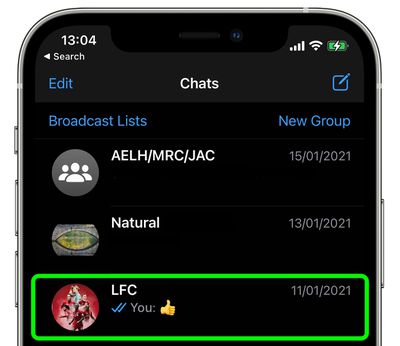
- Launch WhatsApp on your iPhone and tap the conversation thread that you want to export to Telegram.

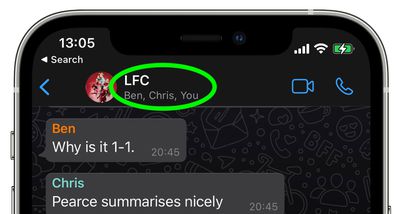
- Tap the contact's name (or the conversation title if it's a group chat) at the top of the screen.
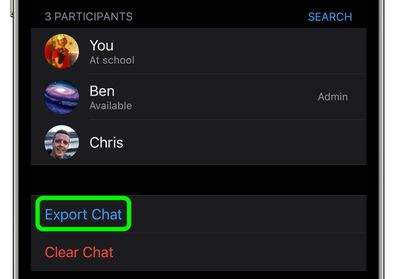
- Scroll down and select Export Chat.
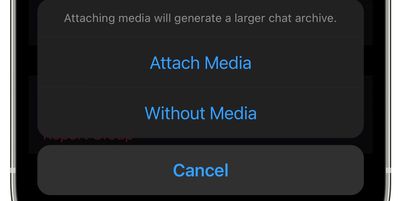
- From the pop-up that appears, select either Attach Media or Without Media.
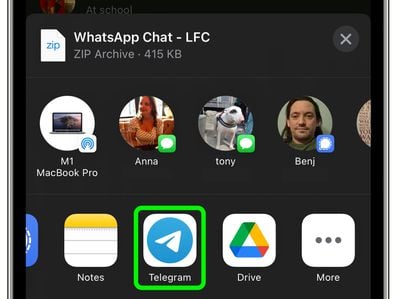
- From the Share menu that appears, select the Telegram app.
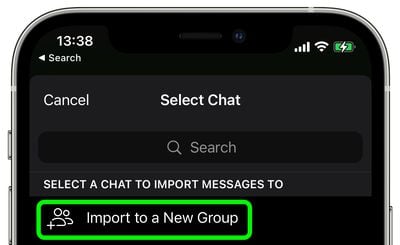
- Select the contact that you want to import the chat to. If it's a group conversation that you're importing, select Import to a New Group.
- Tap Import from the pop-up prompt to confirm.
- Once Telegram says the import has completed successfully, tap Done.
That's all there is to it. Messages will be imported into the current day but will also include their original timestamps, and all members of the chat on Telegram will see the messages.