In iOS 15, Apple has added separation alerts to the Find My app, which let you know when you leave an AirTag or other Apple device behind. Separation alerts also support Find My-enabled third-party accessories. This article explains how you set them up.

FindMy Feature
Called "Notify When Left Behind," the new ‌Find My‌ separation alerts let you know every time you are separated from your item at an unknown location, which can be helpful for items you take with you while traveling or visiting public locations.

The feature automatically sets your home as a Trusted Location (somewhere where you leave your items frequently and don't want to be notified every time), so you need to add your home address to your contact card in the Contacts app before enabling it.

The following steps run through the process of setting up separation alerts in the latest iOS 15 developer beta, a version of which will be available to the public next month.

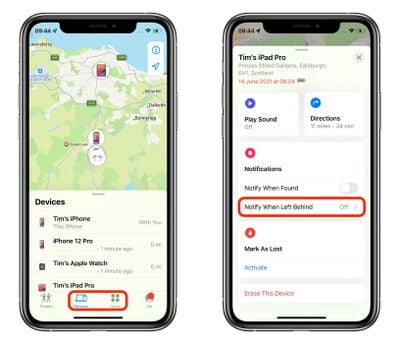
  1. Launch the Find My app on your iPhone.
  2. Select the Devices or Items tab, and tap on the device that you want to set up the alerts for.
  3. Tap Notify When Left Behind.
    find my

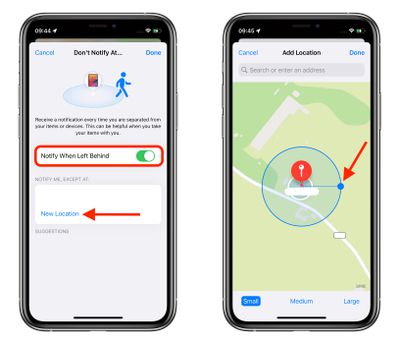
  4. Toggle on the switch for Notify When Left Behind.
  5. Under "Notify Me, Except At," tap New Location to set a Trusted Location where you don't want to receive alerts.
  6. In the "Add Location" map screen, search or enter an address in the input field. You can define the radius of the ringed geofence for your trusted location by dragging the blue dot or using the Small, Medium, or Large options at the bottom. Tap Done when you're finished.
  7. If there are no more location exceptions you want to add, tap Done.
    find my

Now the next time you leave your ‌AirTag‌ or other Apple device behind in a public place, you'll receive an alert informing you in good time, giving you a chance to retrieve it before you travel any further.

Of course, these alerts depend on you not leaving your ‌iPhone‌ behind (there's currently no equivalent separation alert available on Apple Watch for this scenario, sadly), so that's the device you won't want to forget, wherever it is you go.

Apple will make iOS 15 available for general release this fall.

Related Forum: iOS 15

Top Rated Comments

whsbuss Avatar
59 months ago
When will we get a notification on Apple Watch when I leave my iPhone behind!
Score: 18 Votes (Like | Disagree)
i.am.lost Avatar
59 months ago
This finally makes my AirTags useful day-to-day. I’m still surprised this wasn’t a feature at launch.
Score: 9 Votes (Like | Disagree)
Fabian90 Avatar
59 months ago
This is gonna be very handy
Score: 5 Votes (Like | Disagree)
ironpony Avatar
59 months ago
Whoops, left my pants at home again, but it is a "Trusted Location" so no one should notice ...
Score: 5 Votes (Like | Disagree)
Khedron Avatar
59 months ago
According to that screenshot even a small geofence is the size of several buildings?

So this wouldn’t work as a reminder that you left home without something until too late to quickly turn back?

So for smaller homes it would be better to NOT add the trusted location right?

What level of separation triggers the alert?
Score: 4 Votes (Like | Disagree)
DrNevs Avatar
59 months ago

When will we get a notification on Apple Watch when I leave my iPhone behind!
This is what I’ve been after for years. Seems like it would be easy to implement
Score: 3 Votes (Like | Disagree)

Popular Stories

iphone 17 models

No iPhone 18 Launch This Year, Reports Suggest

Thursday January 1, 2026 8:43 am PST by
Apple is not expected to release a standard iPhone 18 model this year, according to a growing number of reports that suggest the company is planning a significant change to its long-standing annual iPhone launch cycle. Despite the immense success of the iPhone 17 in 2025, the iPhone 18 is not expected to arrive until the spring of 2027, leaving the iPhone 17 in the lineup as the latest...
Clicks Communicator Feature

'Clicks Communicator' Unveiled — Will You Carry This With Your iPhone?

Friday January 2, 2026 6:35 am PST by
The company behind the BlackBerry-like Clicks Keyboard accessory for the iPhone today unveiled a new Android 16 smartphone called the Clicks Communicator. The purpose-built device is designed to be used as a second phone alongside your iPhone, with the intended focus being communication over content consumption. It runs a custom Android launcher that offers a curated selection of messaging...
apple intelligence black

Report: Apple's AI Strategy Could Finally Pay Off in 2026

Tuesday December 30, 2025 9:01 am PST by
Apple's restrained artificial intelligence strategy may pay off in 2026 amid the arrival of a revamped Siri and concerns around the AI market "bubble" bursting, The Information argues. The speculative report notes that Apple has taken a restrained approach with AI innovations compared with peers such as OpenAI, Google, and Meta, which are investing hundreds of billions of dollars in data...
apple fitness 2026 1

Apple Teases 'Something Big' Coming Soon to Apple Fitness+

Tuesday December 30, 2025 2:11 pm PST by
The Apple Fitness+ Instagram account today teased that the service has "big plans" for 2026. In a video, several Apple Fitness+ trainers are shown holding up newspapers with headlines related to Apple Fitness+. What's Apple Fitness+ Planning for the New Year? Something Big is Coming to Apple Fitness+ The Countdown Begins. Apple Fitness+ 2026 is Almost Here 2026 Plans Still Under ...
Mac Pro Feature Blue

What's Happening With the Mac Pro?

Wednesday December 31, 2025 9:59 am PST by
Apple hasn't updated the Mac Pro since 2023, and according to recent rumors, there's no update coming in the near future. In fact, Apple might be finished with the Mac Pro. Bloomberg recently said that the Mac Pro is "on the back burner" and has been "largely written off" by Apple. Apple apparently views the more compact Mac Studio as the ideal high-end pro-level desktop, and it has almost...
duolingo ad live activity

Duolingo Used iPhone's Dynamic Island to Display Ads, Violating Apple Design Guidelines

Friday January 2, 2026 1:36 pm PST by
Language learning app Duolingo has apparently been using the iPhone's Live Activity feature to display ads on the Lock Screen and the Dynamic Island, which violates Apple's design guidelines. According to multiple reports on Reddit, the Duolingo app has been displaying an ad for a "Super offer," which is Duolingo's paid subscription option. Apple's guidelines for Live Activity state that...
macbook air march 2020

Apple Says Final Intel MacBook Air and Apple Watch Series 5 Now 'Vintage'

Wednesday December 31, 2025 8:39 am PST by
Apple today added the final 13-inch MacBook Air powered by Intel processors, the Apple Watch Series 5, and additional products to its vintage products list. The iPhone 11 Pro was also added to the list after the iPhone 11 Pro Max was added back in September. The full list of products added to Apple's vintage and obsolete list today: MacBook Air (Retina, 13-inch, 2020) iPhone 8 Plus 128GB ...
Apple Fitness Plus hero

Apple Announces New Fitness+ Workout Programs, Strava Challenge, and More

Friday January 2, 2026 6:43 am PST by
Apple today announced a number of updates to Apple Fitness+ and activity with the Apple Watch. The key announcements include: New Year limited-edition award: Users can win the award by closing all three Activity Rings for seven days in a row in January. "Quit Quitting" Strava challenge: Available in Strava throughout January, users who log 12 workouts anytime in the month will win an ...