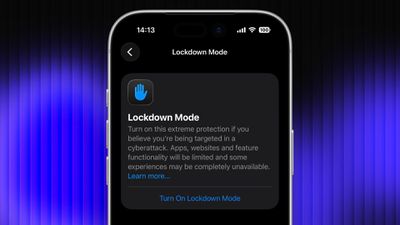
Lockdown Mode is an optional security feature designed by Apple to provide maximum protection against highly sophisticated digital threats. When enabled on your Apple device, it greatly reduces exposure to complex attacks by restricting certain features and network connections. Keep reading to learn how to use it across iPhone, iPad, and Mac.
lockdown
For most users of Apple devices, the standard iOS, iPadOS, and macOS security protections should be sufficient, whereas Lockdown Mode is aimed at users who could be targets of cyberattacks, such as journalists, activists, and government employees. That said, any user can enable it on their device for what Apple calls an "extreme" level of security.

Lockdown Mode Protections

When enabled, Lockdown Mode strictly limits or disables the functionality of features, apps, and websites. Lockdown Mode protections include the following:

  • In the Messages app, most message attachment types other than images are blocked, and some features like link previews are unavailable.
  • Incoming FaceTime calls from people you have not previously called are blocked. Incoming invitations for other Apple services from people you have not previously invited are also blocked.
  • Some complex web technologies and browsing features, including just-in-time (JIT) JavaScript compilation, are disabled unless the user excludes a trusted site from Lockdown Mode. This protection applies to Safari and all other web browsers using WebKit across the ‌iPhone‌, ‌iPad‌, and Mac.
  • Shared albums will be removed from the Photos app, and new shared album invitations will be blocked.
  • When a device is locked, wired connections with other devices/accessories are blocked.
  • Configuration profiles cannot be installed, and the device cannot enroll into mobile device management (MDM), while Lockdown Mode is turned on.
  • Certain network protocols and services are restricted.

How to Enable Lockdown Mode on iPhone and iPad

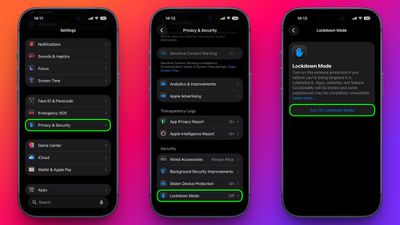
Lockdown Mode is turned off by default on ‌iPhone‌ and ‌iPad‌, but you can enable it by following these steps.

  1. Open the Settings app.
  2. Scroll down and tap Privacy & Security.
  3. Scroll to the bottom and tap Lockdown Mode.
  4. Tap Turn On Lockdown Mode.
  5. Review the information about what features are restricted, then tap Turn On & Restart.
settings

After the restart, Lockdown Mode will be active. You can confirm this by returning to Settings ➝ Privacy & Security ➝ Lockdown Mode, where a toggle will show that it's on.

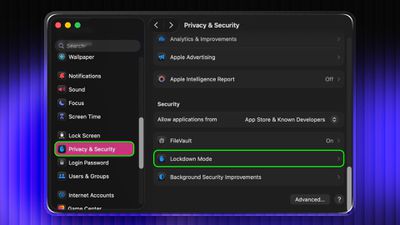
How to Enable Lockdown Mode on Mac

  1. Open System Settings.
  2. Click Privacy & Security in the sidebar.
  3. Under the "Security" section at the bottom, click Lockdown Mode.
  4. Click Turn On Lockdown Mode.
  5. Review the protections and click Turn On & Restart.
settings

Your Mac will restart and Lockdown Mode will be enabled when it boots up.

How to Turn Off Lockdown Mode

Whether you're on iPhone, iPad, or Mac, these are the steps to follow:

  1. In Settings on iPhone/iPad (or System Settings on Mac) go to Privacy & Security ➝ Lockdown Mode.
  2. Tap or click the Lockdown Mode toggle to turn it off.
  3. Confirm that you want to turn it off. Your device will restart to leave Lockdown Mode.

Configuring Allowed Websites and App Exceptions

While Lockdown Mode is active, some websites and certain app features may be blocked for security. Apple allows you to add exceptions in some areas.

For example, in Safari, if a site is blocked by Lockdown Mode, you may be offered an option to allow website exceptions. This lets specific sites load normally while Lockdown Mode remains enabled.

Some third-party apps may also appear in a list in Settings ➝ Privacy & Security ➝ Lockdown Mode ➝ Configure Web Browsing, and you can turn off Lockdown Mode for those apps individually. This lets an app continue to function normally if it was being restricted by Lockdown Mode's web content limitations.


Top Rated Comments

ignatius345 Avatar
7 hours ago at 08:12 am

Its not a new feature, just a lame feature. If u dont want ppl stealing info then maybe dont put it in your phone. Common sense goes a long way. Too bad apple lacks this.
Better yet: when you get your iPhone, just leave it in the factory default state and don’t sign into anything on it or add any contacts or any other data whatsoever. Don’t text anyone and don’t make any calls. Common sense.
Score: 9 Votes (Like | Disagree)
DEMinSoCAL Avatar
7 hours ago at 08:06 am

Its not a new feature, just a lame feature. If u dont want ppl stealing info then maybe dont put it in your phone. Common sense goes a long way. Too bad apple lacks this.
Is that common sense? Leave your doors and windows open when you leave your house? If you don't want ppl stealing your stuff, maybe don't put any stuff in your house! Is that common sense, too?
Score: 6 Votes (Like | Disagree)
Genelec8341 Avatar
8 hours ago at 07:29 am
One of those features you hope you never have to use, but glad it's there if you do.
Maybe the only one.
Score: 4 Votes (Like | Disagree)
newton4000 Avatar
6 hours ago at 09:26 am

I mean, I am kind of a big deal so this is super-duper helpful
Is that you Donnie?
Score: 4 Votes (Like | Disagree)
DEMinSoCAL Avatar
7 hours ago at 08:09 am

Why aren't thee 'safety features' the default. And user has to enable them . rather than the opposite of enable, and then this lockdown mode. Security should be DENY first, with selected enable. Not full ALLOW with a tacked on DENY mode. weird. more ***** from apple i guess.
"DENY first" is a great strategy for firewalls...not so much for consumers who no nothing about the technicality of those features, let alone know whether they should be on or off. It would be a support nightmare to make those features the default on every iPhone.
Score: 3 Votes (Like | Disagree)
klm9210 Avatar
8 hours ago at 07:24 am
I mean, I am kind of a big deal so this is super-duper helpful
Score: 2 Votes (Like | Disagree)

Popular Stories

imac video apple feature

Apple Unveils First New Products of 2026

Monday January 26, 2026 1:55 pm PST by
Apple today introduced its first two physical products of 2026: a second-generation AirTag and the Black Unity Connection Braided Solo Loop for the Apple Watch. Read our coverage of each announcement to learn more:Apple Unveils New AirTag With Longer Range, Louder Speaker, and More Apple Introduces New Black Unity Apple Watch BandBoth the new AirTag and the Black Unity Connection Braided...
iPhone 5s

iPhone 5s Gets New Software Update 13 Years After Launch

Monday January 26, 2026 3:56 pm PST by
Alongside iOS 26.2.1, Apple today released an updated version of iOS 12 for devices that are still running that operating system update, eight years after the software was first released. iOS 12.5.8 is available for the iPhone 5s and the iPhone 6, meaning Apple is continuing to support these devices for 13 and 12 years after launch, respectively. The iPhone 5s came out in September 2013,...
Second Generation AirTag Feature

Apple Unveils New AirTag With Longer Range, Louder Speaker, and More

Monday January 26, 2026 6:07 am PST by
Apple today introduced the second-generation AirTag, with key features including longer range for tracking items and a louder speaker. For those who are not familiar, the AirTag is a small accessory that you can attach to your backpack, keys, or other items. Then, you can track the location of those items in the Find My app on the iPhone, iPad, Mac, Apple Watch, and iCloud.com. The new...
Apple Creator Studio

Apple's Next Launch is Today

Tuesday January 27, 2026 2:39 pm PST by
Update: Apple Creator Studio is now available. Apple Creator Studio launches this Wednesday, January 28. The all-in-one subscription provides access to the Final Cut Pro, Logic Pro, Pixelmator Pro, Motion, Compressor, and MainStage apps, with U.S. pricing set at $12.99 per month or $129 per year. A subscription to Apple Creator Studio also unlocks "intelligent features" and "premium...
Apple Logo Spotlight

Apple to Launch These 20+ Products This Year

Sunday January 25, 2026 6:02 pm PST by
2026 promises to be yet another busy year for Apple, with the company rumored to be planning more than 20 product announcements over the coming months. Beyond the usual updates to iPhones, iPads, Macs, and Apple Watches, Apple is expected to release its all-new smart home hub, which was reportedly delayed until the more personalized version of Siri is ready. Other unique products rumored for ...